Search models, users, collections, and posts

Caleb Wride
@Caleb_Wride
2.2 k
22 k
85.7 k
55.9 k
Bio
Hi. I'm Caleb. I specialize in wasting time, procrastination, and pessimism. "If you don't have anything nice to say, say it anyway." - The greatest amazingest coolest most beautifulest overlord... Me! Honestly, I hope you have a wonderful day!
Achievements

MakerWorld Guardian
Active more than 20 days out of last 30 days UTC time

Popular Model
1 model more than 5,000 successful prints.

Popular Creator
More than 1,000 followers.

Stellar Reviewer
Rate or Comment 527 different models
Pioneer Maker
Print successful 412 different models and 3,306 hours
Pinned Models
Recent Article
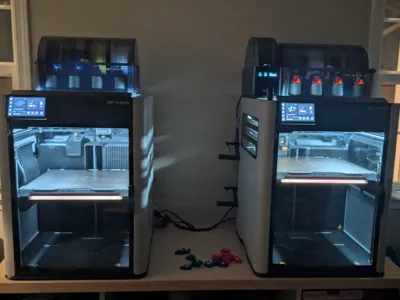
My Opinion of the H2D and H2S
My Opinion of the H2D and H2SI know the H2 printers have been out for a good while, almost a year, and we have all seen countless YouTube Videos, Forum Posts, and Community Reviews on them, but I wanted to throw my 2 cents out there after having owned the H2D and H2S for a while. This article will be structured as follows, so feel free to skip to the parts you are most interested in. And if you don't want to read the whole thing, there is a single paragraph summary pinned in the comments:  - 5 Things I like about the H2D - 5 Things I like about the H2S - How do the H2D and H2S compare? - What is the print quality like? - Laser, Pen Plotter, and Cutting Module Review - Which one do I like more? - Things that need improvement - Some unnecessary but fun or useful upgrades - Which one is right for you 5 Things I like about the H2DI got the H2D a couple months after release. I have a decent number of hours on it, and I have printed materials like PLA, PETG, ABS, PA6, ASA, PC, PPA, TPU, and everything in between on it. This printer handles nearly every material you can throw at it like a champ.  The main thing I like about the H2D is the large build volume. I don't need it, but it is nice. It allows for printing much larger things than the P1S or A1 Minis can handle, and batch printing is way more efficient.  The second feature that I really like is the heated chamber. I don't often print materials that need an actively heated chamber, and most of them the P1S can handle, but having the peace of mind that I can print nearly any material I want warp-free is excellent. The 65 degrees Celsius is plenty for ABS, ASA, PC, PA6, PPA, and many other engineering materials. And paired with the Engineering Plate, this machine is one of the most capable prosumer products on the market.  The third thing I enjoy is the dual nozzle system. I also don't use this very often. (I obviously didn't get the printer because I needed it.) The 2 nozzles allow for lightning-fast color changes and multi-material printing. It enables me to print an object with dedicated support material, print 2 color models with very little waste, and print diverse materials in the same print. It isn't something I use often, but it is nice to have when I need it. The fourth thing I like about the H2D is simply just the touch screen. It has a very user-friendly and intuitive UI. It makes maintenance, filament loading, AMS arrangement, print initiation, and controlling the printer very easy and enjoyable. The fifth thing I really like about the H2D is the ability to print up to 25 colors (4 AMS or AMS 2 Pro units, 8 AMS-HT units, plus one external spool via the second nozzle). I only have it set up to print 5 right now, but I have used it to print up to 11 before. Again, not a feature that I use very often, but pretty useful when I need it. 5 Things I Like About the H2SHonestly, the things I like about the H2S are pretty much the same as the things I like about the H2D. I like the large build volume, heated chamber, touch screen, and 24 color printing (4 AMS or AMS 2 Pro units, 8 AMS-HT units).  I do, however, like that with the single nozzle, you gain more usable space on the build plate.  I also really like the camera quality and AI failure detection on both printers. They are very good at warning you when something goes awry.  Other than that, these printers share most of the same features, besides the obvious one; the H2S lacks the second nozzle. Overall, the H2S features fantastic print quality, ease of use, and excellent AI monitoring. It does lack the nozzle camera that the H2D and H2C have that looks at the nozzles and observes them for nozzle clumping (aka “Blob of Death”) and air printing. What is the Print Quality Like?Just like every other Bambu Lab printer, the print quality of the H2D and H2S is fantastic. All surfaces are smooth, all edges are crisp, and all overhangs are clean. I do think that the cooling is better on the H2D, probably because of the much larger part cooling fan it has onboard. If you know what you are looking for, these printers have a slightly better quality than the A1 and P1 series, which are already totally acceptable.  Laser, Pen Plotter, and Cutting Module Review I chose to go with the non-laser version of both printers. I feel like the green acrylic is flimsier and doesn't look as clean. I also think that if you need a laser, the H2 printers are not the way to go. They have a relatively small workspace, only up to a 40W laser, and you have to do a lot of switching between laser and print mode. I am also concerned about the longevity of the linear rails and rods with all of the smoke. And the smoke purifier is another ~$600. If you need a laser, I recommend the XTool P3. I did, however, purchase the pen plotter and the cutting module. I love having the cutting module for making iron on patches for shirts. The pen plotter is fun to play with, but I don't see any real-world uses for it. In most cases, I would prefer to just use a printer. This is, of course, my personal preference. I have talked with others who absolutely love the extra features that the H2 printers use. And I agree, for the first release of the software, Bambu Suite is very well put together and easy to use, and the laser, pen plotter, and cutting module are all very easy to use and very capable. Which one do I like More?I personally have no need for either. I already have 2 A1 Minis, a P1S, and a Prusa i3 MK3S+ at home, and cheap or free access to a Prusa Core One, and some other large format printers. I do think that the H2D is the better machine. Although you lose a little bit of the build volume for single nozzle printing, the third nozzle camera, the better part cooling, the second nozzle, and the 25-color printing make it the better printer. I find that both printers print flawlessly nearly every time, and when something goes wrong, the AI kicks in and pauses the print. But overall, I like the H2D more.  Things That Need ImprovementI have found several concerning things with both of these printers. The main concern I have is when manually moving the XY axis with the touch screen, you can crash the tool head in the back left and right corners. There is nothing in the software to prevent it from doing so. I think this needs some attention.I know that Bambu makes machines user friendly and closed source, but I would like a little bit more control over the machine. For example, you can't change the chamber temperature on some materials. If you try to heat up the chamber for PLA or PETG, it won't let you, and if you try to lower the temperature for high-temp materials, it also won't let you.  I have also found that if you change the auxiliary fan or part cooling fan speed, when a color change occurs, that fan speed is reset to whatever it was before. I don't know if this is still an issue, as I noticed it several months ago, but it was a little weird. I know that most people don't need or want to change settings like chamber temperature or fan speeds on prints. As long as the print turns out, good. But the 3d printing hobby started out with super janky and unreliable machines. That is how we learned. Sometimes creative hobbyists aren't just printing to print, we are experimenting. We want control of the machine so we can test new filaments, ideas, and completely different experiments. I am not saying that the printer needs to be open sourced, I am too dumb to do anything with that anyways, but just a little more control would be nice. Let us change the fan speed, let us change the chamber temperature, let us manually open and close the top and back vents. Just some type of “Expert” or “Experimental” mode for those of us who could benefit from it. I also have noticed that when using the “Print then Cut” feature with the cutting module, the paper you printed on is supposed to be placed in the top left corner of the cutting mat. I have found, however, that when the toolhead camera scans for the little markers on the paper, it can't find them. If I move the paper one square to the right of the instructed spot, it works.  And Bambu, please just send a USB drive with the printer, it is another $3 or so, but people don't like searching around for one that works. Please just include it. There is also a small 4 pin receptacle, presumably for a rotary tool for the laser, that is just open inside the chamber. I feel like that could get filled with crap from lasering and printing. Some type of cover would be nice.  The screen when fully down hits the body of the printer when you tap it, it makes a cheap clicking sound. The screen is also a soft plastic, which I am not a fan of. I wish it were glass. If Bambu were to even start shipping out free screen protectors for the H2 and P2 printer screens, I think it could make a difference. This is more of a lifestyle thing, but I wish there was a way to move the spool holders to the right side of the printer. If you want to put the printer in the back left corner of a room, it is a pain to load filament onto those spool holders and into the nozzle.  For the H2D, and this may just be mine, but I find that sometimes the bed leveling doesn't work. It takes a while to level with the 2 nozzles, then it goes back and touches 5 points on the bed to double check that it is level, but occasionally, it won't be, and it will level all over again. I have had this process repeat for 15 minutes before.  Another software bug, when the printer is auto homing, and you try to turn the light off, the light only flickers, but stays on. And regarding the light, when you try to turn it off during the print, it warns you every time that it could cause AI issues. I don't want that warning every time. Show me once, or even once per print, but I am tired of that warning. I also have added the Birds Eye camera to my H2D for better positioning of material during plotting and cutting, but there is still no way to calibrate it without the laser. Please Bambu, add some type of functionality to calibrate without the laser.  The build plate is also unevenly heated, which can cause issues with batch printing in materials like ABS. Some Unnecessary but fun or Useful UpgradesI don't know if the onboard hardware of the H2, X1, and P2 printers can handle this, but I think it would be cool to integrate Maker World onto the touchscreen of the printer. You don't need the Community, Contest, Crowdfunding, or Users pages, just the ability to search a model and start a print from the screen. I also think it would be cool if there was a way to synchronize the flashing status LED bar on the build plate of multiple H2 printers. So when they are idle, the LEDs will flash blue in unison. And a light show of some sort would be sweet to show off. The one I want the most would be maintenance routines. I would like a way to move the build plate to the very bottom, middle, and top with a single button press, and the XY axis to the 4 corners, the middle, middle left, middle right, middle back, and middle front to assist with lubing up the rails, rods, and threaded rods. This would be nice with all printers, but especially with the H2D where you have to click the button 50 million times to move the axis from one side to the other.  I would also like a way to view the Birds Eye camera, toolhead camera, and nozzle camera through the app and Bambu Studio. I would also like nozzle camera visibility on the screen, so you can check the nozzle during a print. Which one is Right for You?Honestly, if you are just printing to print, an A1 Mini or P2S are the best. I find that 85% of what I print fits on an A1 Mini. If you need the large build volume, go for the H2S, if you need dual color printing, H2D, and anything more, H2C. I find that these printers are fun to use, but unnecessarily capable for what I do. I still hold the A1 Mini in the highest regard. It is a fantastic printer that can handle most of your needs, but if you want to go crazy, the H2 series might just be for you.