Search models, users, collections, and posts


Bio
Hi. I'm Caleb. I specialize in wasting time, procrastination, and pessimism.
"If you don't have anything nice to say, say it anyway." - Me
Honestly, I hope you have a wonderful day!
Achievements

MakerWorld Guardian
Active more than 20 days out of last 30 days UTC time

Popular Model
1 model more than 5,000 successful prints.

Popular Creator
More than 1,000 followers.

Stellar Reviewer
Rate or Comment 537 different models

Pioneer Maker
Print successful 415 different models and 3,312 hours

I wanted to post an update on my current situation for those of you who weren't wondering.
After the points income update on March 10th, 2026, I have been having some issues with Maker World that I wanted to make you aware of. I am going to be completely transparent and honest here.
I also don't want to seem stuck up or ungrateful for what I have achieved here on Maker World.
I posted my most successful model, my "Satisfying Fabric," on January 6th, 2025. Within the first hour, I got 30 downloads. It quickly grew and became one of the most successful models on Maker World. It is currently the 66th most downloaded model on Maker World. It currently has 73.4k downloads and 48.3k prints. Even though this is the most popular of my models, I have several others with over 1-4k downloads. I can break down some of the statistics of my Maker World downloads.
There have been 1,509,085 grams of material consumed printing my models. That is 1,509 spools of filament. Assuming 75% of that was Bambu brand filament, priced at an average of $20 per spool, Maker World has sold $22,636 of filament, and if 100% of that was Bambu brand filament, at an average of $20 per spool, they have sold $30,181 in filament. This is gross income, not revenue, but it is still in the tens of thousands of dollars.
I have received a total of 124,838.332 points from Maker World. If all of those points had been redeemed for gift cards, I would have a total of $10,190 in gift cards. That is less than half of the money Maker World has potentially made from me alone. The majority of this comes from the "Satisfying Fabric." Before the points income update, I was making around 300-400 points per day from the "Satisfying Fabric." My income from that model has dropped to about 50 points per day since the update to the points income. I am still receiving 100-300 downloads per day on that singular model, but the income per download has been cut significantly.
Why I have a problem with this:
I was one of the first 100 people on Maker World. I am helping fuel Maker World and Bambu Lab filament and printer sales. I feel like I am and have been a fairly present and influential member of the community. I have been here since the beginning. I have spent thousands of dollars out of my own pocket with them, and many thousands more with gift cards.
As Maker World is trying to expand their model database, they initiated the points incentive program. This incentivizes people to upload models, to receive points. With the most recent update, to boost the number of models posted, they increased the incentives for new models. They also decreased the incentives for old models. I am not impressed that I am essentially being punished for helping Maker World grow to where it is today. I get that they want more models posted here, but why punish the existing ones? It is disheartening to think that I can upload a model for it to be successful, only to slowly diminish to nothing, while Maker World profits from my hard work.
This, along with TheNextLayer's most recent YouTube video criticizing Bambu Lab, I have decided to stop posting models here. I will not play their game. I am not going to stand for this. Instead, I will be increasing my activity on the Community, with a new weekly post. As we all love Maker World's Weekly Round Up posts, I am considering posting my own Weekly Screw Up posts, featuring the things Maker World may have screwed up, or dumb things I see on the Community. Let me know if that might be something you would enjoy or want.
Also, for those of you who might be wondering, I did contact Maker World about my concerns. I bantered back and forth with them for a week or two, and they were not relenting. I eventually brought up another matter that had been bothering me in the same conversation. I had sent emails and help tickets requesting Maker World official verification, and they had not responded. If they didn't want to verify me, they should have just said no, but instead, they ignored me. I brought this up in my conversation complaining about my points, and they immediately verified me, probably to make me go away.
The likelihood that Maker World removes this post, my verification, or my income is high because I am voicing what I have experienced. If that is the case, I will make sure to let you know, because then they are also taking away my freedom of speech, which is unacceptable.
So, there you go. This has been my experience with Maker World. I appreciate the success I have had. I am considerably more successful than most users here. I am very blessed to have gained all I have from a couple of hours dinking around on a computer.
Please, let me know how you feel about your experience, or what you think about mine.
Share
19
72
4
Absolutely stunning! ⭐⭐⭐⭐⭐
I have had this little cactus in a hanging planter in my kitchen for a couple of years now, and it stopped growing for... obvious reasons. When I saw @Romans1x16 released this freaking flamboyantly fantastic parametric pot, I knew I had to get that cactus out and into its new home!
After only one Dremel grindng disc exploding in my face, and 300 cactus spines engrained into my gruesomely gargantuan grabbers, I finnaly got the distastefully dumb and dodgy doohickey transplanted into the new pot!
I love the customizable feature!
If I could tweak the design a little bit, I would design the legs to be a press fit or twist on peice, so glue is not required. There are a lot of pockets created by the bridging technique that allow the glue to avoid completely contacting both the pot and the legs.
I honestly love the design. I will add a rating soon, but so far it hasn't shown up on my ratings page. Maybe because I customized it and printed it straight from the app...
Anyways, great work @Romans1x16! This pot is fantastic! It looks great, and the parametric features are very capable and easy to use.(Edited)
Share
8
22
0
You already saw the other post. Just letting you know that this is available to you if you should desire to make it!
Geometric Lantern
55
117
Share
2
16
0
I sat down today as one does when one is bored of standing and whipped up this! It was really rewarding to go from design to finished product in a couple of hours. This is my first real project with the laser too! I am considering uploading it once I figure out how to get decent pictures. It have only made it via laser, but it would be easy to upload both a laser and a print version. It uses the LED lamp kit from BL, and the glowing orb is the only printed part, unless you print the entire thing, of course.
Would you make this?
56%
Absolutely
32%
Probably Not
12%
No
34 votes
Final results
Share
4
31
0
Tah dah. Sat down today during lunch and whipped this thing together. Pretty fun to play with, but if nobody else prints it, so be it.
Infinity Fidget
209
505
Share
4
32
0
I have been wanting to print this model for forever. I have owned the files for a while, but only recently did I get around to printing it. I have a bunch of printers, but rarely use them. Same goes for filament and other accessories. I have been wanting to use an A1 Mini for a fun project for a while, and the P1S has been neglected. So, I used the H2D. I scaled this thing up as big as it could go on the H2D and hit send!
I also added 5th color, and chopped off the bottom ½ inch or so of the rock base because it was designed to be rocky and rough on the bottom, so it would try to print this whole thing off of one point, and I didn't want to risk it.
I will be maxing out an A1 Mini too, and I will share side by side pictures of the 2 after that!
Share
11
39
0
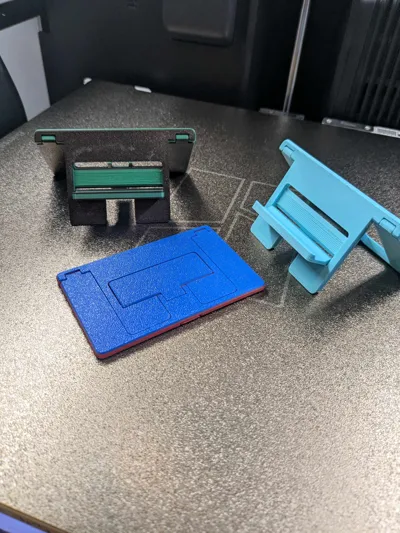
Again, a fantastic model! I marvel at the simplicity used to make such a cool product! I printed 2 of the tight tolerance versions, and 1 of the loose tolerance. They print so quickly, even with 2 colors! They also are very sturdy, and more importantly, fidgety! I love how you can close it with one motion.
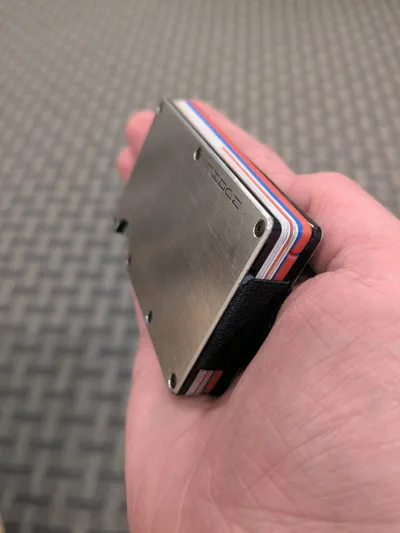
While they do fit in my Ridge wallet, I won't be carrying any because it about doubles the size of the wallet. (No offense, I just have a super slim wallet.) But they are the same size as a normal card, and slip into any wallet!
If I had to give any feedback, I would say that it can be challenging to break loose after printing if you go the way I go and try to prove your strength to your imaginary girlfriend, instead of watching the video on how to break it loose, it might not end well. It is well designed, so it will not break, but I found a considerable amount of force was required to break it free.
Share
5
43
0
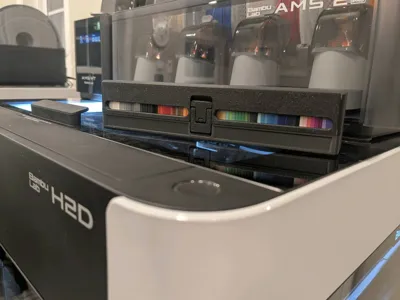
This is an excellent, well thought out model! I love the latch and the window! It is a very solid case for all of the filament swatches. I don't know if anyone else is experiencing this problem, or I am just bad at counting, but it seems to only hold 79 swatches. As is typical for Romans1X16 models, the print in place hinges are extremely high quality and break free nicely.
Share
3
4
0
Have you guys seen the Creality R1 and M1 filament recycling systems? They are in a crowdfunding stage right now, and I will absolutely be backing them. For the early bird price, you get a $900 filament shredder and extruder bundle. Not bad at all!
It is scheduled for release in Q2 of this year!(Edited)
Share
12
26
0
Oh, this is golden.
About once per month I go through and report bad reviews on my models that aren't valid, helpful, or true. I often times get a 1 star review on my Satisfying Fabric because they didn't get good bed adhesion. I also get 3 star reviews that say stuff completely positive, but can't be 5 star because it technically failed. Sometimes I get low reviews that don't have any text or image. I don't find these helpful or constructive, so I report them, and I let Maker World decide if the review should be removed. This month I reported just short of 100 bad and useless reviews. Some saying "my power went out" and others saying "before it had barely started, it messed up, and it's all over my room, f*ck you."
I deem many reviews worthless, so I report them. If you leave a bad review that has constructive feedback, I will not report it. That is what reviews are for.
I tend to show the same amount of respect you show me. Don't lash out like this and expect me to bow down, kiss your feet, and make it better by sending you a free printer. I LOVE a good argument. And I have some practice. I will probably engage in an argument when you leave a review like this. And I will enjoy it.
Also, anybody purchased the new rotary attachment for the H2 lasers? I am curious of it's quality, as it seems a little pricey.
#Crazy Reviews(Edited)
Share
6
65
0
I know you guys probably don't care, but I figured I would share what I have been up to.
With all of the 3d printed spool talk I have had with Romans1X16, I wanted to try designing one myself. Lots of reverse engineering here. I am trying to re-create every feature of the original spool, excluding some of the smaller features that will be too hard to print and some of the injection molding design choices and artifacts.
Share
14
75
0
My Opinion of the H2D and H2S
I know the H2 printers have been out for a good while, almost a year, and we have all seen countless YouTube Videos, Forum Posts, and Community Reviews on them, but I wanted to throw my 2 cents out there after having owned the H2D and H2S for a while. This article will be structured as follows, so feel free to skip to the parts you are most interested in. And if you don't want to read the whole thing, there is a single paragraph summary pinned in the comments: - 5 Things I like about the H2D - 5 Things I like about the H2S - How do the H2D and H2S compare? - What is the print quality like? - Laser, Pen Plotter, and Cutting Module Review - Which one do I like more? - Things that need improvement - Some unnecessary but fun or useful upgrades - Which one is right for you 5 Things I like about the H2DI got the H2D a couple months after release. I have a decent number of hours on it, and I have printed materials like PLA, PETG, ABS, PA6, ASA, PC, PPA, TPU, and everything in between on it. This printer handles nearly every material you can throw at it like a champ. The main thing I like about the H2D is the large build volume. I don't need it, but it is nice. It allows for printing much larger things than the P1S or A1 Minis can handle, and batch printing is way more efficient. The second feature that I really like is the heated chamber. I don't often print materials that need an actively heated chamber, and most of them the P1S can handle, but having the peace of mind that I can print nearly any material I want warp-free is excellent. The 65 degrees Celsius is plenty for ABS, ASA, PC, PA6, PPA, and many other engineering materials. And paired with the Engineering Plate, this machine is one of the most capable prosumer products on the market. The third thing I enjoy is the dual nozzle system. I also don't use this very often. (I obviously didn't get the printer because I needed it.) The 2 nozzles allow for lightning-fast color changes and multi-material printing. It enables me to print an object with dedicated support material, print 2 color models with very little waste, and print diverse materials in the same print. It isn't something I use often, but it is nice to have when I need it. The fourth thing I like about the H2D is simply just the touch screen. It has a very user-friendly and intuitive UI. It makes maintenance, filament loading, AMS arrangement, print initiation, and controlling the printer very easy and enjoyable. The fifth thing I really like about the H2D is the ability to print up to 25 colors (4 AMS or AMS 2 Pro units, 8 AMS-HT units, plus one external spool via the second nozzle). I only have it set up to print 5 right now, but I have used it to print up to 11 before. Again, not a feature that I use very often, but pretty useful when I need it. 5 Things I Like About the H2SHonestly, the things I like about the H2S are pretty much the same as the things I like about the H2D. I like the large build volume, heated chamber, touch screen, and 24 color printing (4 AMS or AMS 2 Pro units, 8 AMS-HT units). I do, however, like that with the single nozzle, you gain more usable space on the build plate. I also really like the camera quality and AI failure detection on both printers. They are very good at warning you when something goes awry. Other than that, these printers share most of the same features, besides the obvious one; the H2S lacks the second nozzle. Overall, the H2S features fantastic print quality, ease of use, and excellent AI monitoring. It does lack the nozzle camera that the H2D and H2C have that looks at the nozzles and observes them for nozzle clumping (aka “Blob of Death”) and air printing. What is the Print Quality Like?Just like every other Bambu Lab printer, the print quality of the H2D and H2S is fantastic. All surfaces are smooth, all edges are crisp, and all overhangs are clean. I do think that the cooling is better on the H2D, probably because of the much larger part cooling fan it has onboard. If you know what you are looking for, these printers have a slightly better quality than the A1 and P1 series, which are already totally acceptable. Laser, Pen Plotter, and Cutting Module Review I chose to go with the non-laser version of both printers. I feel like the green acrylic is flimsier and doesn't look as clean. I also think that if you need a laser, the H2 printers are not the way to go. They have a relatively small workspace, only up to a 40W laser, and you have to do a lot of switching between laser and print mode. I am also concerned about the longevity of the linear rails and rods with all of the smoke. And the smoke purifier is another ~$600. If you need a laser, I recommend the XTool P3. I did, however, purchase the pen plotter and the cutting module. I love having the cutting module for making iron on patches for shirts. The pen plotter is fun to play with, but I don't see any real-world uses for it. In most cases, I would prefer to just use a printer. This is, of course, my personal preference. I have talked with others who absolutely love the extra features that the H2 printers use. And I agree, for the first release of the software, Bambu Suite is very well put together and easy to use, and the laser, pen plotter, and cutting module are all very easy to use and very capable. Which one do I like More?I personally have no need for either. I already have 2 A1 Minis, a P1S, and a Prusa i3 MK3S+ at home, and cheap or free access to a Prusa Core One, and some other large format printers. I do think that the H2D is the better machine. Although you lose a little bit of the build volume for single nozzle printing, the third nozzle camera, the better part cooling, the second nozzle, and the 25-color printing make it the better printer. I find that both printers print flawlessly nearly every time, and when something goes wrong, the AI kicks in and pauses the print. But overall, I like the H2D more. Things That Need ImprovementI have found several concerning things with both of these printers. The main concern I have is when manually moving the XY axis with the touch screen, you can crash the tool head in the back left and right corners. There is nothing in the software to prevent it from doing so. I think this needs some attention.I know that Bambu makes machines user friendly and closed source, but I would like a little bit more control over the machine. For example, you can't change the chamber temperature on some materials. If you try to heat up the chamber for PLA or PETG, it won't let you, and if you try to lower the temperature for high-temp materials, it also won't let you. I have also found that if you change the auxiliary fan or part cooling fan speed, when a color change occurs, that fan speed is reset to whatever it was before. I don't know if this is still an issue, as I noticed it several months ago, but it was a little weird. I know that most people don't need or want to change settings like chamber temperature or fan speeds on prints. As long as the print turns out, good. But the 3d printing hobby started out with super janky and unreliable machines. That is how we learned. Sometimes creative hobbyists aren't just printing to print, we are experimenting. We want control of the machine so we can test new filaments, ideas, and completely different experiments. I am not saying that the printer needs to be open sourced, I am too dumb to do anything with that anyways, but just a little more control would be nice. Let us change the fan speed, let us change the chamber temperature, let us manually open and close the top and back vents. Just some type of “Expert” or “Experimental” mode for those of us who could benefit from it. I also have noticed that when using the “Print then Cut” feature with the cutting module, the paper you printed on is supposed to be placed in the top left corner of the cutting mat. I have found, however, that when the toolhead camera scans for the little markers on the paper, it can't find them. If I move the paper one square to the right of the instructed spot, it works. And Bambu, please just send a USB drive with the printer, it is another $3 or so, but people don't like searching around for one that works. Please just include it. There is also a small 4 pin receptacle, presumably for a rotary tool for the laser, that is just open inside the chamber. I feel like that could get filled with crap from lasering and printing. Some type of cover would be nice. The screen when fully down hits the body of the printer when you tap it, it makes a cheap clicking sound. The screen is also a soft plastic, which I am not a fan of. I wish it were glass. If Bambu were to even start shipping out free screen protectors for the H2 and P2 printer screens, I think it could make a difference. This is more of a lifestyle thing, but I wish there was a way to move the spool holders to the right side of the printer. If you want to put the printer in the back left corner of a room, it is a pain to load filament onto those spool holders and into the nozzle. For the H2D, and this may just be mine, but I find that sometimes the bed leveling doesn't work. It takes a while to level with the 2 nozzles, then it goes back and touches 5 points on the bed to double check that it is level, but occasionally, it won't be, and it will level all over again. I have had this process repeat for 15 minutes before. Another software bug, when the printer is auto homing, and you try to turn the light off, the light only flickers, but stays on. And regarding the light, when you try to turn it off during the print, it warns you every time that it could cause AI issues. I don't want that warning every time. Show me once, or even once per print, but I am tired of that warning. I also have added the Birds Eye camera to my H2D for better positioning of material during plotting and cutting, but there is still no way to calibrate it without the laser. Please Bambu, add some type of functionality to calibrate without the laser. The build plate is also unevenly heated, which can cause issues with batch printing in materials like ABS. Some Unnecessary but fun or Useful UpgradesI don't know if the onboard hardware of the H2, X1, and P2 printers can handle this, but I think it would be cool to integrate Maker World onto the touchscreen of the printer. You don't need the Community, Contest, Crowdfunding, or Users pages, just the ability to search a model and start a print from the screen. I also think it would be cool if there was a way to synchronize the flashing status LED bar on the build plate of multiple H2 printers. So when they are idle, the LEDs will flash blue in unison. And a light show of some sort would be sweet to show off. The one I want the most would be maintenance routines. I would like a way to move the build plate to the very bottom, middle, and top with a single button press, and the XY axis to the 4 corners, the middle, middle left, middle right, middle back, and middle front to assist with lubing up the rails, rods, and threaded rods. This would be nice with all printers, but especially with the H2D where you have to click the button 50 million times to move the axis from one side to the other. I would also like a way to view the Birds Eye camera, toolhead camera, and nozzle camera through the app and Bambu Studio. I would also like nozzle camera visibility on the screen, so you can check the nozzle during a print. Which one is Right for You?Honestly, if you are just printing to print, an A1 Mini or P2S are the best. I find that 85% of what I print fits on an A1 Mini. If you need the large build volume, go for the H2S, if you need dual color printing, H2D, and anything more, H2C. I find that these printers are fun to use, but unnecessarily capable for what I do. I still hold the A1 Mini in the highest regard. It is a fantastic printer that can handle most of your needs, but if you want to go crazy, the H2 series might just be for you.
(Edited)
Share
19
60
1
After a couple hours of CAD, and more time than I would like to admit trying to get this uploaded, I finally succeeded! Enjoy!(Edited)
Planetary Gear Spinner
32
48
Share
4
42
0
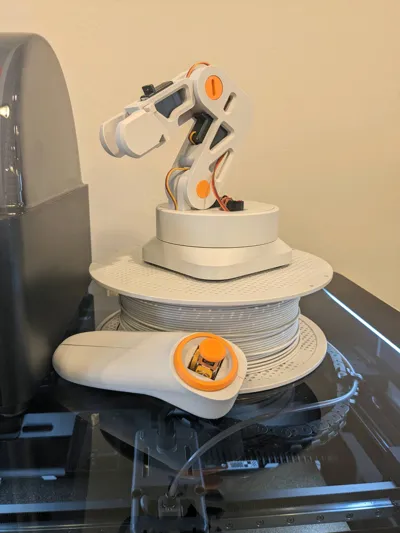
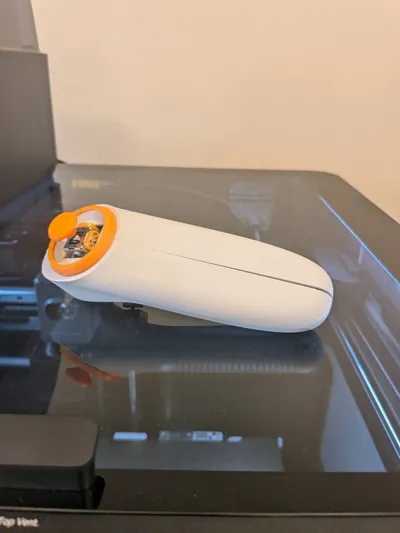
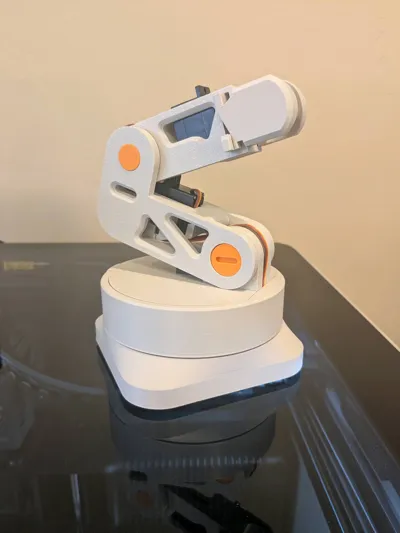
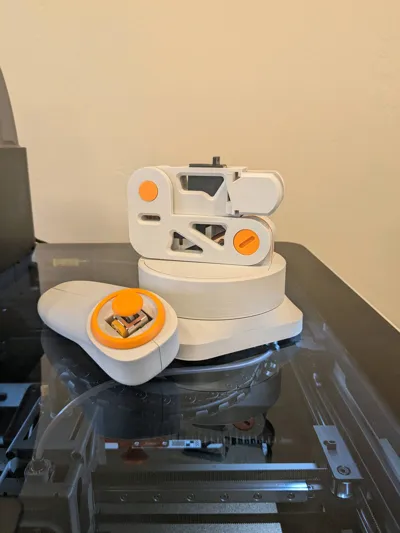
Phenomenal model! There is definitely an attention to detail. It looks and operates very nicely. The magnet holes were too small, and the cover that slides over the main arm servo strips the servo wire, even though there is a channel for the wires to go through. Other than that, I love it!
Share
7
38
0
As requested, here is an updated #Rate My Setup. I am in the middle of moving the H2D and H2S around, so there are cords everywhere, so ignore that. I also have an AMS HT on the way for the H2S. This black friday sale is too good to turn down. 🫣
Share
59
106
0
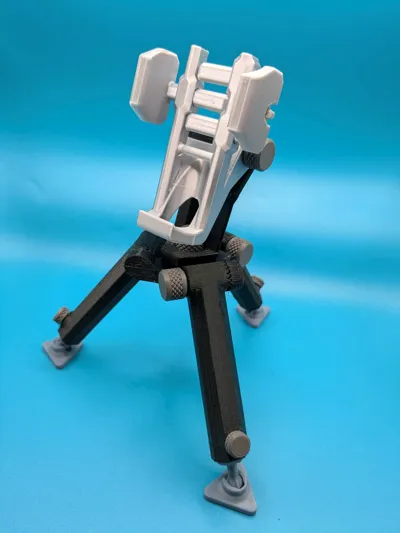
This model is crazy! I can see the attention to detail, and all of the time put into it! It is incredibly versatile and easy to use! Assembly was a breeze! Only a mor*n couldn't figure it out... so good luck! Tolerances are perfect, and work well. The knurling on the screws is a nice touch as well! Holds my gigantic Google Pixel 6a like a champ! This thing is built like it was meant to last. So many options for phone holders as well!
5/5
Printed in:
Polymaker Polylite PLA (Silver) on H2D
Bambu Labs Dark Grey on A1 Mini
Bambu Labs Blue Grey on A1 Mini
Bambu Labs PETG HT (Black) on Prusa i3 MK3S
Share
8
211
0
🚨 I GOT #Bambumerch WITH POINTS, AND YOU CAN TOO! 🚨
So I got a Bambu Lab logo T-shirt for FREE entirely with my MW points.
And I will tell you how.
First, you have to get MW points.
Use those points and go get yourself an H2D with cutting module.
Next, purchase with your points, some Matte Heat Transfer Vinyl. (I used black)
Next, cash out your exclusive point for cash, and drive to Walmart. Grab a T-shirt of your choice.
Next, drive home and cut out the BL logo on your brand new #Bambumerch machine. (H2D)
Next, iron the logo on.
BOOM! 💥
You have #Bambumerch.
Now I know some of you are going to complain that "It isn't actually from Bambu Labs!" But it is. The machine, and the vinyl are. And do you really think BL makes their own shirts? Nope. The probably get them from Walmart too.
Some of you still won't be happy. But look who is spamming the MW community begging for #Bambumerch, and look who is wearing some #Bambumerch right now. Get a life.
And there you go! A full tutorial for all you who have been crying yourselves to sleep at night because you don't have the option to buy #Bambumerch with points.
Now you do.(Edited)
Share
31
134
0
Ta dah! Another fabric model! If all of these people are going to copy my fabric and make money off of it, I might as well copy myself and get more points! I also just wanted a reason to try out the dual nozzles on the H2D. So yeah, here is another fabric model for you guys to try out. I also have one that is VERY satisfying coming soon! Turns out that a laptop can have a hard time slicing a complex model with 1,700 pieces. So go knock yourself out. Print it, use it as toilet paper, sleep on it, do whatever you want. Go have fun!(Edited)
Satisfying Fabric Dual Color
20
16
Share
6
62
0
It was about time. I finally released another model. And per request of @Rando101, I am going to explain why I don't upload very often.
I have... well... I don't exactly know what it is... it isn't a disorder, more of a phenomenon. I have this thing called Aphantasia. Aphantasia is a condition where I can't see a picture in my head. Some people can see images and relive memories like there is a screen in their head. My image visualization in my mind is blank. Between 2-4% of people have this issue. This has a heavy impact on how I go about designing things. I know what I want. I know the specifications. But I can't see a final result in my head. So where do I start designing? How do I get to the end? What is the purpose of life? Who cares? Anyway, I can't visualize what I want. I rarely have dreams because of this. This makes it incredibly hard to turn an idea, without a mental image, into a real, 3d object. I have to take inspiration from other people and build off of what they have done sometimes. All of my models are 100% original though. So, I struggle to get started. Try to focus on where your vision ends, and the blackness surrounds the other 180 degrees that your eyes can't see. It is impossible. That is what it is like for me when I try to visualize something. I just can't. And heaven forbid, I can't draw, so I just start out in CAD. I have to tweak little things until they are just right. Once I have a rough draft of my model, that I can actually see, it is much easier to change little things.
This is why I don't release many models very often. Aphantasia isn't a curse, a disability, a disorder, or a bad thing, it is just a different way of thinking. If I close my eyes, (or keep them open), I can't visualize my mother's face, which I see fairly often. It changes how I have to go about my day. It also makes art really hard. But who cares. I am also really busy, so I have a few decent models, but no time to post them. This model took hours and hours of designing, redesigning, printing, and reprinting to get just right.
Sorry @Rando101, it wasn't very dramatic, but there you go. I don't mind having Aphantasia, it just makes it hard to design.
Also, a little about this filament rack. It held up just under 200 LBS in this picture. It has filament labels and clips. Knock yourself out.(Edited)
Share
17
323
0
The post is no longer available
No more data