Search models, users, collections, and posts
Surrey Homeware
@surrey_homeware
2.3 k
20.8 k
48.8 k
28.9 k
Bio
Surrey Homeware specializes in modern home goods that combine functionality with aesthetics.
Achievements
Featured Creator
1 model is featured by MakerWorld.

Popular Model
2 models more than 5,000 successful prints.

Popular Creator
More than 1,000 followers.

Pioneer Maker
Print successful 180 different models and 1,632 hours
MakerWorld Guardian
This badge has expired
Recent Article
Create customizable models using Parametric MM
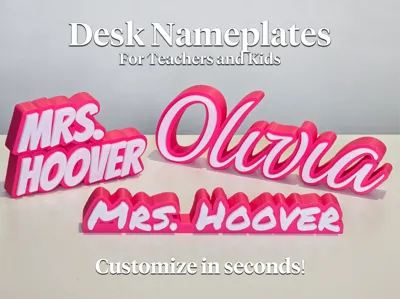
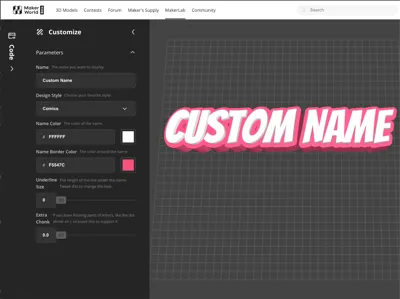
Create customizable models using Parametric MMYou've probably seen models on Maker World that have a "Customize" button. When the user clicks it, they see a UI where they can tweak parameters, live preview the changes, and then download their customized model to print. I always wondered how people created customizable models, and I couldn't find clear documentation in one place that walked through the process and all the available features. I just built my first customizable model, so I documented how it worked. It's a really cool system that opens up all sorts of new options for models. Here's the model that I created that shows how this looks on Maker World: https://makerworld.com/en/models/1250464-cute-desk-nameplate-generator-for-teachers-kids In simplest terms, customizable models are scripts written in OpenSCAD. OpenSCAD is a free programming tool for describing CAD models as code. Maker World runs your OpenSCAD code inside their Parametric Model Maker app and displays the result for the user to download. So if you can write an OpenSCAD script to generate your model and if you can make the model parameters into variables, Maker World will let users manipulate those variables in a nice UI and download a printable 3mf file. It's like scripting your model's feature timeline. If you imagine the steps you take in Fusion or OnShape to model something, in OpenSCAD those steps become lines of code. So instead of clicking the Sphere tool and then dragging out the dimension to 20mm to create a sphere, you would add a line of code to your script that says sphere(d = 20); to get the same result. How do I learn how to write OpenSCAD scripts?There are some good OpenSCAD tutorials on YouTube. This is the easiest way to get a feel for how it works and what you can do.OpenSCAD has documentation and a cheatsheet online.Or you can just use ChatGPT! Describe the object you want to model and ask ChatGPT to create an OpenSCAD script for you. It usually takes some tweaking from there, but it's a good way to get started.How do I test my script as I develop it?You can run your script in OpenSCAD on your own computer as you develop.Or you can run it in MakerLab's Parametric Model Maker in your browser - you don't even need to install OpenSCAD.What version of OpenSCAD is Maker World compatible with?The OpenSCAD project is in a weird state. The last official version was released in early 2021, but they have daily development versions that have added a lot of new features since then. Maker World seems to be compatible with the 2021 release, so just stick with the official release for now.How do I embed my OpenSCAD script in my MakerWorld listing and get the "Customize" button to appear?Create a new listing on MakerWorld but upload the *.scad file instead of a *.3mf file. The system will automatically recognize the *.scad file and add a 'Customize' button to the MakerWorld listing.Do I get MakerWorld points when people use the Customize button?Yes!I want to customize the menu choices available to the user in the customizer. How do I control the UI?Variables that you put at the top of your script will show up as editable options in the UI automatically. To customize how those options appear (to make sliders, drop-down boxes, color pickers, embedded help, etc.), you have to add special comments to your code that tell Maker World which UI widgets to display.The easiest way to see how to format your magic comments is to click the "Sample Code" icon in the very bottom left of the Parametric Model Maker UI. It will load sample code in your editor that shows all the different possibilities.Mostly, they follow the same syntax that OpenSCAD itself uses for custom UIs: https://en.wikibooks.org/wiki/OpenSCAD_User_Manual/CustomizerFor example, here's how to create a UI widget that lets the user choose between three different model sizes from a dropdown list with Large, Medium, and Small options: // Select which size you want Box_Size = 10; // [10:Large, 5:Medium, 1:Small] I want users to be able to customize text on the model. Which fonts are available for my script?You can only use the fonts that Maker World has installed. Luckily, they include most of the fonts on Google Fonts. You can find the exact list of font names by going to the parametric model maker and clicking the "Book" icon in the bottom left and then clicking the "Third-party fonts" menu option.Can I use my own custom fonts? I want to make a sick Avatar logo generator, so I really need the Papyrus font.No, sorry. You can only use the fonts pre-loaded by Maker World, but they have several thousand.Can I let the user choose their own font from a list?Yes! See above about customizing the UI. Adding // font after a variable turns it into a font selector in the UI.Can I use third-party libraries in my OpenSCAD script?You can only use the specific OpenSCAD libraries that Maker World has installed, but they have most of what you might want. Right now, they have:BOSL2 includes lots of general-purpose functions that are missing from OpenSCADUB is another mishmash of general-purpose utilitiesKeyV2 to make keyboard key capsgridfinity-rebuilt-openscad to generate gridfinity binsthreads-scad for making threaded partsGetriebe for generating gearsknurledFinishLib_v2 for adding knurling to surfacesCan users upload logos to my script so I can emboss them on my model?Yes, see this announcement for how to do that.Can I create models that use multiple colors/multiple filaments?Yes, they added this recently! Check out this announcementCan I create models that use more than one build plate? And can I customize the print settings in the downloadable 3mf file?Yes, they also recently added these features as well.Hope that helps! I had a lot of fun playing with the Parametric Model Maker, so hopefully this helps someone else give it a try.
How people are getting gift cards on Maker World
How people are getting gift cards on Maker WorldBambu is generous with rewards, and it's great to have a hobby pay for itself. I've gotten enough gift cards on Maker World that I've run out of things to buy. I've bought all the AMS units and filament that I can physically fit in my house. So I thought I'd share what I've learned about the system to help others who might want to do the same thing. First of all, I think of this as a fun hobby. While points are nice to pay for upgrades, the first goal is to have fun and make stuff that you enjoy. These tips might help you understand how people are getting so many points seemingly so easily, but the intention is not to "game the system". At the most basic level, you get points for:Lots of downloads/prints (both models and the print profiles that go with them)Boosts from users (i.e., direct user appreciation)When you start getting into the hundreds of downloads/prints for an object, you'll start accumulating points at a noticeable rate. And downloads naturally lead to boosts (if you ask for them). In other words, popularity = points. If you want more points, you need to appeal to the widest possible audience. It's just like any other market with supply and demand where certain types of items are way more popular than others. The actual quality of the item you make only has a minor relationship to how popular it will be. Instead, here's how to think about it:Items that almost everyone can use are going to be way more popular than niche items. Maker World lets you see the most popular searches. This is a good way to understand what is popular with the largest audience (i.e. fidget toys, organization, Bambu printer upgrades, seasonal items, etc.) and what is not (a sick upgrade for your 1990 Plymouth Laser that no one else has).Originality WITHIN A GENRE is vital. Don't make the 40th version of the same fidget spinner and think you will get downloads. Nobody wants the off-brand version when they can have the popular one. Instead, make a new kind of fidget spinner that is unique in some way but still appeals to fidget spinner people.Total originality is risky but sometimes pays off if it finds an audience. So don't be afraid to try new things, but don't be disappointed if they don't get many downloads. Getting only a few downloads doesn't make the designs less good or less useful to the people who do download them!Small items that print quickly and use little filament are always more popular than big, complex items. More people are willing to try them out. If you have a big item, maybe offer a mini version to get people to try it.Items that print reliably will get better ratings and more promotion than items that are pushing the limits of the printer and fail often.The difficulty of modeling something has no relation to its popularity. There are no points awarded for being good at CAD, only points for giving the market what it wants. However low effort models (with flat/simple geometry) ARE ranked lower by Bambu.Once you've made something you are proud of, you need to present it well. Bad photos and poor description will keep you from finding your audience.Clear, obvious pictures are vital. The cover photo needs to immediately communicate what the item is and why someone would want it.Using animated gifs as cover photos is excellent, but make sure the first frame of the animation works as a stand-alone picture. Too many people upload animations where the first frame is just a blur, but that's what people see initially when scrolling by. Creating gifs is easy—just take a video with your phone, trim it down to the shortest possible clip that looks good, and use any "video to gif" converter site online to make a gif.Print your item in a filament that is attractive in photos. If it is geometric, maybe use a multi-color filament that looks cool and shows off the angles. If it is a designer object, use filament choices that make it look fancy. If it is a fun toy, use vibrant colors. Show the photo to someone else and see if they think it looks appealing.Light your photos well. You don't need any equipment. Just take photos on a clean table near a sunny window with all the other lights off.Write a short, clear description of your item that communicates how much work you put into it. Mention all the prototypes you tried. Talk about how much you cared about crafting this item. Otherwise the reader has no idea how much work you put into them and won't value them.Always, always, always politely ask for boosts in your description. The description editor lets you drop in a "boost button". You'll get half of your points from boosts and if you don't ask, people won't remember to click it. Don't be spammy. Just say something honest about how you'd appreciate boosts if people like your item.Once you get a decent number of points, you'll qualify to start marking your items as "Maker World Exclusive." The upside is that you get more points for the same number of downloads (which you can redeem for cash, if you want) and you get more promotion on the site, which in turn leads to more points. The downside is that you can't post your stuff anywhere else. The choice is yours, but it's worth doing if you want to maximize points. And most importantly, here's what NOT to do:Gift card redemptions get reviewed when you redeem them. Don't assume that scammy looking posts that get a lot of quick downloads ever get any rewards.Don't try to game the system by having your friends download your items to juice the numbers. Bambu will detect this and not award you gift cards anyway.Don't steal other people's work and post it. Bambu will detect it and take away your points.While users love items created from their favorite copyrighted movies, tv shows, Pokemon, video games, etc., it's really risky to publish these kinds of items. The companies will eventually have your items taken down, and you will lose all your points—even RETROACTIVELY. There are lots of people on the Bambu forums with -15,000 point balances. Again, just because you saw a sick Naruto figurine with 10,000 downloads, don't assume that author got any rewards. Just make your own original stuff.That's a lot. But in short, make original, small, appealing, quick-to-print items that fall into popular genres. Add good pictures and a good description. Ask for boosts. Experiment to see what people respond to. Repeat. That's pretty much it. You'll get lots of points. And don't stop making the unpopular stuff you care about, either. One or two really popular items will get you plenty of points. Then you can waste all your free filament following your passion to make that sick upgrade for your 1990 Plymouth Laser.