
We see so much amazing content in our community every day—from troubleshooting requests and helpful tips to stunning model showcases (like the MakerWorld contest entries!).
However, we’ve noticed that some posts lack hashtags, use irrelevant ones, or have hashtags that didn’t activate properly (not turning blue/clickable). This makes it harder for the community to find your content.
We want to make sure your questions get solved fast and your brilliant designs get the spotlight they deserve! That’s why we’ve put together this quick guide to help you use hashtags effectively and get your posts in front of the right audience.👇
1.Why Should You Use Hashtags?
- Better Categorization & Search: Your post will automatically be grouped into the relevant hashtag page, making it super easy for others to find your content by topic.
- Faster Answers: Troubleshooting posts with the right tags get significantly higher visibility, meaning faster help from the community.
- Boost Your Reach: High-quality posts with accurate tags are more likely to be recommended by the platform, earning you more likes, comments, and followers.
2.How to Add Hashtags (The Right Way!)
🚨 Important: Typing out a hashtag manually (e.g., just typing #text) doesn’t work! If the text stays black, the system won't recognize it, and others won't be able to search for it.
❌ Incorrect vs. ✅ Correct

✅ Correct Steps:
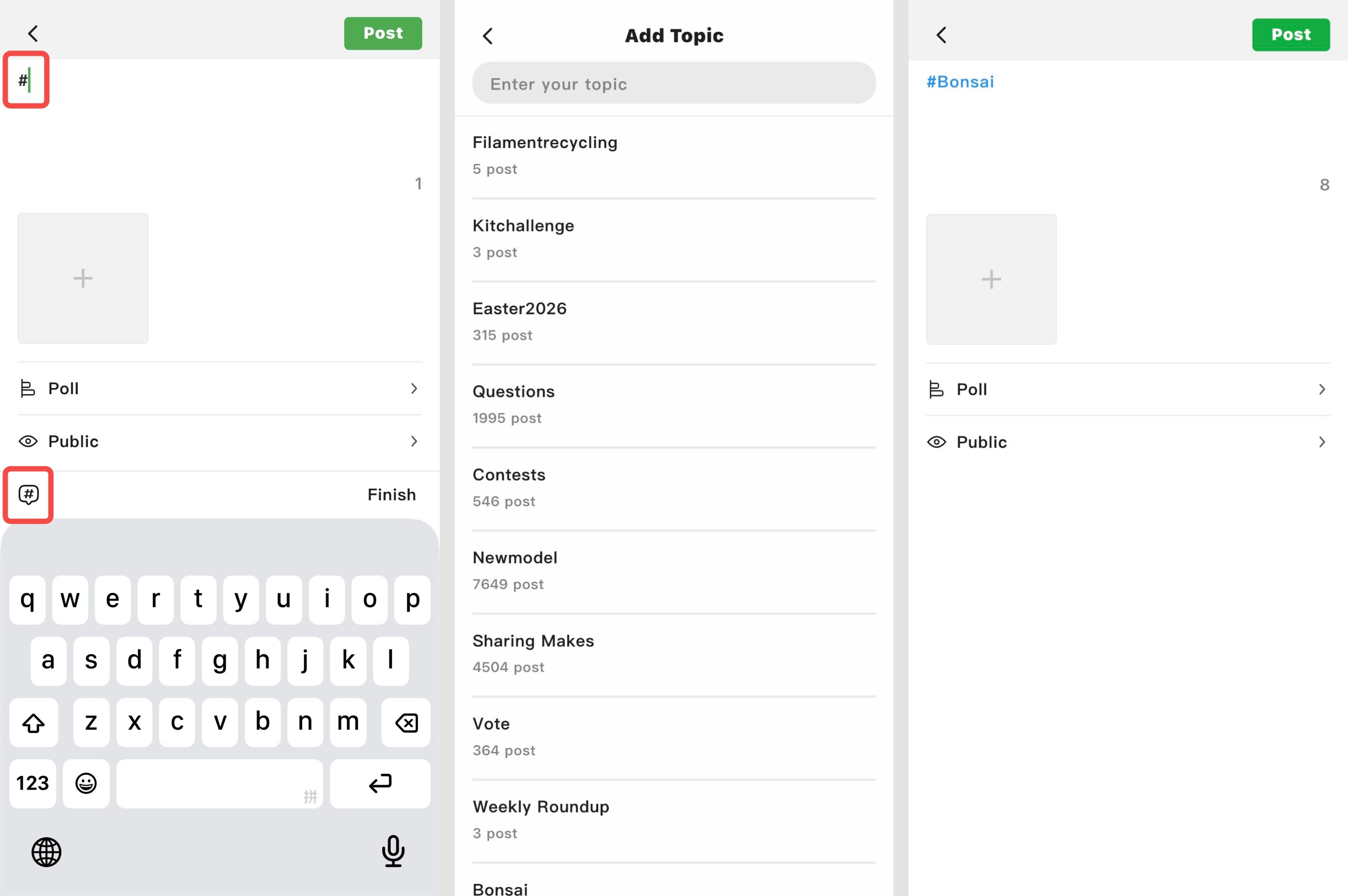
On Mobile:
- On the post editing page, tap the Hashtag icon (#) on the left side, or directly type a # in the text box to open the [Add Hashtag] menu.
- Type your keywords and select the relevant tag from the list (e.g., #Bonsai).
The hashtag text in your post will turn BLUE. This means it’s successfully linked!
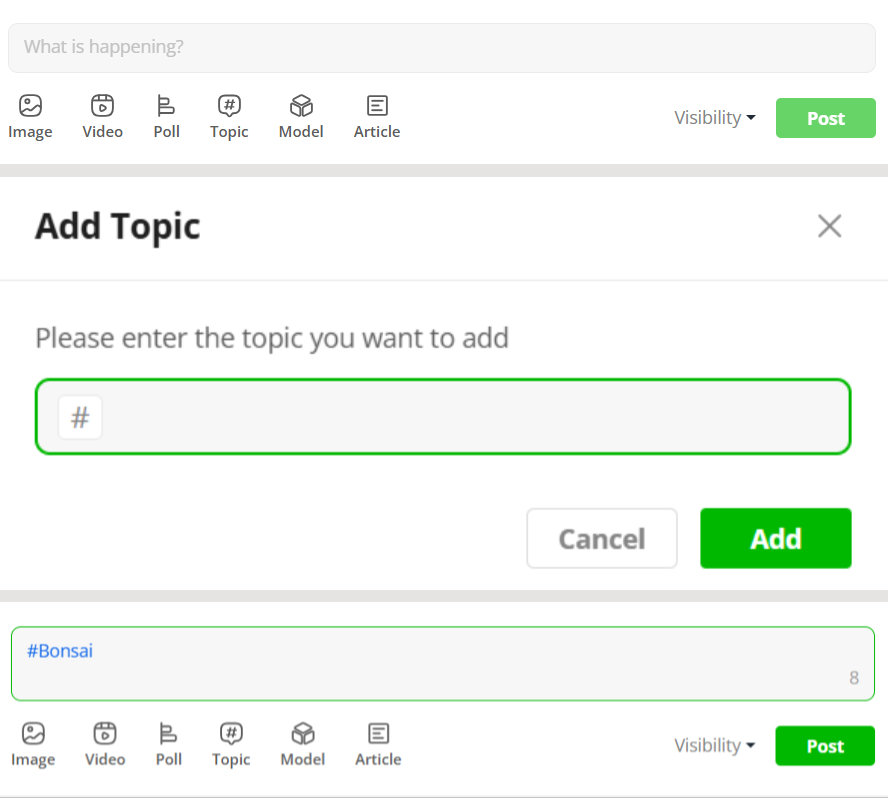
On Web:
- On the post editing page, click the Hashtag icon (#) at the bottom.
- In the pop-up window, type keywords to choose an existing tag, or create a brand new one. Click [Add].
- The hashtag text in your post will turn BLUE.
Tips:
- No Copy-Pasting: Simply copying and pasting a hashtag into the text box will NOT work.
- Tap to Confirm: You must manually type #, tap the suggested tag in the pop-up, and make sure it turns BLUE.
- Quality over Quantity: Pick 1 to 3 of the most relevant tags. You don’t need to spam them!
- Stay Relevant: Using the right tags boosts your visibility. Spamming unrelated tags will negatively impact your post's reach (reduced visibility).
3.Popular Hashtag Reference Guide
Not sure which tags to use? Check out these common ones! (Tip: Use capital letters for each word to make them easier to read!)
🛠️ Q&A & Troubleshooting
📢 Creator Promos & Teasers
- Released Models: #Sharing Makes, #Newmodel
- Upcoming Models: #ComingSoon, #Wip
🏆 Official Contests & Events
- #Contests
- e.g., #Bonsai, #Easter2026 (Always refer to the official tags for current events!)
📸 Showcases & Make Sharing
💡 Tips, Tricks & Tutorials
☕ Community & Requests
💬 Feedback & Suggestions
We hope this guide helps your awesome content reach a wider audience! 🚀
If you have any questions about using hashtags, drop a comment below.


