
SVG 3D Texture Tiles for Bambu Studio
Print Profile(1)
Description
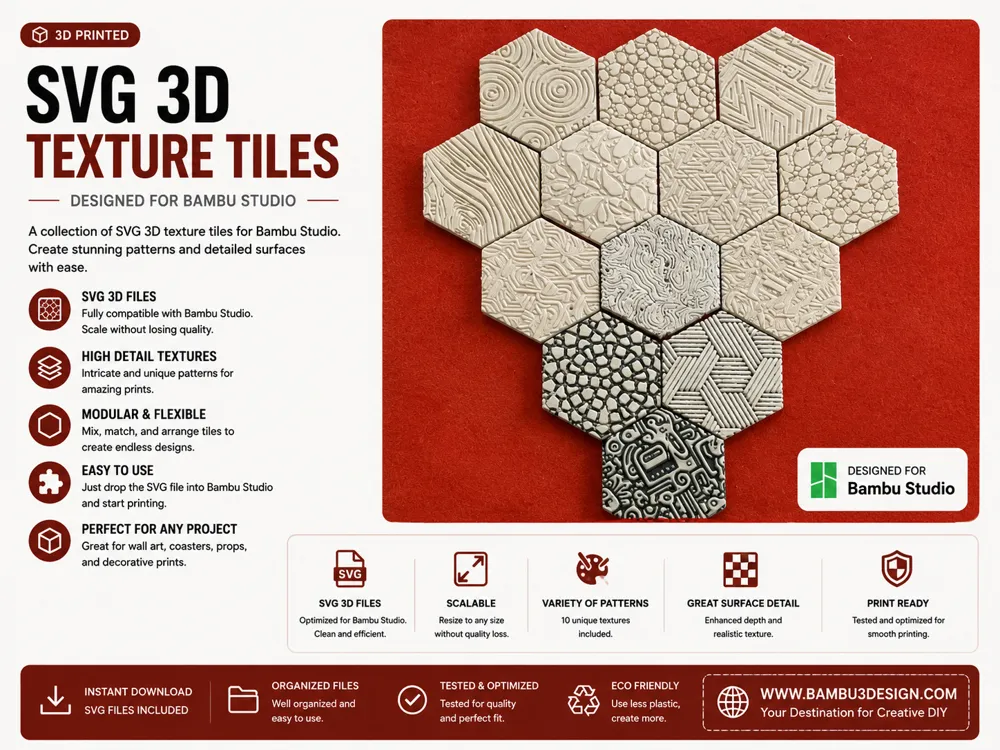
These textures were created using SVG images in Bambu Studio to demonstrate how simple 2D patterns can be transformed into detailed 3D surface textures.
By converting an image to SVG and applying it to a model, you can quickly create unique decorative surfaces for many 3D printing projects such as tiles, coasters, panels, wall art, and custom designs.
In this example, the same hexagonal tile was duplicated and different SVG textures were applied to each piece to show how easy it is to generate a wide variety of surface patterns.
If you want to learn exactly how to convert images to SVG and apply them as textures step-by-step, you can watch the full tutorial on my YouTube channel.
🎥 Full tutorial:
Turn Any Image into 3D Texture in Bambu Studio
(Link to the YouTube video)
In the video I explain:
• how to convert images to SVG
• how to apply textures on your model
• how to control depth and size
• how to create custom surface patterns
License

You shall not share, sub-license, sell, rent, host, transfer, or distribute in any way the digital or 3D printed versions of this object, nor any other derivative work of this object in its digital or physical format (including - but not limited to - remixes of this object, and hosting on other digital platforms). The objects may not be used without permission in any way whatsoever in which you charge money, or collect fees.


Comment & Rating (1)