Search models, users, collections, and posts
NR Workshop
@NRWorkshop
724
15.4 k
34.9 k
16.3 k
Social Media Links
Bio
I like to make designs that sit somewhere between practical and artistic, with a bit of fantasy influence mixed in. A lot of my models end up being functional, simple mechanical builds, or replica models that lean toward the J.R.R. Tolkien style. I try to keep the shapes clean and the details clear so everything prints well, but still has some character to it. Overall, I focus on making things that look solid, make sense (or no sense), and carry a mix of usefulness and the kind of style I enjoy working with.
Achievements

MakerWorld Guardian
Active more than 20 days out of last 30 days UTC time

Contest Winner
Won 3 model contest awards.

Featured Creator
1 model is featured by MakerWorld.

Stellar Reviewer
Rate or Comment 232 different models
Recent Article
P2S Review After 100+ Hours of Printing
P2S Review After 100+ Hours of PrintingHey guys, I recently noticed that the P2S has accumulated over 135 hours of printing. I thought you guys might want to hear my opinions on it, so here they are: So far I have had a great experience with the P2S! After printing with various types of filament; PLA Glow, PLA Wood, PLA Matte, PETG HF, and High Speed PLA. Using the AMS on complex models. Made and printed models that need perfect tolerances… I did a lot of testing! Things/improvements that I love about the P2S:The price $; so cheap for an amazing printer!The nozzle wiper; this is one of my favorite upgrades! It works 10x better than the one on my X1C and P1S! The X1C/P1S spill the poop all over the interior of the machine. The P2S has virtually no poop or waste dirtying the interior.The speed; I do notice the speed difference between machines, P2S is faster.Easy nozzle swap; this is another one of my favorites! Being able to swap nozzles quickly is sooo nice!The filleted bottom lip; when the rare piece of purge escapes the chute, this is really nice for cleaning it out!The side spool holder; I really like how this is setup, with the PTFE tube coming straight from it.Volume; with all that speed, you would think its loud. But no, its more quite than the X1C/P1S! I also like that it has the sounds to alert of any problems/finished print!Filament cutter; I really love the way they did this! Instead of taking up precious print space like with the X1C/P1S, they made a little flap that extends and cuts the filament.The lighting; I love that it has two light bars now! One is not enough.Handles; its so much easier to carry with them.Things that could be improved:Strength of spool holder: when putting it together, its easy, but it could be improved. It stays in its place nice, but it wiggles a lot.Storage; I liked it better with a micro SD card, now it needs a flash-drive.Ball screws; when unboxing and preparing to print, you have to unfasten two red plastic things from the front ball screws. When doing that, you have to use some force to pull them off. Resulting in the ball screws being very loose, they can be moved a decent amount when the print bed is at its lowest! But there are steel rods to help strengthen it.Toolhead cover; it happens when taking off and pulling on the cover. When trying to realign the magnets, there is a few cords that get in the way, so you have to wiggle it around for it to snap in.Overall, its a great new printer. Its cheap, fast, new, and looks good. But there is also some improvements to be made about it. I someone asks me, I will recommend it more than both the X1C (discontinued) and P1S.  If you have any questions about the P2S, comment below!
Troubles you can have printing a multicolor model!
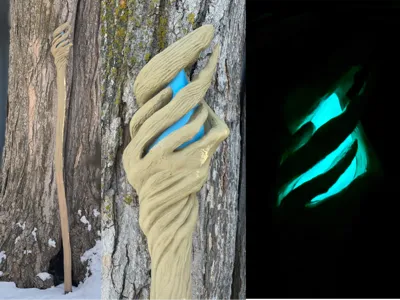
Troubles you can have printing a multicolor model!I went through a LOOOTTTTT of headache this weekend trying to finish a multi-color model! My AMS 2 Pro went bad when printing the top (multi-color) piece of my Full Sized Gandalf's Staff. At about 60% through the print, the PLA glow started throwing errors every time it loaded and unloaded. You could say I was trying to save that print for the whole day. I would get an error, then once I got past that error, it would flash another error. After that, I might get the print running for one layer, but that only takes about 1 minute. Soo I got hardly any time to do anything while that was happening, and it was happening for 7+ hours. So after doing that for hours, naturally, I stopped the print. But I did make a repair print thankfully. I cut the model at the height of which I stopped the print, then printed that and glued it onto the unfinished infill. I don't know why it did this, maybe its the filament. It was PLA Glow Blue, so it was special filament. I checked the diameter of the filament, and it was the same as other filament. If you have any ideas to what caused this, comment please! In conclusion, my AMS 2 Pro slot 1 is not reading or sensing filaments right now, even though it will pull filament into the printer for some reason. Plus, my other AMS (2 Pro) is currently clogged with a piece of broken filament (I think 😬).  Buuut... I finished the model! It turned out great in the end, as you can see (check the link below)! But it is a little more chunky than I thought it was gonna be 😂, maybe V2?!If you have any thoughts or questions, comment!  Here's the model: https://makerworld.com/en/models/2296133-full-sized-gandalf-the-grey-staff-w-glowing-gem#profileId-2505692
Recent Makes (Ratings with High Scores and Photos)