
Bambu Lab A1 - Crossbar Mount 3 & 4 Nozzles Holder


Print Profile(3)


Description
Thanks to the design of the Bambu Lab A1 printer, the nozzle can be switched quickly—one of the key reasons I chose the A1 over other models. After some practice, I can switch nozzles in just 30 seconds.
What I found was that it took me more time to get the nozzle I needed for my print job than to actually switch it. Some days, I have to switch the nozzle multiple times for different jobs. To streamline my routine, I modeled this crossbar-mounted nozzle holder for three nozzles, designed specifically for the Bambu Lab A1 printer. The holder wraps around the top crossbar with hidden snap-on anchors.
Updates:
2024-10-29 Added a new print profile for 4 nozzles version to cover 0.8 mm nozzle.
2024-11-25 Added a new print profile for 3 nozzles version to cover 0.2, 0.4, and 0.8 mm nozzles.
Other related model:
Top mounted AMS lite users, you can use my other nozzle holder design,
A1 - Under the Crossbar Nozzle Holders (1 to many) by 3D-Dreamer - MakerWorld.
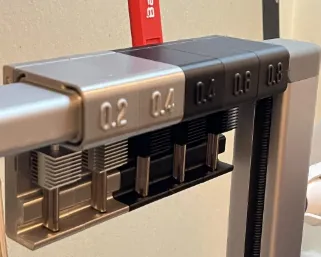
Install Instructions:
- Check all the anchors are printed ok. There are 4 anchors on each of the 3 u-shaped mounting brackets.
- Check each of the anchors to ensure they can be pinched together and spring back.
- Mount the u-shaped brackets on the crossbar from below at the location where you want the nozzle holder will be. You can use the holes on the holder to put the 3 brackets at the right spacing.

- Engage the back 3 long anchors first. Pushing the holder downward while using your hands to support the mounts preventing them from falling off from the crossbar. Push the holder down until the holder touches the top of the front 3 short anchors.
- Push the holder all the way down after aligning the front 3 anchors to the 3 front slots with both hands.
- When all 6 snap-on anchors are installed correctly, you should not see large gap between the holder and the 3 brackets.


Hope you will find this nozzle holder useful to your A1 printer. 😉
Boost Me (for free)
Your support will help me buy more filaments to test out new models which you'll see from me. Thank you
License

You shall not share, sub-license, sell, rent, host, transfer, or distribute in any way the digital or 3D printed versions of this object, nor any other derivative work of this object in its digital or physical format (including - but not limited to - remixes of this object, and hosting on other digital platforms). The objects may not be used without permission in any way whatsoever in which you charge money, or collect fees.


Comment & Rating (111)