
Skull Extruder Front Cover V3 - A1 and A1 Mini



Print Profile(6)




Description
Boost Me (for free)
Huge thanks for all the boosts on this! It truly makes a difference, and I appreciate every bit of support. You all are awesome! 🙌
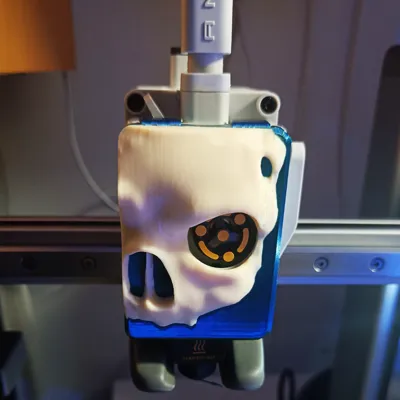
The Skull Extruder Front Cover V3 is a striking 3D model designed for 3D printing, featuring:
- A skull dramatically emerges from the surface.
- The extruder wheel cleverly integrated as one of the skull's eyes, adding both functionality and a bold, eerie aesthetic.
- Multi-Color / AMS version
- Bambu Labs branded and unbranded versions.
- Intricately detailed to add a menacing, Halloween-inspired touch.
- Perfect for FDM printing, blending creativity with mechanical utility.
This cover is compatible with both the Bambu Labs A1 and A1 Mini 3D printers, making it an ideal upgrade for users of these machines.
This design will make a unique and eye-catching addition to any A1 or A1 Mini setup!
How to mount it:
- Remove the stock cover, and if you have printed the split version, glue the skull to the printed cover.
- Hook the two top clips of the Skull Extruder cover into the extruder.
- Press on the lower right part of the cover.
- Press on the lower left part of the cover, and the cover should be clipped in properly.
V2 is a Combined version, which takes longer to print and wastes more filament, V3 is a split version, which I recommend to shorten print time a lot, and has almost no waste, only a little bit due to the Bambu logo in a different color. I recommend printing the skull in 0.08mm layer height to not get visible top layers on the skull features, but it looks decently good in 0.2 too.
License

You shall not share, sub-license, sell, rent, host, transfer, or distribute in any way the digital or 3D printed versions of this object, nor any other derivative work of this object in its digital or physical format (including - but not limited to - remixes of this object, and hosting on other digital platforms). The objects may not be used without permission in any way whatsoever in which you charge money, or collect fees.


Comment & Rating (2102)