
Dragon Egg Coin Bank - Flush Object


Print Profile(10)


Description
I wanted a taller Flush/Purge object for my multi color prints that I could resize to the height I wanted but most dragon eggs were cut half way up so they weren't maximizing the height potential. I put the threads in the bottom of this egg to utilize the full height as a flush/purge object that could be scaled to match whatever I was printing.
Coin slot is sized to standard US coins
I added a negative part for the coin slot so it can be removed if its unneeded, and can also maintain size if you need to scale the egg up or down.
The coin slot should be 27mm x 2.5mm for standard US coins.
The coin slot in the XL and XXL profiles are 32mm x 3mm.
If you are using other coin dimensions simply measure or google the max size you'll need and scale the coin slot negative part 1-2 mm larger than the coin.
I also left the egg and threaded cap as one object so they both scale together properly to keep threads matched up.
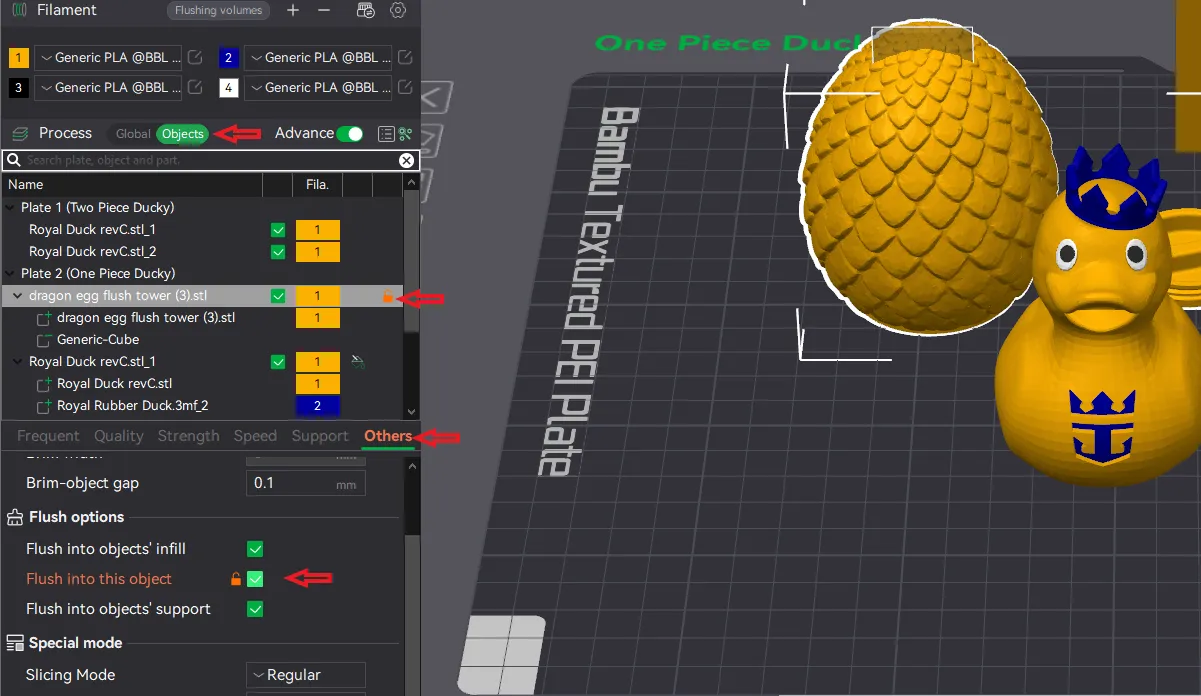
To utilize this as a flush/purge object select “Objects”, then select the Dragon Egg, click the “Others” tab, then “Flush into this Object”.
This remix is based on


License



Comment & Rating (440)