
Sierpiński Pyramid (Customizable)


Print Profile(4)



Description
Intro
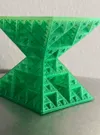
The Sierpiński Pyramid is a 3 dimensional manifestation of the Sierpiński triangle.
It's a fractal, that is subdivided recursively into smaller and smaller pyramids.
In (mathematical) theory it goes on and on into infinity, which means you would be able to zoom in infinitely and still see more little pyramids.
Unfortunately we live in the real world where there are no mathematically precise fractals. The next best thing we can do is to show a subset of the fractal.
Print Settings
The Pyramid is printed in Vase Mode. With that said, it's incredibly sturdy. I wouldn't be afraid to literally throw a level 6 pyramid around.
Versions
I've uploaded different recursion depths (or levels if you want to be one of the cool kids) which show off the beauty of the Sierpiński Pyramid.
For every level you go deeper, the longer it's going to take (like in inception) and the more filament it's going to use (not like in inception).
In the print profile you can find the levels 3 to 6, which go from 6.5 minutes to a whopping 14 hours. I recommend printing a lower level first to check if everything is alright with the printer (and you).
I've also uploaded the different levels with a base layer and without base layer. The one with base layer is more stable since it it can't bend at the bottom, it also helps with the first layer sticking. The one without base layer prints faster and uses less filament, although the difference is basically negligible. See Print Info below to compare.
The version with base layer also gives you the added bonus of creating a Sierpiński triangle when held up against the light.
Parametric adjustments
Maker World introduced the option to adjust parameters with OpenScad files. Unfortunately rendering a Sierpiński pyramid takes ages, and the model generator already gives up at level 5.
Parameters
level: the level of the pyramid
side_length: the side length of the unit pyramid, that is the smallest unit of pyramid in the fractal. By default it's 1.875 which causes a level 3 pyramid to have the side length of 15mm. The formula for calculating the side length is `{side_length} * 2^{level}` so if you were to choose a side length of 2.5mm, then level 4 would be `2.5 * 2^4 = 40mm`.
overlap: the overlap between unit pyramids. Setting this to 0 would create a perfect mathematical Sierpiński pyramid, however it would be impossible to print since nothing is connected and therefore everything would be floating. Setting this too high ends up making the fractal look less detailed.
base_height_ratio: this is the ratio of the base to the height (parallel to Z axis). By default it's the square root of 2 which causes the pyramid to be equilateral. Setting this to `pi/2` gives you the ratio of the pyramids of Giza (presumably)
base_offset: By default this is 0, which gives you a model with a base layer, the higher this is, the more of the bottom is cut away. The range of this variable is [-1:infinity (probably)]
Print Info
(On the A1 & according to Bambu Studio)
No Base
| Level | Time | Filament |
| 3 | 6m32s | 0.25g |
| 4 | 27m37s | 1.32g |
| 5 | 2h25m | 7.69g |
| 6 | 14h00m | 45.88g |
With Base
| Level | Time | Filament |
| 3 | 6m47s | 0.27g |
| 4 | 28m27s | 1.39g |
| 5 | 2h28m | 7.99g |
| 6 | 14h18m | 47.42g |
| 7 pls dont print this | 3d9h52m | 296.20g |
Potential Problems
First layer not sticking
The biggest culprit for me is forgetting to wash the build plate from time to time.
If you experience the first layer not sticking you could try to:
- Wash your build plate
- Use a textured PEI plate
- Use glue
- Use the pyramid version with base layer
- Slow down the first (few) layer(s)
- dry your filament?
- use different filament?
- i'm just guessing at this point
Nozzle too close to build plate / Extruder gear slipping
For some reason this always happens to me when I use the 0.2mm nozzle, not sure if something is wrong with the nozzle, the printer, the slicer or with me.
You'll know it's too close, if the extruder can't push any filament out and the extruder gear will therefore slip. The slipping will make clicking sounds, so please watch out for that when printing the first layer.
Nevertheless, to combat this I change the Z-Offset in the slicer. Unfortunately there is no setting to change the offset, you'll have to change it in your printers start gcode. (Orca slicer has a setting btw)
Somewhere at the bottom of the start gcode you should find
;===== for Textured PEI Plate , lower the nozzle as the nozzle was touching topmost of the texture when homing ==
;curr_bed_type={curr_bed_type}
{if curr_bed_type=="Textured PEI Plate"}
G29.1 Z{-0.02} ; for Textured PEI Plate
{endif}
Remove the minus from `G29.1 Z{-0.02} ; for Textured PEI Plate` and choose `Textured PEI Plate` as your plate type
Little tangent: In case you were wondering, choosing `Textured PEI Plate` over `Smooth PEI Plate / High Temp Plate` just changes the Z offset as far as I know. The comment in the first line of the gcode snippet explains it pretty well.
Changing the offset from -0.02 to 0.02 essentially raises the nozzle by 0.04mm from where it usually would be. If the issue persists, just raise the offset by more.
If more people are having this issue, let me know in the comments and I'll upload a version with adjusted Z offset.
Filament stopped coming out of the nozzle
Most likely heat creep. Happened to me when trying to print a level 7 pyramid with matte PLA. To combat this you might want to try printing cooler than normal. To fix this you could pause the print (if the stopping just happened) and unclog the nozzle with an acupuncture needle. If the heat creep happened a while ago you could cancel the print, set the print bed to the printing temperature and unclog your nozzle. Once that's done you can do some Gcode trickery to resume from the failed location. That is all theory though, I have no idea how to do this unfortunately
It looks too cool
Not sure how to help you with this.
Where is Level 7?
While Level 7 fits on the 256mm build plate, sorry A1 mini :(, it takes 30minutes to render in OpenScad, way too long to slice in Bambu Studio and around 20gb of ram. I'll upload the 3mf for a level 7 in case you like suffering.
Where is Level 8?
Ok don't get ridiculous
but just to do the math. Going from one level to the next basically multiplies the material by 6, so level 7 is ~300g which means level 8 is ~1.8kg. Time should also be factor 6, however in reality it seems a little less, so 3d10h print time at level 7 becomes ~20.5d at level 8. Since it's a little less than 6x, lets say ~20d give or take. You also need a print volume of 480mmx480mmx340mm, if you want to print it in one go, which would be one big chungus of a build plate if you ask me.
Closing Thoughts
If you print this, congratulations. You are now in possession of something special. I never get tired of staring at the fractal. But then again, I'm pretty weird.
There is something unique about holding a fractal in your hands. Also it's pretty weird to hold in your hands in general, since it weighs like nothing.
Also I'd love to see your prints with your amazing filament choices!
License

You shall not share, sub-license, sell, rent, host, transfer, or distribute in any way the digital or 3D printed versions of this object, nor any other derivative work of this object in its digital or physical format (including - but not limited to - remixes of this object, and hosting on other digital platforms). The objects may not be used without permission in any way whatsoever in which you charge money, or collect fees.


Comment & Rating (323)