
Four Towers, One Print!


Print Profile(1)
Description
Critical Download Instructions: To utilize this model correctly, you MUST Download STL/CAD Files. Attempting to download via "Open in Bambu Studio" bypasses essential g-code, impairing functionality.
To download properly, rather than clicking directly on Open in Bambu Studio, click the arrow on the right, click Download STL/CAD Files at the bottom. Four files will pop up, each for different filament types. You can download individually or click download all. Sorry for any confusion, it's the way MakerWorld has it set up.
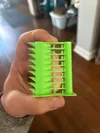
Four Temp Towers in one print! Maximize Your Calibration Efficiency with these Temperature Tower Files!
Elevate your 3D printing with this temperature tower model, designed for unmatched calibration convenience. This comprehensive model allows for simultaneous printing of up to four temperature towers using the same type of filament. Say goodbye to the tedious process of printing each filament separately!
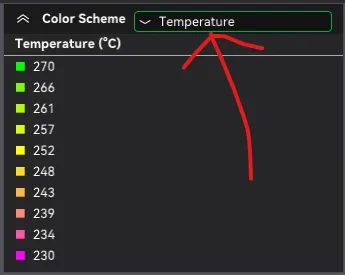
If you're calibrating just two or three filaments, you can easily remove the unnecessary models without impacting the temperature settings. The print will proceed flawlessly, maintaining accurate temperature adjustments throughout. This can be checked by selecting Temperature color scheme in the top right corner of the preview tab.
Key Features:
- Simultaneous Printing: Print up to four towers at once to save time and filament.
- Filament Flexibility: Compatible with filaments of the same type to streamline the calibration process. Note: Filament types can not be mixed in a single print.
- Minimal Filament Changes: Designed for efficient printing by object rather than by layer, reducing filament changes to three or fewer.
- Comprehensive Tests Included: Bridging (15-25mm lengths), Stringing, Overhangs (35° and 45°), and rounded edges to ensure detailed calibration.
Temperature ranges:
- PLA: 230° - 190°
- PETG: 265° - 230°
- ABS: 270° - 230°
- ASA: 270° - 230°
Prepare for a seamless, efficient calibration experience with this temperature tower. Download now and revolutionize your calibration process!
For any questions, suggestions, or feedback, please DM or comment. I work full-time and will respond as soon as possible. Thanks for your patience!
P.S. If it's not too much trouble, clicking the "Open in Bambu Studio" button would really support me by awarding points. Just remember, this action won't include the g-code in your file – it's purely a way to help me out. You will still need to download STL/CAD Files to get the correct g-code.
(Slightly modified) description brought to you by ChatGPT :)
License

You shall not share, sub-license, sell, rent, host, transfer, or distribute in any way the digital or 3D printed versions of this object, nor any other derivative work of this object in its digital or physical format (including - but not limited to - remixes of this object, and hosting on other digital platforms). The objects may not be used without permission in any way whatsoever in which you charge money, or collect fees.


Comment & Rating (21)