
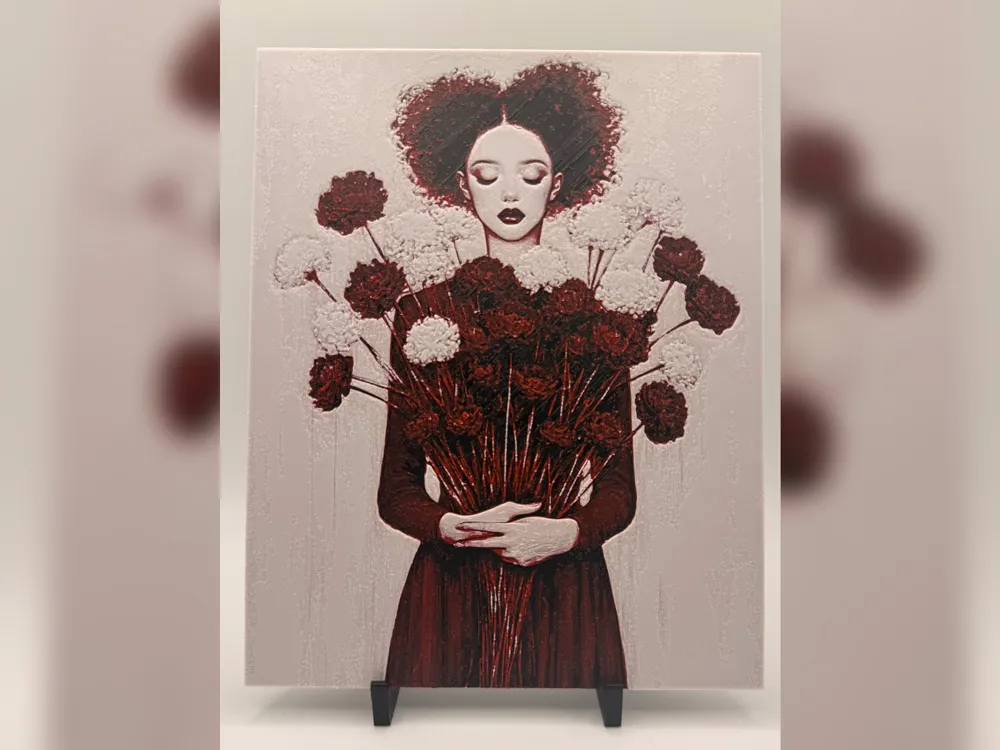
Crimson Bloom Portrait HueForge Print
Print Profile(1)

Description
☕ Enjoying my work? Consider buying me a coffee – buymeacoffee.com/jdau
Boost Me (for free)
I hope you find something here that you enjoy printing. Ratings, Boosts, and requests are always welcome, and they help keep new designs coming.
A gothic floral portrait with a quiet, almost storybook feel. The girl is framed by deep red roses and soft white blossoms, with her closed eyes, dark lips, and heart-shaped hair giving the piece a calm but slightly haunting presence.
The limited red, black, beige, and white palette gives it a strong handmade art-print look without needing a lot of colours. It works well as a decorative wall piece, especially if you like darker floral art, portrait prints, or something a little different from the usual HueForge poster style.
Print Settings:
- 100% infill
- Sparse Infill Pattern: Rectilinear
- Turn off "Detect Narrow internal solid infill"
- 0.08mm layer height
- 0.16mm initial layer
- Model size: 160x200mm
- Optional: You can use a height range modifier up to 0.48mm to print the solid base layers at a higher layer height, such as 0.24mm.
Filaments used:
- PLA BambuLab Basic Black
- PLA BambuLab Basic Red
- PLA BambuLab Beige
- PLA BambuLab Basic Jade White
This print uses 4 unique filaments.
Similar filament colours may be used, including close Bambu Lab or equivalent alternatives, but results may vary depending on filament brand, colour, transparency, and calibration.
Swap Instructions:
- Start with Black.
- At layer #8 (0.72mm), swap to Red.
- At layer #14 (1.2mm), swap to Beige.
- At layer #20 (1.68mm), swap to Jade White for the rest.
Extra Tips for hueforge prints!
- Set your filament temps to 10c lower ~ 210c
- Ensure detect narrow internal solid infill is off
- Resizing! Ensure that you unselect “uniform scale”, and only modify the X & Y axis, the Z axis MUST remain the same
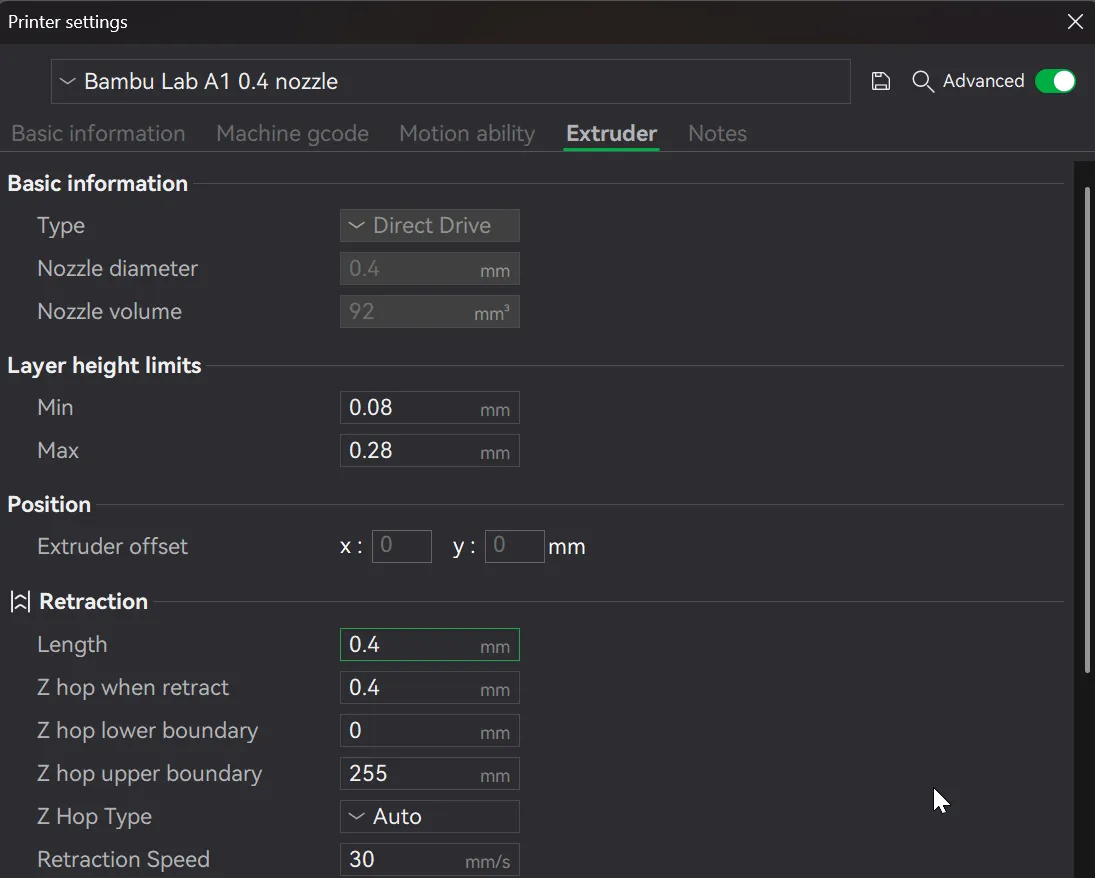
Setting your retraction length to ½ of what it currently is will reduce stringing
To speed up printing, you can use a height range modifier - Only do this after the swaps/pauses have been inserted and the model sliced first!
i.e. where a model has the following listed: "Optional height range modifier supported up to 0.72mm where noted."
1. Right click on the body under the Objects tab, and select height range modifier
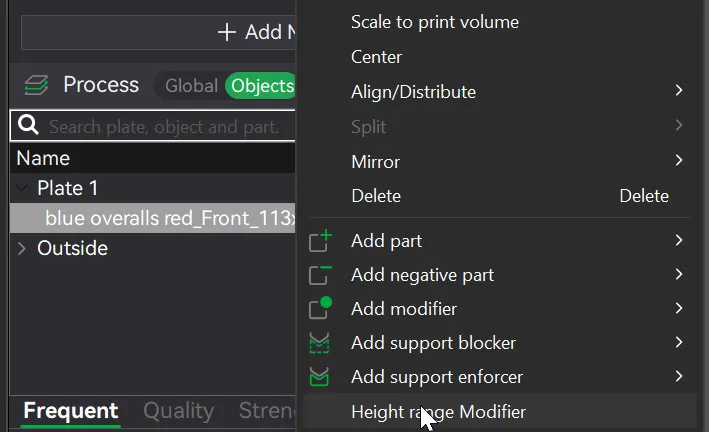
2. Change the two values specified below
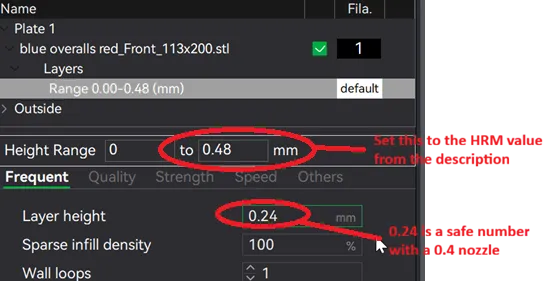
3. Reslice and watch your print time drop down!
License

You shall not share, sub-license, sell, rent, host, transfer, or distribute in any way the digital or 3D printed versions of this object, nor any other derivative work of this object in its digital or physical format (including, but not limited to, publishing derivative works outside the Makerworld platform or hosting on other digital platforms). The objects may not be used without permission in any way whatsoever in which you charge money or collect fees. Subject to the above restrictions, derivative works may be published only within the Makerworld platform, and all such derivative works must be licensed under the same SDFL‑C license, without modification or additional terms. You may download the digital versions of this object, 3D print it, and display images, videos, or usage demonstrations of 3D printed versions of the object on personal social media platforms or Makerworld official channels, provided that no digital versions of the object are shared or distributed.


Comment & Rating (0)