
Bambu Studio Color Mixing Test - Only 4 Spools!
Print Profile(1)
Bill of Materials


Description
Boost Me (for free)
If you like this model, please consider giving me a boost. It's free! I would really appreciate it :)
Want to color your own models like this? This test print was created using Full Spectrum 3D, a free web tool that works with any 3D printer and runs completely locally in your browser. Just upload any STL and paint it with hundreds of custom colors or gradients using only your standard spools. When you're done, it exports a ready-to-print 3MF file you can drop straight into any slicer. Check it out to bring full-color printing to your own projects!
As of Bambu Studio V2.5.3, a Color Mixing feature has been added.
The Color Mixing feature allows you to mix multiple filaments in the same print to create new colors by adjusting the ratio.
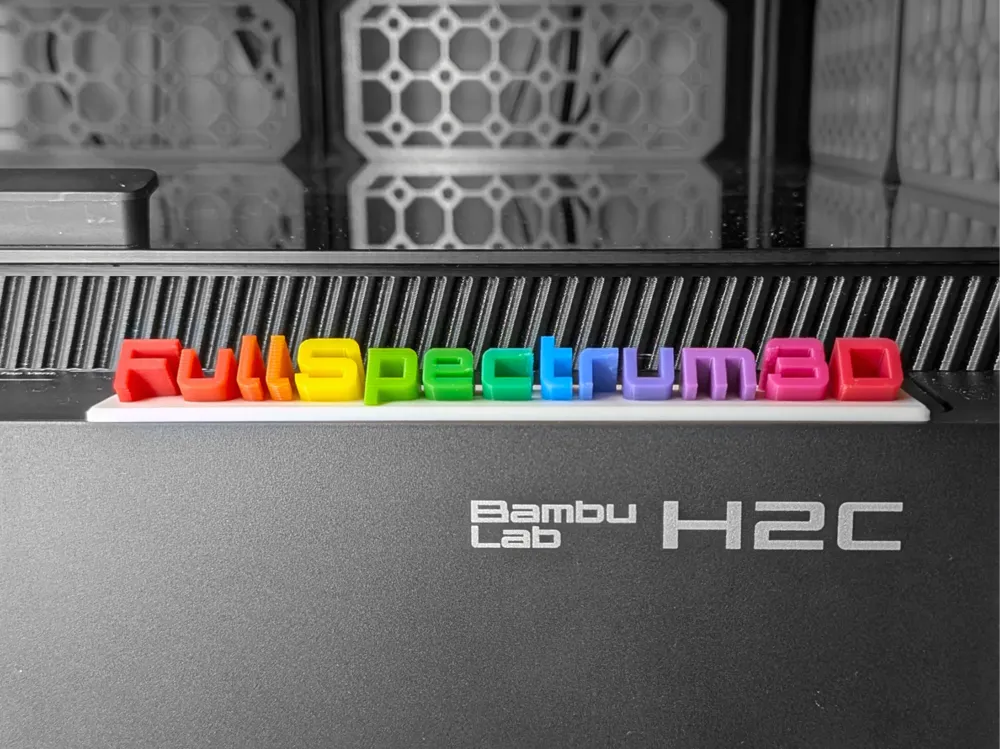
I've created a test model you can print out to experience this for yourself.
How to Use
Supports printing from Bambu Handy! Just print the default print profile. I've pre-processed the model so you don't need to wait for Color Mixing to come to Bambu Handy. I strongly advise against using any print profiles other than the official “Designer” profile. The pre-processed model is sliced into layers exactly 0.12mm tall, so print profiles with non-matching layer heights may cause defects such as gaps or missing layers in the printed model. Additionally, layer heights taller than 0.16mm will most likely result in subpar color mixes. Please be warned if you print them anyway.
For Bambu Studio users, click Download STL/CAD Files, then download FullSpectrum3D_BambuStudio.3mf. This is different from the default print profile's 3MF file, and was created using Bambu Studio V2.5.3.
Printing mixed-color filament on a single-extruder printer requires frequent filament changes and flushing, which may significantly increase waste and the risk of nozzle / waste-chute clogging.
Because of this, I only recommend printing Color Mix prints with the H2C!
Recommended Filaments
The Full Spectrum U1 community has done much of the groundwork on testing which filaments are best for color-mixing. In short, it is highly recommended to use filaments with high Transmission Distance (TD). The more light that can pass through the filament, the better it will mix with other filaments.
My recommended filaments which I used to achieve the effect in the photos are the following:
- Jayo PLA Red
- Polymaker Panchroma Translucent PLA Cyan
- Polymaker Panchroma Translucent PLA Magenta
- Polymaker Panchroma Translucent PLA Yellow
- Any white PLA for the base
You can also use Bambu Lab's CMYK bundle plus Bambu Lab Basic Red, but the results will not be as good.
FAQ
- Why does the print take so long?
Color Mixing works by printing layers of different thicknesses or multiple thin layers of different colors on top of each other to achieve the illusion of a different color. The human eye can't see details smaller than 0.1mm, so a lower layer height works best, which takes longer. Each layer also requires multiple color changes which further adds to the print time.
This model was inspired by @rocky_boi's Full Spectrum test print and was modelled from scratch.
License

You shall not share, sub-license, sell, rent, host, transfer, or distribute in any way the digital or 3D printed versions of this object, nor any other derivative work of this object in its digital or physical format (including - but not limited to - remixes of this object, and hosting on other digital platforms). The objects may not be used without permission in any way whatsoever in which you charge money, or collect fees.


Comment & Rating (95)