
Two Color Ruler
Print Profile(1)

Description
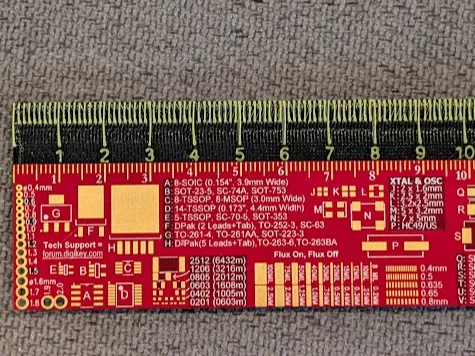
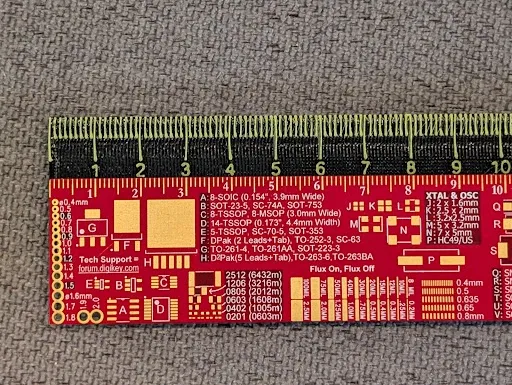
Upgrade your workspace with this sleek and highly functional Dual-Color 30 cm Ruler.
Single-color 3D printed rulers can be hard to read, with markings that blend into the body. This design solves that problem by using a second color for the numbers and gradations, creating a sharp, high-contrast tool that is both beautiful and incredibly easy to use.
Key Features:
- 📏 Full 30 cm / 300 mm Length: The standard size for all your measuring needs.
- 🎨 High-Contrast Readability: The two-color design makes the millimeter and centimeter lines pop, preventing measurement errors.
- 🔄 AMS/MMU Ready: The model is provided as a multi-part .3mf file, ready for seamless printing on multi-material systems like the Bambu Lab AMS. Just assign your colors and print!
- 📄 Single-Extruder Friendly: Don't have an AMS? No problem! You can easily print this with a manual filament swap. Instructions are below.
- 💪 Durable & Practical: Print it in PETG or PLA+ for a tool that will last for years.
Printing Instructions & Recommendations
For Multi-Color Printers (Bambu Lab AMS / MMU):
- Load the .3mf file into your slicer (Bambu Studio, PrusaSlicer, etc.).
- Assign your desired filament/color to each part in the slicer. For best results, use two high-contrast colors (e.g., White and Black, or Blue and Yellow).
- Slice and print!
For Single-Extruder Printers (Manual Filament Swap):
- Load the .3mf file into your slicer.
- Assign your first color (this will be for the markings).
- Add a "Pause" or "Filament Change" command at the appropriate layer height in your slicer.
- Start the print with your markings color.
- The printer will pause at the specified layer. Follow your printer's instructions to unload the first color and load your ruler body color.
- Resume the print.
Print Profile Settings
- Printer: Bambu Lab X1C / P1S / A1
- Material: PLA, PLA+, or PETG (PETG is recommended for better durability and flexibility)
- Layer Height: 0.2 mm
- Infill: 15-20%
- Wall Loops: 3
- Supports: None needed
- Brim: Not required
I hope this ruler is as useful for you as it has been for me!
Please share your makes and leave a rating if you enjoyed the model. I'd love to see the creative color combinations you come up with! Happy printing!
License

You shall not share, sub-license, sell, rent, host, transfer, or distribute in any way the digital or 3D printed versions of this object, nor any other derivative work of this object in its digital or physical format (including - but not limited to - remixes of this object, and hosting on other digital platforms). The objects may not be used without permission in any way whatsoever in which you charge money, or collect fees.


Comment & Rating (0)