


Print Profile(1)

Bill of Materials
- 3x12mm screw x 20:
- Plexiglass: 2mm thickness x 1:
Description
Create a secure and professional display cover with this set of top and bottom corner brackets designed to hold 2mm plexiglass panels. This system allows for easy assembly with screws and optional embedded magnets for a snap-lock mechanism.
You can find the showcased display box here: https://makerworld.com/en/models/1191624-kill-team-display-stand-for-vespid-stingwings#profileId-1203519
And the display plaque here: https://makerworld.com/en/models/1190874-vespid-stingwings-plaque-display-label#profileId-1202583
Printing & Assembly Instructions:
✅ Print the top and bottom corners for your display cover.
✅ For embedded magnets, pause the print at layer 45, insert a 5x5mm cube magnet, and continue printing.
✅ If using magnets, use a hardened steel nozzle! A stainless steel nozzle will attract the magnets, causing print issues.
✅ Secure the corners to the plexiglass using 3x12mm screws.
Materials & Dimensions:
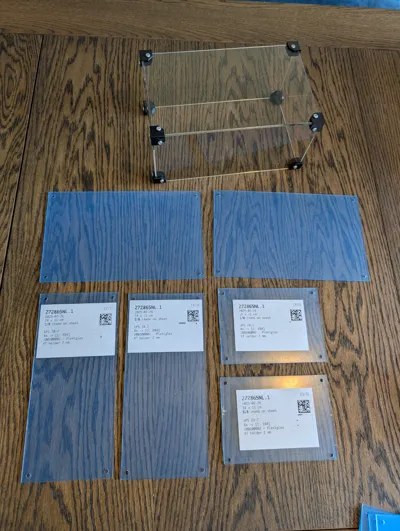
🛠 Plexiglass: 2mm thickness. For my example I used these sheets:
- 2x 11x15cm
- 2x 11x24cm
- 1x 15x24cm
- If you don't have a laser cutter, order pre-cut sheets for cleaner edges.
- Drill 4mm holes in each corner, centered 0.8cm from the edge (or order them pre-drilled for the best result).
🛠 Screws: 3x12mm
🛠 Magnets: 5x5mm cube
🔧 Important: If you're making a locking box, check magnet polarity to ensure a proper fit.
This system provides a secure, professional finish while keeping your display protected during transport and use.
License



Comment & Rating (37)