


Print Profile(13)



Description
The Perpetual Calendar
A fully 3D printed calendar. No Magnets, no bolts, no glue and no screws are needed. Just 3D printed parts.
If you don't have an AMS unit, you can just print the date/month tiles in one color - Then you use a Posca Marker or similar to add the date and months.
I seperated each color print (besides the date/months tiles) to individual print plates. Please move these around as you please for faster or more eficient prints.
NB: When assembling the calendar please only tighten the axis so you can still move the date and month individually.
The indicator tiles needs to be inserted in this order.
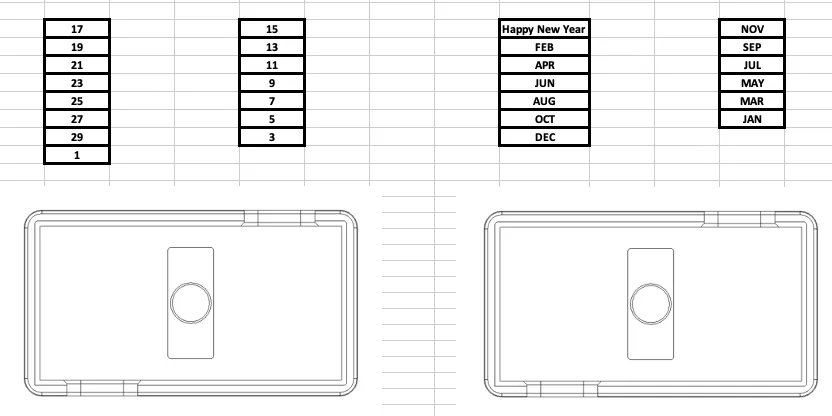
NOTE: The two housings are not the same.
The centerblock one for the days is 31,4mm - The centerblock for the months is 28,8mm
If you’re having issues with adhesion in general with your printer - please use the print profile with added brim to the threaded axis.
Please have a look at this assembly video I've made. If you follow these steps it's a very simple assembly.
This video shows how to orient the date tiles so the calendar works as intended.
Please make sure you print bed is clean when printing the multicolor parts to ensure maximum adhesion.
Due to the nature of 3D printed parts being very light, you might encounter that the tiles won't fall down immediately. If this happens just give the housing a little tap and it should fall into place.
My calendar is printed with these filaments:
Sunlu PLA+ White (I am having bed adhesion issues with this filament - I recommend Bambu PLA White instead)
Sunlu PLA+ Black
Bambu Lab PLA Basic Orange
UPDATE 31-12-2023:
Uploaded a new print profile. Version V1.1
Made a few modifications to the two housings so the tiles would fall down more consistently.
This update also reduces the print time by more than 1 hour.
UPDATE 08-01-2024:
Some users have been complaining/leaving low ratings about the ironing of the tiles or bed adhesion.
Please modify this yourself within Bambu Studio if your printer is not well calibrated or maintained.
Also, make sure your printer bed is clean from any grease.
I've had zero issues with my own prints. both ironing and bed adhesion.
Printed on a P1S.
License

You shall not share, sub-license, sell, rent, host, transfer, or distribute in any way the digital or 3D printed versions of this object, nor any other derivative work of this object in its digital or physical format (including - but not limited to - remixes of this object, and hosting on other digital platforms). The objects may not be used without permission in any way whatsoever in which you charge money, or collect fees.


Comment & Rating (1494)