Search models, users, collections, and posts

PrintyPlane

Print Profile(1)

All
P1S
P1P
X1
X1 Carbon
X1E
A1
A1 mini
H2D
H2D Pro
H2S
P2S
H2C
X2D
A2L

PrintyPlane 0.2mm layer with 2 walls.
Designer
41 min
1 plate
4.9(114)

Open in Bambu Studio
Boost
408
749
153
104
1 k
636
Released 

Description

This is a difficult test print, if you like the style but want an easy print, check out the EZ (easy) version here:


https://makerworld.com/en/models/1053435?from=search#profileId-1040582


EZ-Printyplane and Test Printyplane can be identified by the antenna behind the cockpit (EZ version has no antenna).


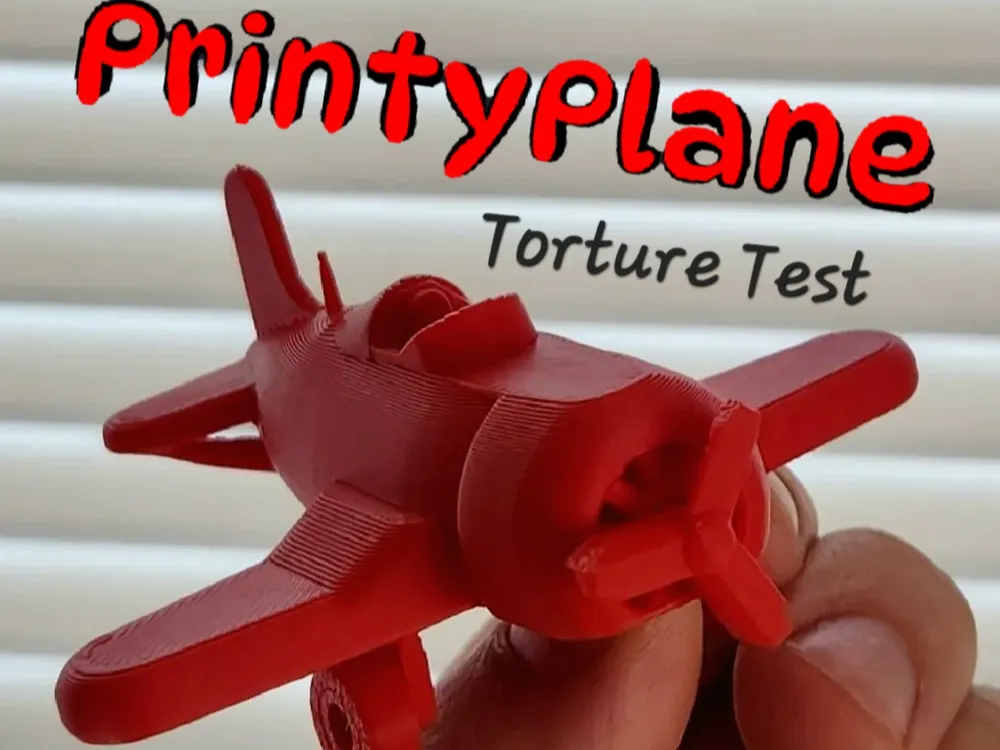
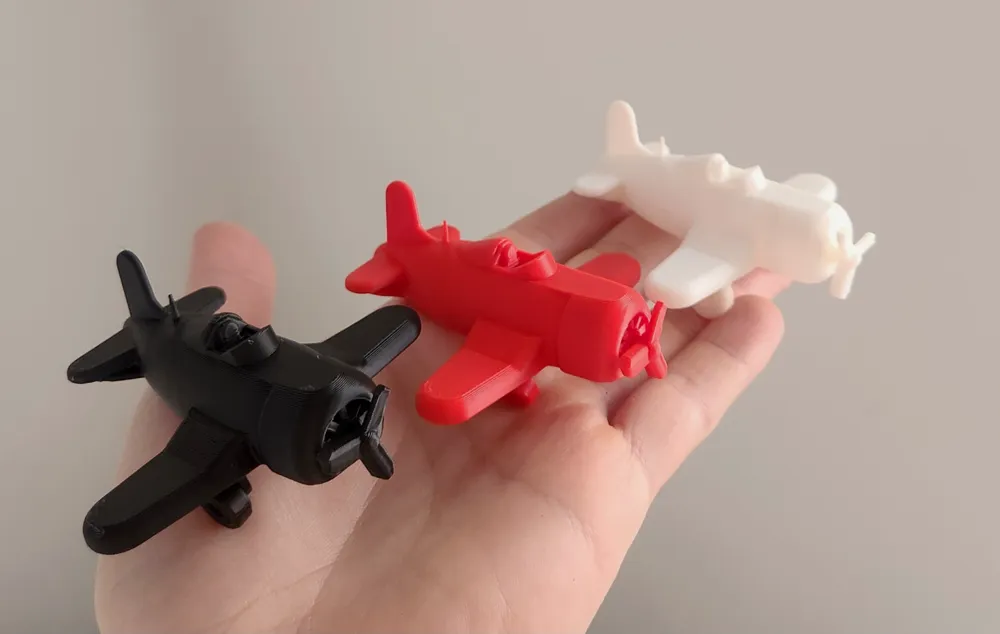
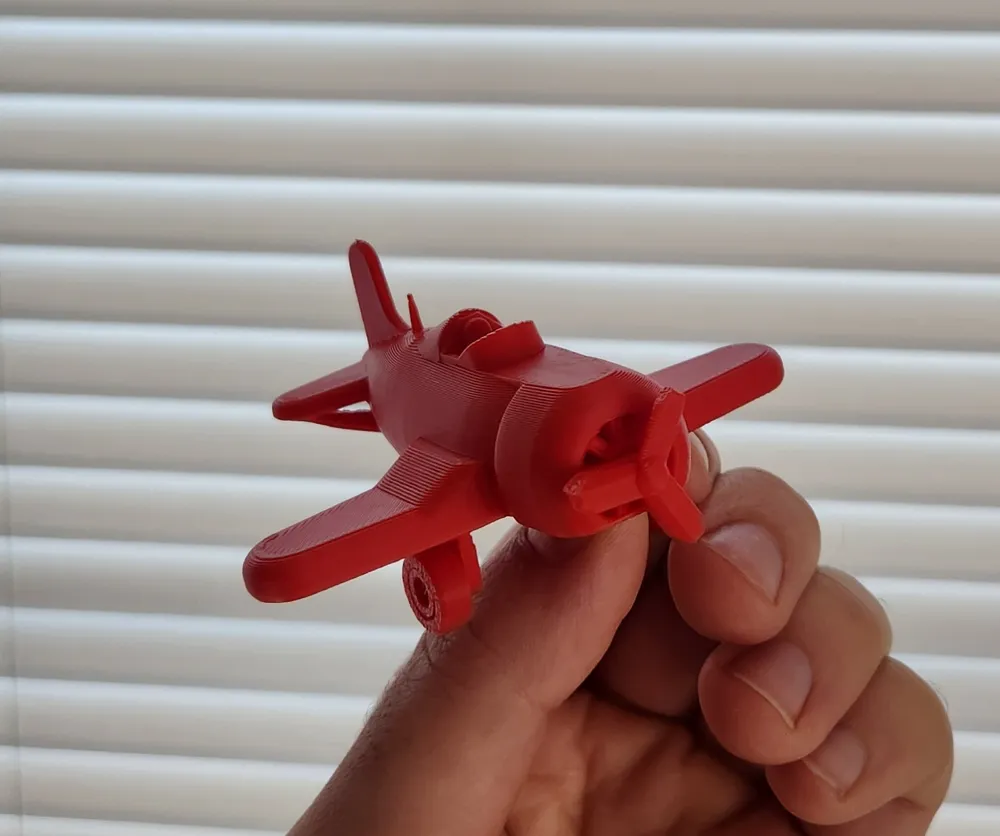
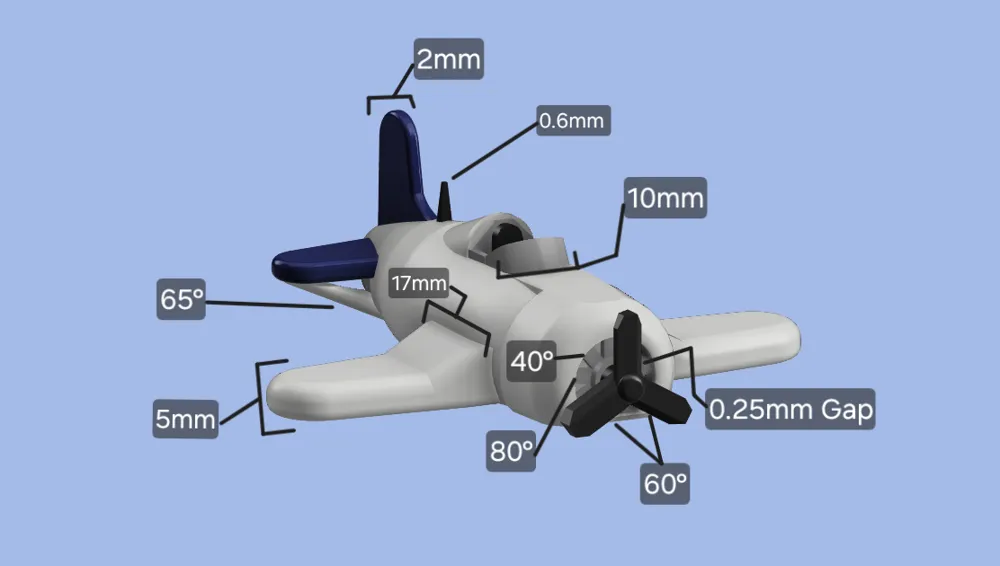
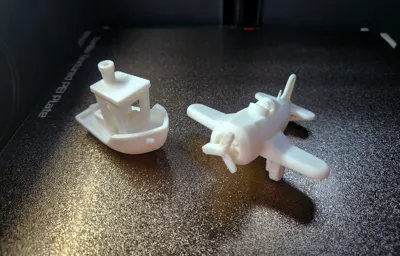
This model airplane is a test print to test overhang angles, gap tolerances (vertical and horizontal), stringing, bed adhesion, elephant foot, and dimensions in all three axis both squared and circular. 


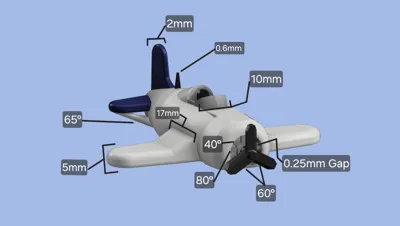
Overhangs of 40, 60, 65, and 80 degrees are designated for testing, with the 80 degree overhand being placed where if it fails the model should still come out nicely. 


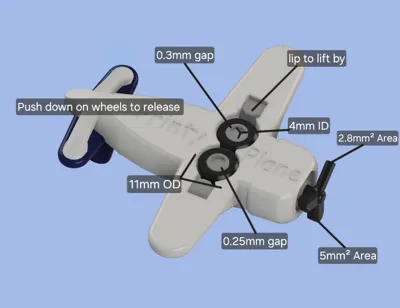
The wings, tail, and windshield provide dimensions to test for accuracy on all three axis, and the wheels provide two circular test (inner and outer diameter).


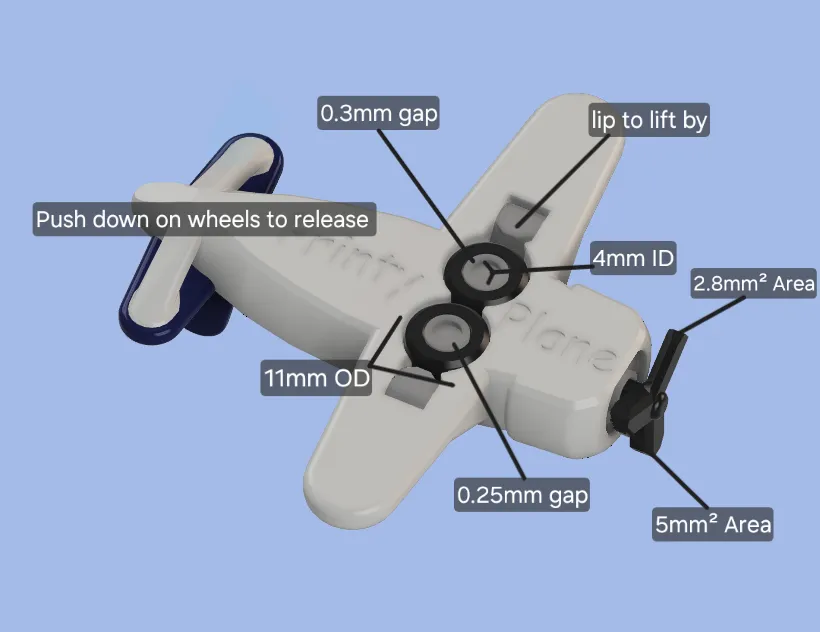
Gap tolerances are tested with the two wheels having gaps of 0.3mm for the right wheel (If imagining yourself in the airplane), and 0.25mm for the left (so if one wheel spins and the other doesn’t you know its close), this tests the gap in the vertical axis. The gap check for the horizontal or longitudinal axis is with the propeller, the gap on the shaft is 0.25mm, and when it prints there is a thin layer only one nozzle thickness wide holding the internals of where the prop meets the rest of the plane, with a little force it should brake free and you should be able to spin the propeller.


To check for stringing, there is a radio antenna behind the cockpit that acts as a stringing test between itself and the tail.

Elephant foot and bed adhesion are tested by the propeller meeting the build plate, with one blade having 5mm square surface area and the other 2.8mm square.


After removing the print from the bed, you may have to push down on the wheels to “pop” them loose, and then lift them out and a small nub should be in place so the “click” out to the down position.


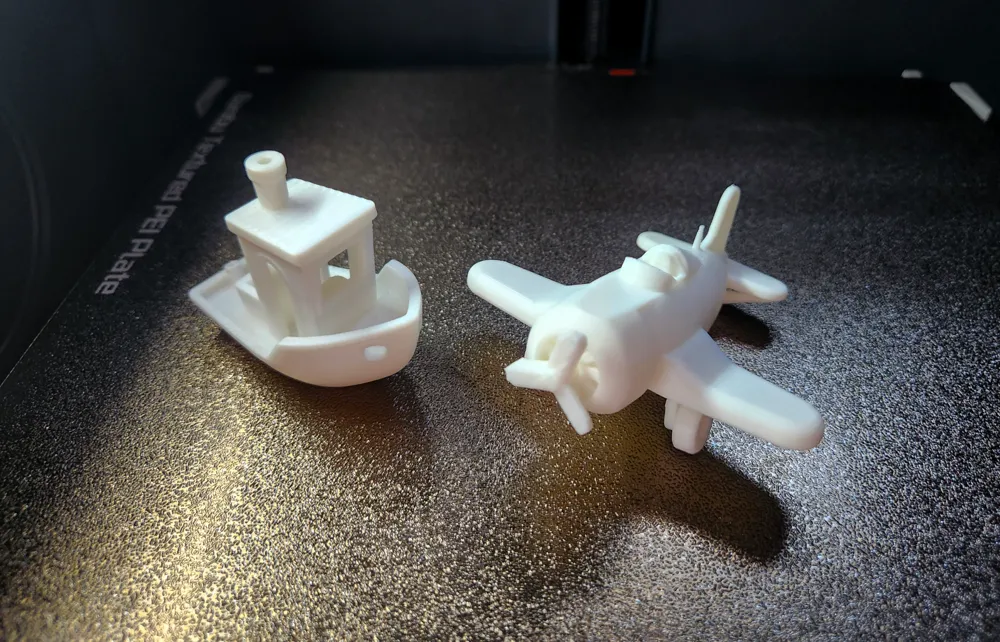
Feel free to do as you wish with this, it was a little passion project for me to make a cute airplane test print, I use 2 walls 0.2mm layer height for my test prints. For reference, my P1S takes 37 minutes and 11.76g of filament for one benchy on standard speed, and the airplane model takes 40 minutes and 13.75g of filament.


Thanks for checking it out!

Comment & Rating (153)

(0/1000)

Print Profile
PrintyPlane 0.2mm layer with 2 walls.
Very cool! Any chance we could get the .step files so we can easily add patterns, missiles, pilots etc?
The profile uploader has replied
profile
5
Reply
does the .mf3 not do that? I'll see if I can make it a step file and I'll upload it
0
Reply
Replying to @filimentforge :
Step files just make editing a lot easier as they load into most CAD programs as a solid object with distinct faces, instead of polygons. If your CAD program doesn't allow you to export as a step file then don't worry about it!
0
Reply
Replying to @BrewBoyBlasters :
.step file has been uploaded, i look forward to seeing your tricked out printyplane, just please dont judge my poor model management skills
(Edited)
2
Reply
I went a bit off on this one, printed it at 250% (perfect fit on the A1 mini), my grandson is gonna love it.
The designer has replied
designer
8
Reply
how do the wheels and propeller feel at that size? do the wheels still click down into place?
1
Reply
Replying to @filimentforge :
they do, everything works as it should. propeller was a tiny bit stuck, but freed up easily, same with the landing gear
1
Reply
Print Profile
PrintyPlane 0.2mm layer with 2 walls.
attempted it an multi colour, just as a airplane model, works well, only issue was propellers didn’t print. however the single prop spins freely as does the wheels
The profile uploader has replied
0
Reply
the bed adhesion must be perfect, it is a challenging print, I love the multi color!
(Edited)
1
Reply
Replying to @filimentforge :
how would one achieve better adhesion? clean the bed?
0
Reply
Replying to @BaklavaBaby29 :
clean your bed with soapy water, don't touch the bed with your fingers (oil on your hand can mess things up) and run an auto calibration and bed level, then give it a go, you can also slow your print speed
0
Reply
My Bambu Lab A1 mini printer is new and my first print was unsuccessful
The designer has replied
Show original
0
Reply
this is a difficult print, if you recently received your printer I suggested you make sure your build area is clean and free of oils from your hands, and make sure to run a calibration, also I would start with an easier project before trying this one
1
Reply
if you like the model but want an easy print try this one: https://makerworld.com/models/1053435
0
Reply
Boosted
Quick and easy print to test tolerances and printer accuracy. I like more than the boat or the bench. Thanks!
designer
2
Reply
Print Profile
PrintyPlane 0.2mm layer with 2 walls.
X1c, .4 nozzle, .16 layer height, 4 wall loops, 200mm/s outer wall 300mm/s inner wall, 10% gyroid infill, no support, 7h25m print time, bambu Matte PLA, 300% scale Printed good. A few dropped bridges under the tail wing. Prop spins, wheels a little loose on the spin and very tight on the swing down. Everything else is excellent. Such a good print just as a print. Makes a fantastic benchmark. Thanks for the files. Happy Printing
profile
1
Reply
Boosted
Print Profile
PrintyPlane 0.2mm layer with 2 walls.
This is a fantastic model, a delightful test for one's printer. It is unfortunate that the propeller proves so challenging to print; a failed print significantly detracts from the final result. (But that is precisely the point of a Benchy—to avoid excessive simplicity). This model allows for far more comprehensive testing than the standard Benchy (Boat). The retracting train is simply incredible! Using eSun filament and the Bambu Lab PLA Basic profile, only the propeller failed to print correctly on my first attempt. A 16mm dimension is missing from the motor cover (see photo)
Show original
1
Reply
Print Profile
PrintyPlane 0.2mm layer with 2 walls.
Had issues with the propeller, but otherwise came out great; both wheels turn. Have you considered entering this in the fighter jets design contest? Update: I broke the last propeller blade while twisting to brake the propeller free. The remaining nub spins well.
The profile uploader has replied
0
Reply
if you like the print but don't want to bother getting your bed adhesion perfect give this one a try: https://makerworld.com/models/1053435
0
Reply
Print Profile
PrintyPlane 0.2mm layer with 2 walls.
I printed 10 now I have an Air Force
0
Reply
Print Profile
PrintyPlane 0.2mm layer with 2 walls.
good print
0
Reply

License

This user content is licensed under a
Creative Commons Public Domain
