Search models, users, collections, and posts


Bio
Making simple, useful designs.
❤️ - A life long Apple Lover
❤️🖨️- 3D printer fanatic
❤️🅵- Using Fusion360 for my designs
Please do not hesiatate to reach out or post if you have questions/comments/concerns/ or need help with my models!
Please like, collect, post, share, or boost if you like my models!
Achievements

MakerWorld Guardian
Active more than 20 days out of last 30 days UTC time

PUBLIC EXERPT: How to Customize Your Bookmarks
PUBLIC EXERPT: How to Customize Your BookmarksThe below is a exert of a follower only article, to view the full article, follow me (@Tekwiz17) and go to https://makerworld.com/community/post/1775987 for the full article. It is no cost. If you are not a follower, you will get a 404 Error. How to Customize Your BookmarksBy @Tekwiz17 One of my more popular models is my Public Domain (CC0) Blank Bookmark Kit, and the reason it is my most popular models is that anyone can do anything with it, make it blank, customize, and upload to MakerWorld or other sites. This guide will go through how to customize in two ways, via Mesh Graffiti or Bambu Studio. METHOD COMPARISONMesh Graffiti - EASY- Color Changes ONLY - ANY image file needed (or paint/use text) {PARTLYIN EXPERT}Bambu Studio - HARD - Color Changes, Add, Subtract - SVG OR STL NEEDED (or paint/use text) {NOT IN EXERPT}Customizing with Mesh Graffiti (EASY)Mesh Graffiti is a powerful MakerLab tool introduced recently by MakerWorld. This tool allows you to upload a STL/3MF and customize with text, SVGs, and images.Steps to Customize via Mesh GraffitiOpen Mesh Graffiti (https://makerworld.com/en/makerlab/meshGraffiti?from=makerlab)Open my model, Blank Bookmark Kit (https://makerworld.com/en/models/2735879-blank-bookmark-kit)Download the 3MF (see below image)Go to the Mesh Graffiti tab and import the 3MFAfter importing the 3MF it should look like thisOn the right sidebar remove all colors you don't want and add the ones you doSelect how you want to add by using this menu (Top is painting, Middle is text, bottom is image)CUSTOMIZING (For all, after preparing, use left sidebar to adjust rotation and size.)PAINTINGSelect painting (top) and then paint where you want to, after selecting color… For the full article, please follow me and go to https://makerworld.com/community/post/1775987, if you dont follow you will get a 404 Error. There is another section and the finish of this sectionc
Share
1
0
0
I’m a model creator: for the MagLev kit, I am thinking I would love to do a Harry Potter theme set (multipal). Harry Potter is a staple in my life and is one of the greatest books of all time.
Idea 1: The Golden Snitch
A classic from a classic, from the sport of “Quiddtich” the golden snitch flys around the Quidditch pitch. The base could be a Quidditch Pitch
Idea 2: The Soarting Hat
One of the first things in Harry’s journy to Hogwarts, the soarting hat brings him into Hogwarts House. Base could be the Hogwarts Crest
#Kitchallenge #Maglevdiy
Kit Challenge Round 3: Magnetic Levitation DIY
What can you build when gravity is no longer a limitation? We’re excited to kick off this round of the Limited Kit Challenge with a featured Maker’s Supply kit. If you have an idea for how it could become something useful, fun, decorative, or unexpected, we’d love to see it.Featured KitMaker’s Supply | Magnetic Levitation DIY Kit (ZC008)Kit Features:Automatic Levitation ActivationAppropriate Load-bearing (Up to 200g)Including Magnetic Levitation Base&Float, 12V 2A AC/DC Adapter with Removable PlugUsage Note: In addition to this kit, other Maker’s Supply accessories can also be added.How to JoinComment under this post and include:What you want to create (the use case or scenario)The general form or function of the model (images are recommended)Why Magnetic Levitation DIY Kit is essential to your ideaAt the start of your comment, please identify your role:“I’m a model creator”“I’m an idea contributor”If you are a creator, feel free to reply under any idea comment that you would like to turn into a real model. Creators who actively engage with ideas are also more likely to be selected.Timeline:Idea submission deadline: 15 days after postingSelection announcement: within 5 days of this postWhy This Kit Is InterestingThe magnetic levitation kit can make ordinary 3D printed models truly float, like magical artifacts, floating islands in miniature scenes, spaceships with alien, and futuristic vehicles, etc.Rather than simply making things float, we’re especially excited to see experiences and creative ideas that could only be achieved through magnetic levitation.🧠 Inspiration ExamplesFloating Mage Tower - Magnetic Levitation Light @MaKim — float the top portion by using the kitFloaty Puff - Levitating Pufferfish Lamp @Printyjay — let cute pufferfish float by using the kitMaglev Hot Air Balloon @fana — Let the hot air balloon rise in your home by using the kitMagnetic Levitating Soccer Ball @Mc2.project3D — even turn ordinary ball games into exquisite floating ornaments, just like scoring a real goal🏆 Support for Selected SubmissionsAt least 10 standout ideas will be selected.Selected idea contributors and/or the creators who develop selected ideas may receive:Free kits, parts, and filamentsOfficial support during creationOfficial promotion opportunitiesOngoing BOM commission incentivesJoin NowWhat would you make float? Share your idea in the comments—your concept could be the next one we help fund, feature, and bring to life.About the Limited Kit ChallengeThe Limited Kit Challenge is an official prompt-based community co-creation program built around Maker’s Supply kits.Each round features a specific kit or selected partsCommunity members submit ideas within a limited timeSelected ideas may receive free kits and filament supportPublished projects may receive official promotion and BOM commission opportunitiesWho Can Participate?MakerWorld model creatorsIdea contributors and design enthusiastsYou do not need to be a model creator to submit an idea.Selection & SupportSubmissions may be reviewed based on originality, effective use of the kit, feasibility, and clarity. Selected creators and/or idea contributors will be announced in the comments. Selected creators may be contacted by private message and asked to provide a brief creation plan, design approach, and estimated timeline. Please note: both selected idea contributors and the creators who develop selected ideas may receive Maker’s Supply parts support.Participation is also limited to regions our shipping partner can deliver to. Appreciate your understanding. We’d love to see more of these ideas brought to life, and creators are encouraged to reply to ideas they’d like to develop.For Selected CreatorsSelected creators will be contacted by private message.If selected, creators will need to:Complete a project based on Magnetic Levitation DIY KitPublish the final model on MakerWorld with the correct BOMShare at least one community article after publishing that includes:The hashtags #KitChallenge and #MagLevDIYContent such as inspiration, design process, assembly steps, final results, and any challenges encounteredFailure to meet delivery or posting requirements may affect eligibility for future challenges. Submission does not guarantee selection. Projects must comply with platform guidelines and intellectual property requirements.
(Edited)
Share
0
0
0
Introducing my Bookmark series! If you want a custom series: boost and comment!
Blank Bookmark Kit
17
52
Share
1
0
0
I’m a model creator, my idea is to use the LED strip lights to make it easier to monitor your prints on Bambu Handy! Many printers like the A1/P1/X1 series have poor lighting! We coukd use this to improve lighting conditions without making the printer inacsessable! Easally print the part, insert the LED strip, and slide over a componet and plug jn! Some ideas could be, ex) A1M, over Z axis bar, and more!
#Kitchallenge #S-Shapeledstriplight
MakerWorld “Limited Kit Challenge” Round 2
To help great ideas get discovered and built—and to unlock more creative possibilities with Maker’s Supply kits—we are launching a long-term, recurring community program. We’re glad to see so many people participate enthusiastically in the first round. We received many creative and interesting ideas, and several have already been selected for support. We’re excited to see these ideas brought to life!We know you may look forward to more interesting challenges like this, so the second round of our time-limited challenge is now live—we welcome more creators to join!The “Limited Kit Challenge” SeriesThe Limited Kit Challenge is an official prompt-based, community co-creation series.How it works:Each round focuses on a specific Maker’s Supply kit or selected partsThe community is invited to submit ideas within a limited timeOutstanding ideas are selected, and kits and filaments are provided for free to support creationPublished projects may receive promotion opportunities and BOM commission incentivesFrequency: Once per week Whether you’re an experienced creator or a user with a great idea, everyone is welcome to participate.🧩 Round 2 Challenge AnnouncementTheme: S-shape LED Strip Light ChallengeIf you could only use one S-shape LED Strip Light, what would you design? We are officially kicking off Round 2 of the Limited Kit Challenge. Featured kit: Maker’s Supply | S-shape LED Strip Light(KA002)Kit Features:Chasing, millions of colours, and 1%-100% brightness adjustment, all could be controlled via remote or appProgrammable with WS2812B ICFlexible foldable and bendable, 5M/16.4 FT with cuttable designNote: In addition to this kit, other Maker’s Supply accessories can also be added. Lighting is one of the most powerful elements in decoration. It can transform even simple objects and make ordinary designs feel striking and immersive.
3D printing is also an ideal medium for creative lighting projects. With thoughtful modeling, lighting elements can be seamlessly integrated into decorative or functional designs—opening up possibilities for home décor, car décor, desk setups, and even your 3D printer itself.
Imagine how amazing your project could look once the lights turn on. So now, let's take a look at some excellent inspirational examples: 🧠Inspiration examples:Halloween Megapack Inserts Shadowbox @Uzziel3D Wheel of Fortune - With LED Light @Uzziel3D GlobeGlow - Wooden World Map @Dominik Laptop Stand with Fans, RGB, Tilt & Phone Holder @FADY✅Who Can Participate?All MakerWorld model creators Submitting an original idea is not required—you can also collaborate by bringing someone else’s idea to life.Design enthusiasts and idea contributorsYou do not need to be a creator to submit an ideaHow to JoinPhase 1: Idea SubmissionWhere: Comment under this postPlease share:What you want to create (use case or scenario)The general form or function of the model (images are recommended)Why a S-shape LED Strip Light is essential to your ideaBoth users and creators are encouraged to participate.Creators can also reply to and claim ideas they are interested in creating.To make collaboration easier, please identify your role at the beginning of your comment:If you are a model creator, start with: “I’m a model creator”If you are an idea contributor, start with: “I’m an idea contributor”Timeline: We will review submissions on a rolling basis and select promising ideas Within 7 days of this post.🏆 Official Selection & Kit SupportIdea SelectionAt least 10 high-quality ideas will be selectedCriteria include:OriginalityEffective use of the kitFeasibilityCommunity engagementResults will be announced in the comments, and selected creators and/or idea contributors will be mentioned.Kit Delivery & Creator SupportSelected creators will be contacted via private messageA brief creation plan (design approach and estimated timeline) will be requiredAll required kits, parts, and filaments will be provided free of chargeOfficial support will be available throughout the creation process🛠 Phase 2: Creation & Publishing RequirementsSelected creators must:Complete a project based on the S-shape LED Strip LightPublish the final model on MakerWorld with:The correct BOM is attachedShare at least one community article after publishing that includes:The hashtag #KitChallenge and #S-shapeledstriplightContent such as Inspiration, design process, assembly steps, final results, and any challenges encounteredFailure to meet delivery or posting requirements may affect eligibility for future challenges.Promotion & Earnings SupportSuccessfully published projects may receive:Official Promotion ResourcesInclusion in an official collectionOngoing BOM commission earningsJoin NowIf you were to build a 3D printing project using the S-shape LED Strip Light, what would you create?Share your idea in the comments—your concept could be the next one we fund, feature, and bring to life.
(Edited)
Share
0
0
0
Introducing, WORBY - Digital Caliper Holder!
WORBY - Digital Caliper Holder (1x1)
5
17
Share
0
0
0
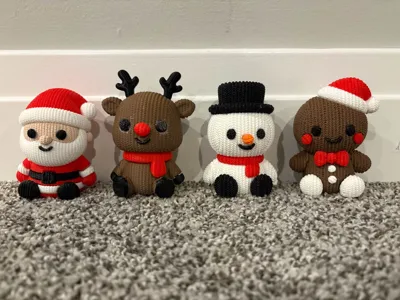
Such a amazing print for the holidays!! I loved it so much I had to print the other 3 matching ones!!!
Share
0
0
0
Have a baseball rolling around that won't stand up? This quick and easy print solves that!
Baseball Stand V2.0
6
10
Share
0
0
0
Hey Makers! Lets start a challenge, use the tag, #BestDesign25 to share the design you loved best this year!! Top 5 with most likes will be voted on to figure out the best design of this year! Like a post if you like a model, and share a photo of your print, and write a bit why you like it!
Let the best design win!(Edited)
Share
1
0
0
Shout out to @Wakachowi with their amazing knitted Santa, Reindeer, Snowman, and Gingerbread Man!!! All amazing designs and I had to print all of them! Side note; @Wakachowi I would love to see a kitted Grinch next on the same style as the others!! Boost! Boost! Boost!
Note to anyone printing snowman, try a orange nose, it looks better!
Share
1
0
0
Share
0
0
0
Share
0
0
0
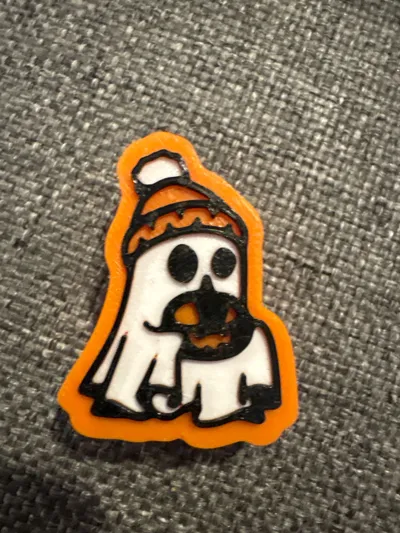
Very good quality, easy to tell what it is. I was surprised how easy it was to remove the supports with a pencil. love it!
Share
0
0
0
Share
0
0
0
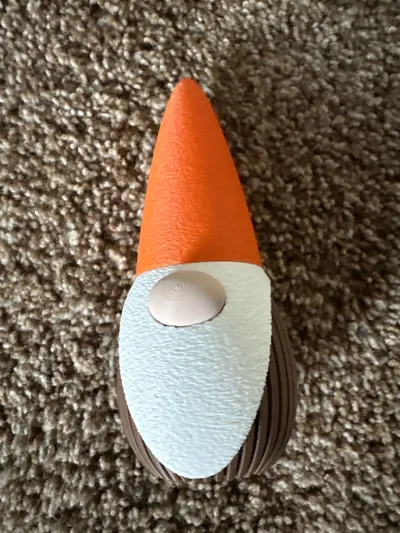
really great design, and surprisingly low Fillament costs for that long of a time, not complaining though… nice work.
Share
0
0
0
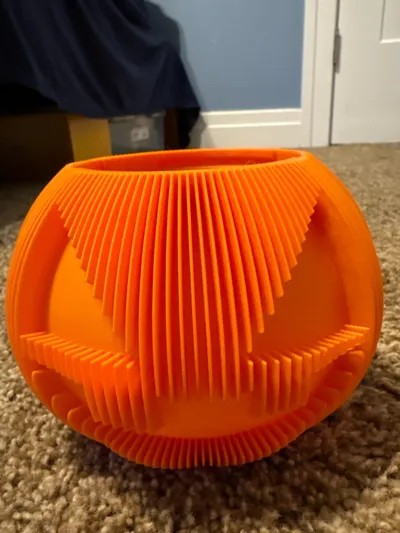
very long print but looks great at the end, unlike shown in photo there is NO REGULAR HANDLE to print… overall great though
Share
0
0
0
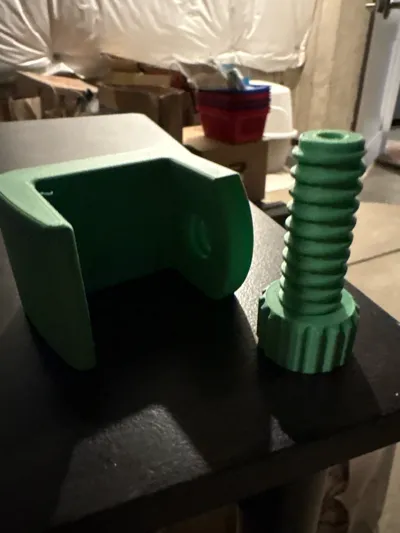
love the clamp design, fits perfectly under
my desk. there should be a makerworld tool or a parametric model that we can edit for custom attachments to the clamp! great work! :)
Share
0
0
0
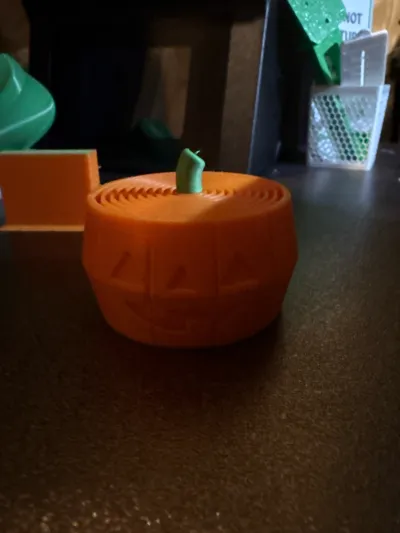
really nice design, looks phenomenal in
matte pla, nice texture and love the face!!! 🎃
Share
0
0
0
Really nice, and works well with tea light. would have a base to connect tea light though…
Share
0
0
0