
Fillosophy - Infill Showcase


Print Profile(2)


Description
Important
You'll need to print the .3mf file. Only printing the .stl models won't work, as they are lacking information about when, where and how to print which infill.
If you don't have an AMS, but still want to print this in color, look here.
Model
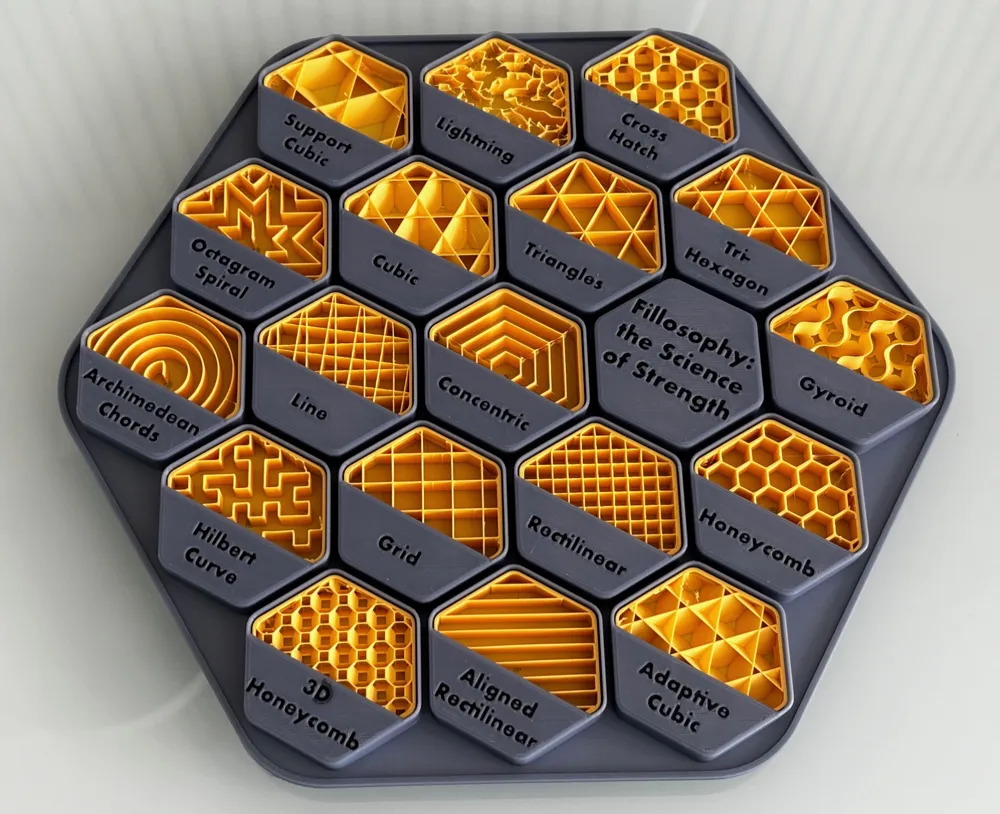
This is a comprehensive display of all the infill patterns available in BambuStudio. Designed as a single-print piece, it offers a visually appealing way to compare and contrast the various infill options at a glance.
Key Features:
- Showcases all infill patterns supported by BambuStudio.
- Single-print design for easy production.
- Unique aesthetic approach to infill demonstration.
- Educational tool for understanding infill options.
- Multicolor, so the infills can really pop.
- Concentric patterns are centered within themselves.
Also check out my compact version of Fillosophy.
This model serves as both a practical reference and an artistic representation of 3D printing infill techniques. Whether you're a beginner looking to understand different infill patterns or an experienced maker seeking a quick visual guide, this showcase provides valuable insights into BambuStudio's capabilities (I really learned a lot doing this). This model was created from scratch, driven by the desire to explore and present infill options in an aesthetically pleasing manner. In my research I of course found similar models, but decided to follow another aestethic. Go take a look at @SlowEvo's take on this for example, if you like 90° angles more!
How to print
- Use the .3mf file!
- Check your color composition and the lettering technique with the test print on the second plate. I highly recommend this, as the results vary depending on the selected color palette (dark on light vs. light on dark etc.).
- Don't add support, even when asked to do so! The floating cantilever warning is a false positive. Everything is supported. Really!
License

You shall not share, sub-license, sell, rent, host, transfer, or distribute in any way the digital or 3D printed versions of this object, nor any other derivative work of this object in its digital or physical format (including - but not limited to - remixes of this object, and hosting on other digital platforms). The objects may not be used without permission in any way whatsoever in which you charge money, or collect fees.


Comment & Rating (525)