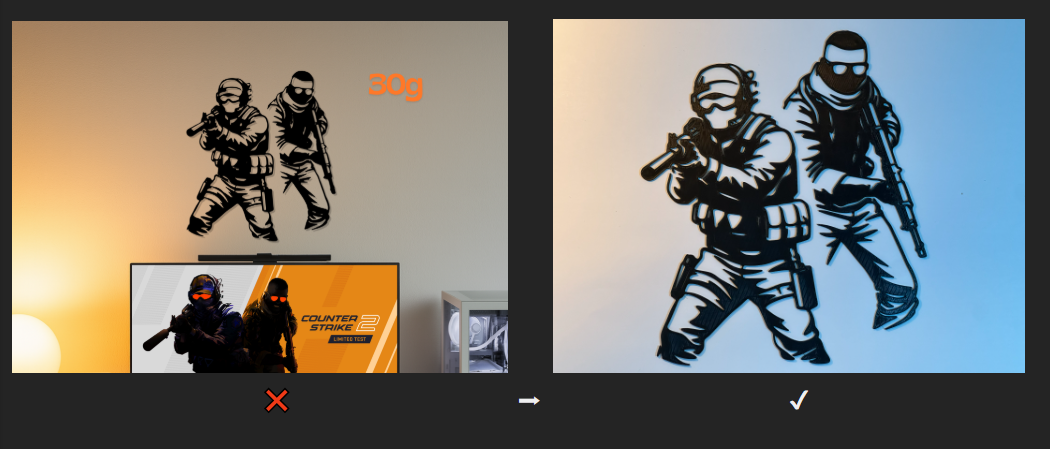
MakerWorld recently updated its rules for model thumbnails:
❌ AI-generated images are now forbidden
⚠️ Photomontages are not recommended
⏳ You have less than 3 months to update your models and stay compliant.
If you missed the notification, here’s the official post:
https://makerworld.com/community/post/1447793
My tips for clean, consistent, and compliant model photos 👇
1️⃣ Keep a consistent setup
I highly recommend using the same photo setup for models that belong to the same collection.
The goal is to build a strong visual identity so your models are instantly recognizable.
You can still create variations, for example by changing light colors, to help differentiate models within a collection.
2️⃣ Lighting is everything
Good lighting makes a huge difference.
Personally, I use two LED lights with different colors to add depth and life to the photo:
- One neutral light (white or warm white)
- One accent color of your choice on the opposite side
This creates soft gradients and helps highlight shapes and details.
3️⃣ Use real prints (clean ones!)
Make sure the printed model is clean:
- Remove stringing
- Trim small artifacts
- Wipe dust
Real, honest photos always look better than over-edited images.
4️⃣ Simple backgrounds work best
Neutral backgrounds (white, gray, soft gradients) keep the focus on the model.
Avoid clutter, your model should be the star of the photo.
5️⃣ Camera angle matters
Try a slightly angled view instead of a flat front shot.
Showing depth instantly makes the model more readable as a thumbnail.
These rules may feel restrictive at first, but they actually help keep MakerWorld clean, fair, and consistent for everyone.
Hope this helps, feel free to share your own photo tips below! 🙌