Search models, users, collections, and posts


Bio
Beginner to 3D printer learning design using FreeCAD.
Achievements

MakerWorld Guardian
This badge has expired

I could never remember where I put the tape measure. Now it has one spot and it's not moving.
Day 14 (the last one): a custom pegboard stand, three iterations to get the peg tolerance right.
Tape Measure Pegboard Stand
0
0
Share
0
0
0
Planned an iPad mini tray. Printed for four hours. It didn't work.
Day 13: designed a phone stand instead and moved on.
Minimal Phone Stand
0
0
Share
0
0
0
Wet gloves on the counter. Gloves on the faucet. Neither worked.
Day 12: designed a clip-on holder that hangs under the sink so the gloves can drip-dry out of the way.
No screws. No adhesive. Slides right onto the cabinet edge.
Under-Sink Cabinet Glove Holder
2
2
Share
0
0
0
Day 11 of the 14-day print challenge. Made a vase with a geometric pattern today.
Yesterday's was small and functional. Wanted something more elaborate, spent two hours fighting FreeCAD, and got nowhere. Found the Make My Vase tool in Makerworld's Makerlab and it did exactly what I needed.
Turns out Makerworld has some solid design tools built in worth exploring.
Geometric Pattern Vase
0
0
Share
0
0
0
Bad allergies mean no real plants, so I've been going full fake flowers. Finally designed a vase that actually fits what I have instead of using a too-big birthday vase that made everything look sparse.
Measured the stems, modeled it in FreeCAD, printed it the same day. Sometimes the best designs are just the ones that solve your exact problem.
Simple Vase
0
1
Share
0
0
0
Pliers Gridfinity Insert: Day 9 of 14
The cutout was generated using Tooltrace.ai, which traces the silhouette of an item from a photo and builds a Gridfinity bin around it. Because the resulting bin was wider than the A1 Mini bed, I cut it in half and added dovetails so the pieces lock together without hardware. The shadow insert is printed separately in a second color and sits inside the cutout to make the shape visible at a glance.
Pliers Gridfinity Insert with Custom Cutout
0
0
Share
0
0
0
Desk Cord Clip: Day 8 of 14
What it is: A flat adhesive-mount clip that keeps your charging cord on top of your desk instead of slipping behind it.
Design notes: Kept the base as low-profile as possible so it doesn't snag on anything. The channel is sized for standard laptop charger cables. Tight enough to hold the cord in place, loose enough that you can pull it out without a fight. No hardware needed, just stick it down with double-sided tape.
Desk Cord Clip
1
3
Share
0
0
0
I followed a tutorial from Mango Jelly Solutions on YouTube to learn how to model two separate bodies with a pin-and-hole hinge that prints assembled. The key is leaving the right clearance between the pin and the barrel so the joint moves after supports are removed. My tolerances came out a little tight on this version, but the pivot works and it closes cleanly. Next iteration I'll loosen the gap by about 0.1mm.
Pivoting Clip
0
0
Share
0
0
0
I uploaded a photo of a banana, MakerLab produced the 3D file, and I printed it on my Bambu A1 Mini. No modeling software involved.
The geometry is surprisingly solid for a fully AI-generated model. It prints well with supports at 0.2mm layer height and doesn't need much cleanup.
My cat Zola immediately adopted it as a toy. Your results may vary.
Part of my 14 day design and print challenge, one new print every day on the A1 Mini.
Miniature Banana -- MakerLab AI Model Test
0
0
Share
0
0
0
Day 5 of designing and printing something new on my Bambu A1 Mini.
I already had bookends. They worked fine. But they were the wrong color, wrong vibe, just kind of visually loud on a shelf I've spent a lot of time getting right.
So I designed my own. Clean L-shape, diagonal brace for rigidity, hollow walls to keep it light. Printed in white PLA so it disappears into the shelf instead of fighting with everything else.
Minimal Bookend
0
2
Share
0
0
0
Kept this one intentionally simple: flat profile, no unnecessary geometry. The notch is sized to catch a standard spoon or spatula handle at a comfortable resting angle. Flat bottom means it's easy to wipe clean, which matters more than it sounds when there's sauce involved.
Cooking Spoon Rest
1
4
Share
0
0
0
Day 3 of my 14-day design and print challenge.
My car Zola has claimed my Kindle as her personal heated seat. So I designed a stand to keep it upright and slightly less appealing to sit on. One piece print, no supports, done in a couple hours.
Kindle/E-Reader Stand
9
20
Share
0
0
0
Day 2 of the 14-day print challenge and this one came from an IKEA assembly situation that got out of hand fast.
Three sections, no supports, prints clean. Keeps your screws sorted and off the floor.
3-Section Parts Tray
3
9
Share
0
0
0
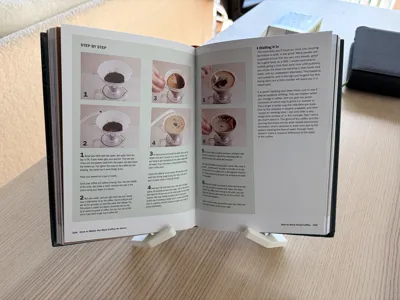
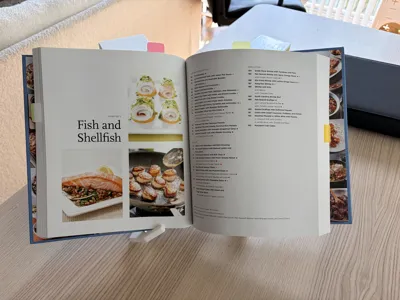
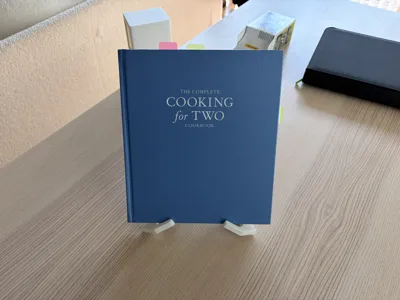
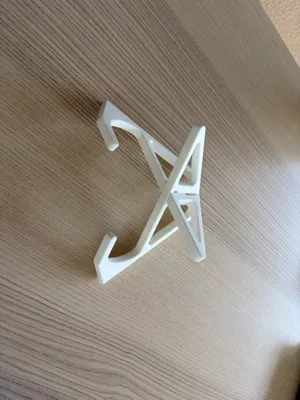
Printed on A1 Mini with PLA Matte. Print quality was good. Functionality works well for smaller books, although my larger cookbook does not fit very well.
Share
0
0
0
No more data