Search models, users, collections, and posts

Bio
Designing fun stuff for a fun community!
Achievements

MakerWorld Guardian
Active more than 20 days out of last 30 days UTC time

Contest Winner
Won 2 model contest awards.

Featured Creator
3 models are featured by MakerWorld.

Maker's Supply Contributor
2 models with Maker's Supply Model Kit achieves 500 successful prints.

Popular Model
5 models more than 5,000 successful prints.

Popular Creator
More than 1,000 followers.

Stellar Reviewer
Rate or Comment 355 different models

Pioneer Maker
Print successful 257 different models and 3,223 hours

We have had a great strawberry harvest this summer thanks to this plant support!
Strawberry Support - Ultra-Light & Expandable
37
115
Share
0
0
0
I was surprised how small the Rechargeable Power Kit from Bambu is and was inspired to design a small chase toy for it. It's so fast!
ZIPTAIL – Rolling Chase Toy
77
243
Share
1
0
0
One of my favorite things about home improvement is coming up with different uses for 3D printing. Today I designed and installed these bird themed coat hooks for our kids.
Perching Birds Coat Hooks
103
316
Share
0
0
0
I've always loved construction toys and I'm excited release my own! I was playing with a variation of my chainmail bracelet, trying to turn it into a chainmail fidget sheet. Combining the smaller panels was so much fun that I realized I was holding a construction toy system, not just a fidget toy. Let me know what you think!#Contests #ChildrensToys #Sharing Makes #New Designs
Share
2
1
0
CUBY has some new long awaited accessories! What should we design for it next?#Sharing Makes #Newmodel(Edited)
Share
2
0
0
I want to give a shoutout to a fellow designer @Iamdjem He designed this app MakerStats to keep track of points, model downloads, prints etc. and it’s just what I needed without even realising. Before I got distracted easily by unread messages or comments when opening Handy app to check my points or how a model was performing. This allows to quickly check points and other statistics at a glance and even tells at which position a model is on trending. It’s fairly new and keeps getting better via regular updates by the designer but it already has some really cool features such as various home and lock screen widgets. I encourage you to read his article about the app below!#Makerstats(Edited)
#Sharing Makes#Tools#Questions#Analytics#Software#Makerworldexclusive#App#3Dprintingtools#MakerWorld Points#Makerstats
How I keep tabs on my MakerWorld daily stats
I've been quietly working on this for longer than I'd care to admit. It started when I caught myself opening my MakerWorld profile on my phone way too often, just to see what changed. Did anyone download the new model? Did i gain more followers? How did today compare to yesterday?
I'm a developer by day, so I did what developers do: I built a small companion app to scratch my own itch. I called it MakerStats, and over time it has grown into something I genuinely use every day.
I figured I'd share it here in case other creators might find it useful too.
What it actually showsMakerStats pulls together the public stats from any MakerWorld profile and lays them out in a way that's easier to scan than tabbing around on a small screen. For your own profile, you can also sign in to see your earnings data, with regular and exclusive points combined, which I always found a bit fiddly to add up manually.The things I personally use the most:Daily increase counters for downloads, likes, follows, boosts, prints, and points, with a clean baseline that resets at midnightHome Screen widgets, Live Activities, and lock screen stats, so your latest numbers are always one glance awayModel performance with color-coded badges for trending, featured, and exclusive designs, so you can spot which of your prints are catching onPoints tracking in your local Points Shop currency (USD, EUR, GBP, JPY, AUD, CAD, KRW, CNY), with automatic detection of withdrawalsCrowdfunding tracking for active, upcoming, and past campaigns, with cumulative-raised charts and reward-tier breakdownsInteractive growth charts across 7-day, 30-day, 180-day, and 365-day views, with tap-any-bar to see exact values for that dayMulti-account support, in case you manage more than one MakerWorld profileConfigurable notifications for follower milestones, model trending events, and new pledgesA note on dataEverything MakerStats shows uses publicly available data that MakerWorld already exposes on profile pages. You don't need to sign in at all to look up a profile, browse a creator's models, or check stats. Signing in is only there for your own points and earnings, since those aren't public.And on the app's side, there's no analytics, no tracking, and no ads. Your data stays on your device.
Where to find itIt's on the App Store and Google Play, just search for MakerStats. A macOS version is in the works for anyone who'd rather glance at numbers on a bigger screen.If you try it and something feels off, or there's a number you wish it tracked, send me a note. I'm a creator on here too, and pretty much every feature in the app today came from someone else asking for it.
P.S.
App is paid, but it is a one time payment for lifetime ownership. I did not want to make it into subscription and i did not want to have annoying adds.
Happy tracking,
Minimal.
(Edited)
Share
1
1
0
As requested, my AMS wall mount setup now also works without a Skadis board! #Newmodel #Behind the Scenes #Sharing Makes(Edited)
Share
0
0
0
Designing a Foldable LED Panel for 3D Print Photos
Solving a problem I couldn’t ignoreIf you have ever uploaded a model you are proud of and felt that the photos did not reflect the actual quality, you already know the problem. For me, the issue was not occasional but consistent. Getting usable lighting for photos was a constant struggle. I do not have a studio setup, and living in the Nordics means natural light is limited to begin with. More importantly, the only time I usually have for this hobby is late evening, after the kids are in bed, when there is hardly any natural light. The result was predictable. I was taking photos in poor conditions, with uneven lighting and harsh shadows, and even good prints ended up looking average. At some point it became clear that this was not really a photography problem. It was a tool problem. Like any other maker, I stopped trying to work around the issue and decided to build something to solve it. Moreover, instead of purchasing a light, I used the Lithophane LED Backlight Board Kit from Bambu Store that I already had waiting for a project.Building a Tool Instead of a WorkaroundThe goal was not to replicate studio lighting. That would have made the project unnecessarily complex and bulky, especially as I don't usually print and photograph very large models. Instead, I wanted something compact, repeatable, and easy to take out and setup and then put back to storage. I based the design around the Lithophane LED Backlight Board Kit since it provides large LED panels that can be chained together. It offers a clean and consistent light source, which allowed me to focus on the mechanical design. The challenge then became how to shape, position, and control that light in a way that is actually useful when photographing prints.The Design ProcessLike in many of my designs, I wanted to minimize number of components and use of fasteners or glue. I started with the design of the LED board chassis that also houses the diffuser. Making prototypes of just this part exposed problems quickly. One of the most significant issues was the light frame warping off the bed when printing. It was severe enough that parts did not align properly, which made assembly unreliable or, in some cases, impossible. Fixing this required more than minor adjustments. I had to rethink wall thickness, reinforce specific areas, and tune the print profile carefully to make the result stable across different prints. Accessibility was also a priority. I prototype on an A1 mini, which meant validating that the design works reliably on a smaller, open printer. If it works there, it will work on all Bambu machines. Printability was treated as a constraint from the beginning. Supports are minimal and only used where they are functionally necessary. I then continued the design moving down from the light panels, adding the two way articulating hinge and the vertical strut. Again, I printed early prototypes of these parts while I was designing the next parts. This way I was able to solve problems in real-time and tweak things quickly as soon as the parts finished and start the next print, whether it was structural stability, tolerance fit, or assembly feel. The folding legs required more thought. I wanted the light to store compactly, but still remain stable in use. Since most of the weight is at the front, a short rear support was sufficient. This led to a solution where the two long front legs fold against the vertical strut, and the tightening knob also functions as the back leg. Assembly was another area where I wanted a reliable outcome. The final model requires no glue or separate fasteners. Parts snap or thread into place, and tolerances were tuned across multiple iterations to make that process consistent. The goal was to avoid the typical friction points where a model technically works but is frustrating to put together. Once the design met my criteria for print quality, fit, and usability, I printed two complete builds. These are the units shown in the model photos, and they are also the ones I use in practice.This step was important. It verified that the print profile holds up outside of isolated part testing and works as a complete system.Arriving at a Usable DesignWhat emerged from that process is a lighting panel that is simple in concept but flexible in use. The articulated stand became the central feature. Instead of fixing the light in a single position, it allows controlled and precise adjustment. In practice, this makes a noticeable difference. Small angle changes can soften shadows or bring out surface detail in a way that ambient lighting cannot. The first photo below shows the setup with the light off. In the second setup the model is well illuminated but a shadow is cast to the right. The final setup shows how the light can illuminate the print from the front, eliminating shadows, as well as from the top in case details on top surface need highlighting. What Actually ChangedI'm not an expert in photography or lighting, but the results are clear in practice. The main improvement is not brightness, but control. Instead of dealing with uncontrolled shadows and inconsistent exposure, I can adjust the light position precisely and get repeatable results. It does not replace a full studio setup, but it removes a major limitation in a typical home environment. Surface details are easier to capture, and the overall presentation is more accurate.Why This MattersOn MakerWorld, the first impression is almost always visual. Even well-designed models can be overlooked if the lighting hides detail or makes the result look flat and easy to scroll-over. This project started as a way to solve my own problem, but the problem is common. Many makers are working in similar conditions, without access to dedicated lighting or consistent natural light. Providing a simple, purpose-built tool for that gap felt like a worthwhile direction. For me, it turned an inconsistent process into a controlled one. That alone made the project worth pursuing. You can find the model here:LED Panel USB Light with Articulated Folding Stand
(Edited)
Share
16
8
0
I've struggled with light when taking photos of my models so I designed a LED panel light that uses the Lithophane LED Backlight Board Kit from Bambu store!
LED Panel USB Light with Articulated Folding Stand
75
248
Share
3
3
0
My popular filament and PTFE cutter got its long requested update and now supports P2S blades as well! Will you update yours?
#Newmodel #Sharing Makes(Edited)
Share
3
0
0
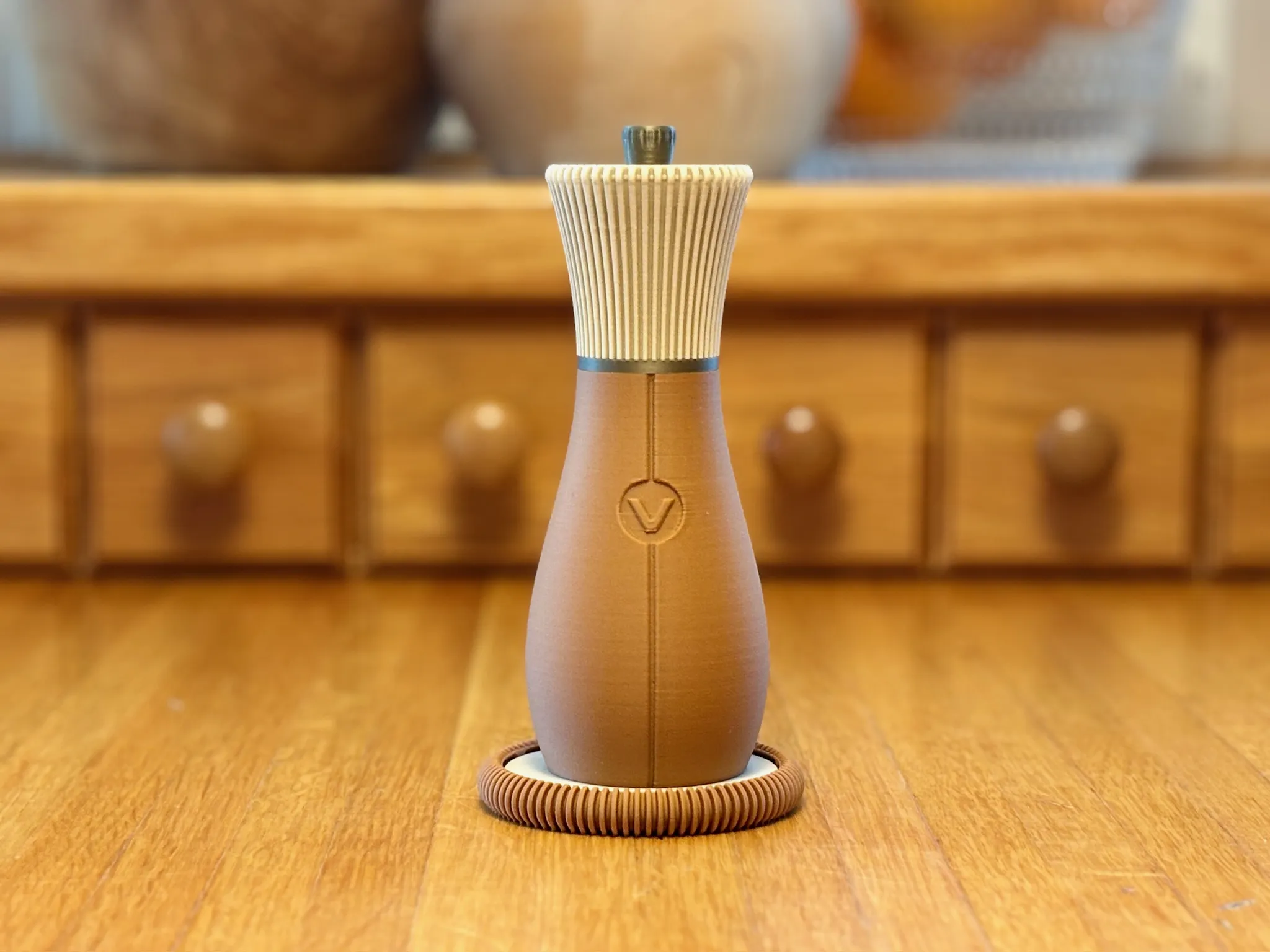
I'm very much into practical jokes when it comes pranking. That's what led me to design the "Spepper Mill". It's a working salt and pepper dispenser combined in one. I'm looking forward to confusing my dinner guests as they ask for salt or pepper and always get what they asked for from a single mill!
#2026Aprilfoolsday #Sharing Models #New Designs #Contests(Edited)
Share
2
6
0
I needed a roller while using the cutting module, but the options on MakerWorld didn’t quite match what I was looking for—so I designed my own. That quickly evolved into a full system of tools I’ll be releasing incrementally.
Key features:
- TPU for AMS roller: Applies pressure without marking surfaces (unlike PLA/PETG)
- Full PLA roller option: Includes a scarf seam for smoother, more consistent rolling
Optimized handle design:
- Designed for dual-nozzle printing
- Prints nicely in single material also with fuzzy skin grip
- Minimal supports required
Most 3D printed tools tend to compromise on either performance or shape to save print time. This project takes the opposite approach—prioritizing usability, surface quality, and real-world performance.
This roller is the first release in a broader tool series built around that idea.
What should released next? Comment if not in the list.
0%
Vinyl weeder + scrap collector
14%
Print finishing mini scraper
29%
Bed scraper
57%
Nozzle cleaner
7 votes
Final results
Share
4
0
0
We updated our H2 with a laser and immediately ran into an issue of how to select the best materials to match with filaments. These sample cards and sleeves have already helped us greatly and hopefully you'll find them useful too!
The Perfect Match - Sample Cards and Sleeves
4
9
Share
2
0
0
Meet CUBY! Perhaps it has potential to become an unofficial CyberBrick mascot 😉
CUBY - CyberBrick Robot Buddy
1.4 k
3 k
Share
3
5
0
I'm curious how you have placed your AMS? On the printer, next to it, on a riser or on the wall? 🤔 Post a photo with your comment below! 📸
I've always wanted to mount my AMS units on the wall so that they don't block top access to the printer or don't take table space. I found some nice solutions, but none that met my idea of the perfect wall mount:
- Compatible with AMS 2 Pro and AMS HT
- Tilt up for "storage" and tilt down for easy filament access
- Easily removable from the wall
- AMS HT should be side mountable on the H2 for TPU printing without extra accessories
- Integrated with Ikea Skadis for extra utility and clean cable management
If you're looking to level-up your setup, this mounting system does it all!(Edited)
GIF
Share
2
4
0
Share
5
9
0
Since Christmas my Infinite Pop-Up Fidget Toy gained some traction among 3D printing newcomers. Unfortunately, reading instructions is apparently too much to ask from youngsters these days, so my notifications was flooded with comments on how to assemble the thing! Hopefully this new version will be easier for everyone to figure out 😄
GIF
Infinite Pop-Up EVO Fidget Toy
553
1.5 k
Share
0
3
0
I’ve been wanting to build a one-handed controller for CyberBrick so the controller contest came at the right time! Please check it out and drop a like 🙏 Comment what are your thoughts on it!
Share
2
5
0
New and improved bracelet is out! This link system has so much potential for other designs as well. Do you have any ideas on where it could be used?
NASA Chainmail Fabric Bracelet M - Clasp - 20sizes
4.7 k
12.5 k
Share
3
0
0