
Bambu A1 MINI Adjustable Camera Holder


Print Profile(4)


Description
(A1 VERSION IN MY OTHER MODELS)
During this upgrade, some parts of your printer may be damaged, I am not responsible for any damage caused by incorrect installation or other damage. If your cables appears too short for this mod you should not install it.
This model allows A1 MINI users to adjust camera angle! I remixed well prepared @henlor A1 Mini faceplate model (by adding a mounting hole) with my A1 camera holder
INSTRUCTION (It's prepared for A1 version but will work the same with Mini version):
Print all 3 models as they are in print profile, camera holder should be printed with supports
DURING NEXT OPERATIONS THE PRINTER SHOULD BE TURNED OFF!
Remove original faceplace and camera according to BambuLab instruction
Push camera into it's new holder, it's supposed to be pretty tight so vibrations won't make any noise
Put new faceplate on the X-axis with the cable going through a hole and carefully bend the connector 90 degrees, it'll be easier to connect it.

Push the cable through camera holder hole and connect it.
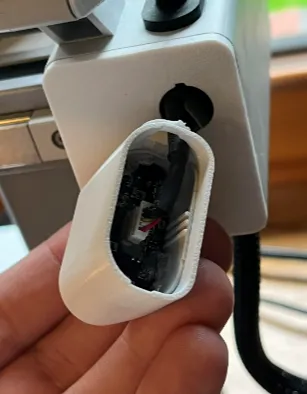
Push in the camera facing down and rotate it so it locks


Put the back cover and adjust the angle


This remix is based on


License



Comment & Rating (760)