Search models, users, collections, and posts
Recommendation
Creator’s Club
Creators & Fans
Show Your Make
Off Topic
Post Details

#PrintClinic
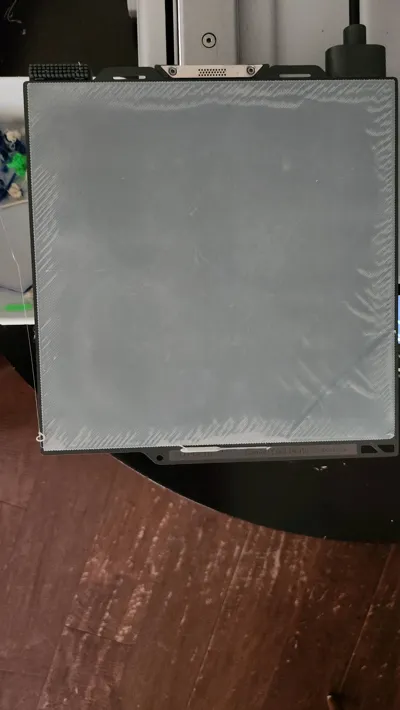
I have an A1 mini and I'm printing this model with a Cool Plate Supertack build plate. For a while (not just with this print) there's been this issue of the first few layers having these imperfections that I can't explain. I print everything with bed leveling enabled and I clean this plate regularly. I'm skeptical about the filament but this happens with most of the filaments I have, so I don't know if it's an issue somewhere in the printer or if I just need a new build plate.
Share
2
27
0
Comment (27)

@user_1113347382 : your heatbef temp mught me too low, or your nozzle temp might be too low. consider also your filliment being wet. try ti look into therse thjngd
0
Reply

@potato_2014 : i have this issue too its not to noticable after the print is finished, the other layers kinda “iron” out thr problem
0
Reply

@tekwiz17 : Possibly try a better adhesion plate, like a PEI or glue plate better
0
Reply

@The_3D_Makers : i have the same issue on the first layer but in the 3rd layer it usually just goes away and if i slow down the problem stops
0
Reply

@IAFF : You can also dry your filament
0
Reply
@IAFF : I had this issue with the A1 as well, there where some untightened screws inside the nozzle
0
Reply

@Sagooinc : If you are confident that your flow rate and flow dynamics are tuned as best as they can be, this could be an issue with the slicer first layer squish settings causing a little too much overfill. Try reducing the initial layer flow ratio, and ideally a cleaner first layer will improve the subsequent layers.
If you haven't spent time manually calibrating your filament, it is good practice, so you can visually see the variations caused by flow changes. The bambu wiki is a great source for the tutorials on these. (https://wiki.bambulab.com/en/software/bambu-studio/calibration_flow_rate)
The poster has replied
0
Reply
@donatti5 : : nah, I have Bambu filament already and it has the same issue.
0
Reply
@LayerLab1 : : *Sorry what I mean was buy a Bambu spool! I was a bit unclear!😅
0
Reply

@ssf720 : several other ideas to toss out if you haven't got it solved.
Have you dried the filament?
Have you tried using Elmer's washable glue or hair spray? I haven't tried hair spray, but the glue stick has helped lots.
Is your printer enclosed or does it have air blowing on it?
I'm not sure what you are printing, but I also learned to read comments on that particular item I'm printing. Lots of times the comments have helped me tweak the settings on the printer.
The poster has replied
0
Reply
@ssf720 : : after looking at your picture, wondering if it is also an issue of temp and cooling too fast. is this an original print? if not, ask the creator for advice. I would imagine that they slowed down the first layer and maybe raised the temp of the bed. Try tweaking the temp slowly in the specs for the filament.
There are several things to help with adhesion. Elmers has been consistent for me. I am mostly printing PLA on cool plate though
0
Reply
@donatti5 : : now it seems like the imperfections arent always in the same spot, since on the first image, they showed up all over the model, but not it's just in the edges.
0
Reply

@UltraModern3D : tell me if you have any other questions
The poster has replied
0
Reply
@UltraModern3D : : ya, it should not look like that but im out of ideas
0
Reply
@donatti5 : if it helps here what a first layer test normally looks like with the cool plate super tack
0
Reply
@UltraModern3D : i would use a different bed, bed level, make sure your table is not wobbley, and make sure your silicon sock around the nozzle is not allmost broken, also maybe tighten belts if you haven’t recently and try useing dryed pla or pla silk or pla matt
The poster has replied
0
Reply
@UltraModern3D : : ok
0
Reply
@donatti5 : : it does have a few scratches but they're not in that spot
0
Reply
Trend
PrintClinic
1
the Great Benchy Nations
1.8 k
2
Questions
966
3
Newmodel
713
4
ChildrensToys
547
5
Contests
507
6
Sharing Makes
447
7
Ubn
446
8
Thebreachcontest
282
9
Comingsoon
268
Activities