Search models, users, collections, and posts

Print Profile(3)

All
A1
H2D
P2S
H2D Pro
H2C
H2S
X2D
A2L
A1 mini
P1P
X1 Carbon
X1E
X1
P1S

Universal file
Universal file
Designer
8 h
5 plates
5.0(4)

A1mini
A1mini
Designer
8.3 h
6 plates

One-piece bed, suitable for large-scale printers.
Designer
4.2 h
1 plate

31
66
34
0
29
7
Released 

Bill of Materials

List other parts
  • Custom Keyboard 3D Printing Kit x 1: https://bit.ly/44K8PW0

Description

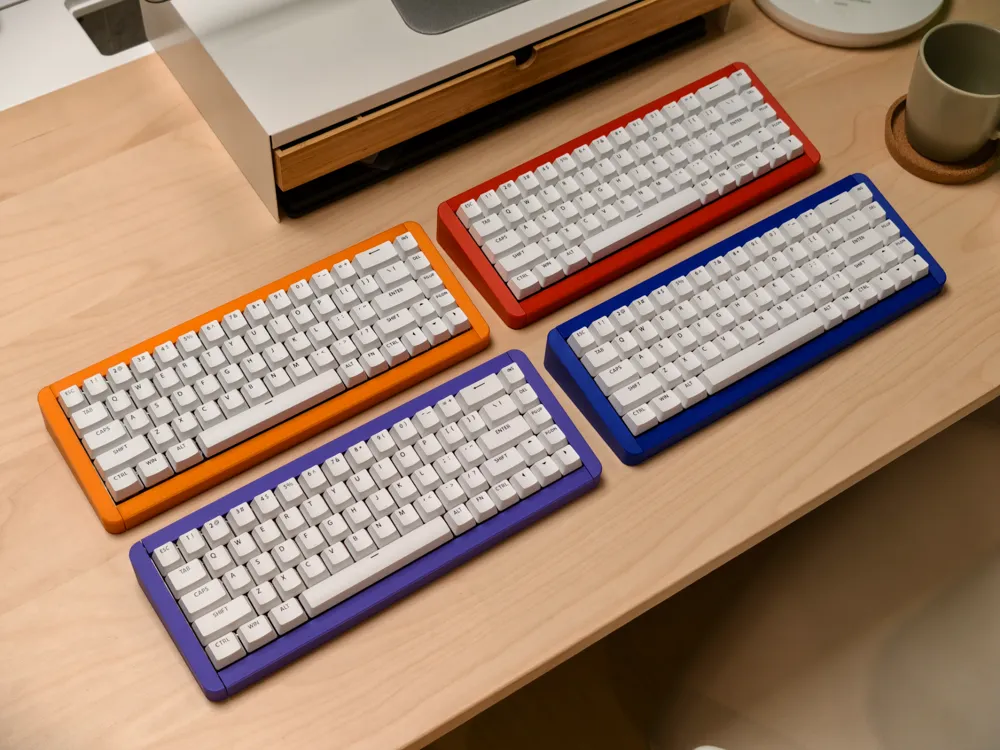
The Basic version is the most minimalistic keyboard design. With a 10-degree keyboard tilt angle and a 16mm front height, this combination delivers an exceptionally comfortable user experience.


Documentation (1)

Other Files (1)
MksDriver-1.0.0.16.zip

Comment & Rating (34)

(0/1000)

I can't print the item? It's grayed out. I paid for the model.
(Edited)
The designer has replied
1
Reply
I have the same problem
0
Reply
I also have this issue
0
Reply
Yeah same
0
Reply
Printed in PLA Matte. Although the assembly is easy, I would appreciate some description by the designer. There 15 pins and I only used 6(!) for the frame. The other 9, I assume are used with the keyboard it self to lock it with the printed frame.
The designer has replied
0
Reply
Thank you for your feedback! The assembly instructions and descriptions will be provided in the coming days.
0
Reply
Same problem here.
The designer has replied
0
Reply
We’re currently looking into the issue — thank you for letting us know!
1
Reply
I bought the bluewave version and now it's asking me to pay for the shipping and the files. Ok I paid the shipping fee, but the files were included when I chose the version back in septembre.
0
Reply
Print Profile
Universal file
Printed well with PLA Matte. No problems. I am waiting for the keyboard itself to attache it to the frame.
0
Reply
Plate 1 will not slice, has error? Using H2S.
The designer has replied
0
Reply
I got an error too. Error: Flow::spacing () produced negative spacing. Did you set some extrusion width too small? I couldn't see any obvious error in the slicer settings. I may have missed it though. Try right clicking on the model and select fix model. That may remove the error. Although you may want to wait for a response from Makesenstudio.
0
Reply
We’re currently looking into the issue — thank you for letting us know!
1
Reply
I have not printed this yet, but it appears changing the infill to "gyroid" or "adaptive" cubic fixes the problem. I didn't look at other infill options. I was hoping to see more files before deciding which one I print first.
0
Reply
when will the a1 mini model be out?
The designer has replied
0
Reply
The A1 Mini printing files haven’t been uploaded yet — please wait a little longer, they’ll be available soon.
0
Reply
Replying to @Makesenstudio :
👍 will they be out before shipping? thank you!
0
Reply
Replying to @MikHash :
Yes
0
Reply
Hi - the keyboard was fun to put together - is there anywhere online I can find instructions for pairing the keyboard and changing the lighting?
The designer has replied
0
Reply
Sorry for the late reply — we just had a short holiday recently. The pairing instructions are included in the manual. As for the lighting, the keyboard currently only supports fixed lighting effects and does not support custom lighting configuration at the moment.
0
Reply
it is cool
0
Reply
Print Profile
Universal file
0
Reply

License

This user content is licensed under a Standard Digital File License.

You shall not share, sub-license, sell, rent, host, transfer, or distribute in any way the digital or 3D printed versions of this object, nor any other derivative work of this object in its digital or physical format (including - but not limited to - remixes of this object, and hosting on other digital platforms). The objects may not be used without permission in any way whatsoever in which you charge money, or collect fees.