Search models, users, collections, and posts

Bio
Printing since '24
Achievements

MakerWorld Guardian
Active more than 20 days out of last 30 days UTC time

Contest Winner
Won 3 model contest awards.

Featured Creator
1 model is featured by MakerWorld.

Popular Creator
More than 1,000 followers.

So I'm designing a roller coaster that will ride around your Christmas tree, featuring an S-shape LED strip light.
This is full redesign of my Christmas Tree Express (linked model). The hard part for the rollercoaster is the rail: it has to look like classic railway track but work like a bent coaster rail, where the cars grip it from every side so they can't fly off. On the real thing that means a tubular rail and a three-wheel wrap: top, underside, and side. Gorgeous and ingenious, and almost impossible to 3D-print.
So right now I'm chasing a rail profile that prints cleanly and still holds the cars snug. Progress is humble (Blender grab), but the mechanism is coming together 🤩 looking forward to sharing test print results!
#Kitchallenge #S-Shapeledstriplight
Share
1
2
0
What if you could reach every last corner of an IKEA ALEX drawer — all the way to the back?
I went looking for an organizer first, but couldn't find one that did everything I wanted: made for the ALEX, with proper labels, and easy to take out of the drawer so you can use the drawer right to the back. So
#Newmodel That's why I designed my own. Since ALEX drawers don't slide all the way out, the whole thing is built around lift-out trays. Pull the front tray straight up and the entire drawer opens up to you. From there it grew into a modular grid of baskets, slide-in labels to keep everything findable, and sizing tuned to the Bambu Maker's Supply boxes so the hardware drops right in.
The detail I'm quietly proudest of: thanks to the Arachne wall generator in the slicer, the labels come out with really crisp, fine lettering
What would you sort into it first? I'd love to see how you'd lay yours out.
Share
1
0
0
Still working on the outdoor wall lamp and the prototype just passed the first real-world test. Light transmission of the PETG Translucent profile I used is excellent, and an intense thunderstorm rolled through but the light is glowing on the wall like nothing had happened.
For the next design iteration I'm improving heat and humidity management of the enclosure - more news soon!(Edited)
Share
1
0
0
I'm designing a outdoor wall lamps because I destroyed three commercial ones trying to repair them.
A year and a half ago I installed three outdoor wall spots on the house. I'd specifically gone for the kind you can swap the LED in yourself — figured replaceable bulbs would mean a longer life than sealed all-in-one units. They were designed to be fully waterproof.
All three are dead now. Most likely a mix of trapped condensation and thermal overload: sealed enclosure, no ventilation. When I wanted to replace the bulbs, I stripped a screw on each one. Three for three, game over.
So I started sketching my own. The brief I gave myself: minimalist, as small and compact as possible. Two-material construction — a PETG translucent cylinder doing both the waterproofing and the light diffusion, with an ASA sleeve around it for UV resistance. Ventilation and drainage openings so the LED can breathe and doesn't drown in its own condensation.
Right now I'm in the testing phase, working on two questions in parallel:
How transparent and waterproof can I print PETG? Printing slow and hot has brought promising results with clear visible improvements over the default profile. And waterproofing? I printed a small 1.5 mm thick bowl, filled it with water and I'm testing it now on a folded kitchen towel.
That's where I am now. So, which design sketch do you prefer?
#Comingsoon(Edited)
Share
1
0
0
What's the most useful thing you've printed or designed?
I'm curious to hear from you, what's the one print that earned its place in your daily life?
For me, hands down, it's my Clean Submarine kitchen paper holder. With two kids in the house, we have to be prepared for the unexpected at all times. Spills at dinner, sticky fingers, mystery substances on the floor — having a paper towel within arm's reach during meals is honestly a small daily blessing.
I started looking for a fun, design-forward holder that could fit under any shelf. When I couldn't find anything on MakerWorld that fit the bill, I figured I'd design one myself. And while I was at it, I added a countertop stand version, and a Skådis-compatible mount for workshops.
It's the most-used thing I've printed. Multiple times a day, every day.
#Sharing Makes
Your turn! What's the print that actually pulls its weight in your home or workshop?
Share
10
10
0
I'm thrilled to show my newest design: A playful submarine-shaped holder for your kitchen towel roll. The design is fully 3D-printable, can be customized to fit most kitchen towel rolls and requires no hardware, no glue, no screws. The best part - the propeller spins when you tear off a sheet!
Clean Submarine
5
11
Share
0
0
0
Introducing a compact, modern compost bin designed for everyday kitchen use. Featuring the intuitive functionality of a pivoting carry handle and removable lid, and introducing a clean, architectural shape that fits well in contemporary interiors.
Square waste bin
130
483
Share
2
0
0
The Grand Buzzynest is almost fully booked 😱
Share
0
0
0
One year later: a small Grand Buzzynest update.
(print it here 😉: https://makerworld.com/models/1343343?appSharePlatform=copy )
Some makers had fair questions about whether plastic would really work for solitary bees.
One year later, the first bees have emerged and several brood tubes have been opened from the inside. So the cycle has completed successfully, and the first guests have checked out of their hotel rooms 🐝👋🏻.
Such a fun milestone to see in real life. I’ll keep watching how it develops over time.
Share
2
1
0
Proudly introducing my #Newmodel . Use them as house numbers, studio signage, interior typography, or modular labeling.
Each character is 170 mm tall and built around a hidden mounting bracket. The front snaps cleanly onto the mount, keeping screws and hardware completely out of sight for a precise, floating look.
The system supports:
• Wall mounting
• IKEA SKÅDIS pegboards
• Magnetic surfaces
Everything aligns accurately and stays consistent. You can reposition, reorder, or expand your setup at any time without redesigning it. Optional snap-on upgrades are coming soon.
Three separate models are now available:
• Numbers (0–9)
• Uppercase (A–Z)
• Lowercase (a–z)
Clean geometry. Modular mounting. Built as a system.
Find all sets here: https://makerworld.com/en/collections/20933440-large-modernist-characters
Where will you use these characters, and which upgrades would you like to see?
Share
0
0
0
My First Bambu H2C Print (and Why a Zebra Benchy Was a Bad Idea)
My Bambu H2C got delivered this week. Obviously, I wanted to test everything at once: speed, multicolor, toolhead changes, and reliability. So I came up with the idea of printing a Zebra Benchy.
That turned out to be… educational.
So I downloaded the Benchy model in Bambu Studio, rotated it 30 degrees over the X-axis, randomly painted layers black and rotated it back to it's original angle. Against Bambu Studio's advice, I chose no prime tower because the prime tower doubled the amount of filament needed
What went wrong
During the print, two things happened:
1. The printer reported filament feed issues: the extruder overloaded.
2. Shortly after, it threw an error related to the hotend locking mechanism.
The print itself showed classic symptoms:
• inconsistent stripes
• rough transitions between colors
• visible extrusion issues right after color changes
At first glance, this feels worrying. New printer, errors, half-finished Benchy.
Why this was not a good idea
In hindsight, a Zebra Benchy combines multiple worst-case scenarios:
• Very frequent color changes
Each stripe means a toolhead action, pressure loss, and re-engagement. This heavily stresses the system.
• Small, unforgiving geometry
The Benchy is tiny. There’s no room to “recover” after a color change. Any imperfection becomes visible immediately.
• High visual contrast
Black and white make even minor defects obvious.
• I printed this with a nearly empty white filament spool
The last meters of filament tend to feed less smoothly, which adds mechanical resistance at exactly the wrong moment. This is what triggered the filament feed issue
Put together, this was not a normal print. It’s was a stress test.
The important takeaway: Nothing was broken ☺️ and the printer did exactly what it should do:
• it detected abnormal conditions
• it stopped instead of forcing parts
• it protected itself
In other words: the H2C passed its first test. I've owned a A1 and a P1S, but I'm super impressed by the overall build quality of the H2C. The Vortek system is pure magic and I'm really excited to continue exploring what the #H2C can do!
Share
2
0
0
I’m obsessed! This is exactly what I was looking for. Tolerances are good, I’ve added some lubricant and this is running like a charm. One small suggestion for improvement, I think a mesh supporting the print-in-place cogwheels would make it easier to loosen them.
Here's the video I created for my newest design using this model 😎

GIF
Share
1
0
0
I’m building a full alphabet set in Blender (A–Z, a–z, 0–9). Sneak preview below. I’ve been using AI (Claude + Blender MCP) to run parts of the modeling workflow — here’s what it’s surprisingly good at, and where it fails fast.
The “design” part isn’t the hard work. The hard work is the factory work: hundreds of repeatable steps — booleans, manifold fixes, alignment, selection, exports, QA… over and over.
So I tried something different: Claude Desktop + Blender MCP. In one sentence: you describe what you want to do in Blender in plain English, and Claude runs those operations directly in your open Blender scene. After a few weeks of real use, my clearest takeaway is this: it’s amazing at running repetitive changes, but it does not replace Blender knowledge.
Here’s a concrete example of what worked exceptionally well.
At one point I asked Claude:
“For each of the 52 meshes in this collection:
• Apply the boolean modifiers top-to-bottom
• Run ‘Make Manifold’ and report anomalies
• Select the mesh and all meshes overlapping its bounding box
• Export to STL into …/Fronts”
Claude executed the entire pipeline and flagged an anomaly on the letter “g”: far more vertices removed during Make Manifold. A quick manual check revealed the cause: the “g” still had old, duplicated boolean modifiers, which made the shape collapse during the manifold operation. Fixing it manually took minutes.
That’s the sweet spot. Blender MCP runs Blender scripts consistently and reports anomalies; you still own correctness. It’s a way to accelerate craftsmanship by offloading repetitive work, while keeping judgment and verification where they belong: with you.
Now, what this isn’t (and where it fails fast).
Early on I tried things like “model this from a sketch” or vague geometry instructions like “flatten the top surface,” “select the contours,” or “close the ends.” Claude would often confirm it succeeded, but manual checks showed the result was far from what I meant.
So expectations matter:
• Not a magic button that generates finished, print-ready designs. Although these generators exist, models are never print-ready
• Not a replacement for learning Blender. You still need to understand modifiers, booleans, units, mesh hygiene,...
• Not great at subjective decisions (“does this look right?”). You remain the judge.
Hopefully this sparks a discussion, gives a realistic picture of what’s possible today and encourages a few of you to try it on a real project.#Newmodel #Vote #Milestone
Are you using AI agents for your designs?
3%
Yes, regularly
10%
I have tried it
14%
No, but I'd like to
73%
No, and I don't have plans
29 votes
Final results
Share
1
1
0
Working on something fun (and a bit crazy): a tiny aerial tramway that actually stops, reverses, and keeps on running in a loop.
Challenges I've faced so far:
- designing a mechanism that lets the gondola uncouple, glide into the station, and then re-couple on the return line. The test you see here uses a magnet for coupling and I’m now experimenting with adding a spring-loaded clamp that grabs onto a knot in the cable.
- because the first gondola I designed was dragging down too much, I had to completely redesign it from scratch and cut its weight down by a factor of three, while still staying as close as possible to the original scale.
It will take me a few more days to get everything reliable enough to publish, but I’m getting closer. Stay tuned for test runs and build files 👀🚡
Merry Christmas everyone!🎄
Share
5
0
0
When I was a kid, one of my favourite toys was a small Ferrari RC car that came with a one-hand remote: a steering wheel on the side, a throttle for my index finger and just enough buttons to feel “high tech”. This model is my modern, 3D-printable take on that style of controller – customizable and built around CyberBrick hardware
Wheel Remote
48
78
Share
2
0
0
Proudly introducing my newest model - inspired by the iconic spirit of vintage American hot rods, this compact coupe model is designed for effortless printing and tough play. Even without an AMS you’ll get a sharp multi-color result, with shiny details like the exposed engine adding visual punch. All parts click together like a puzzle using the included snap-fit clips — no screws, glue or hardware needed.
Hot Rod Coupe
69
144
Share
4
0
0
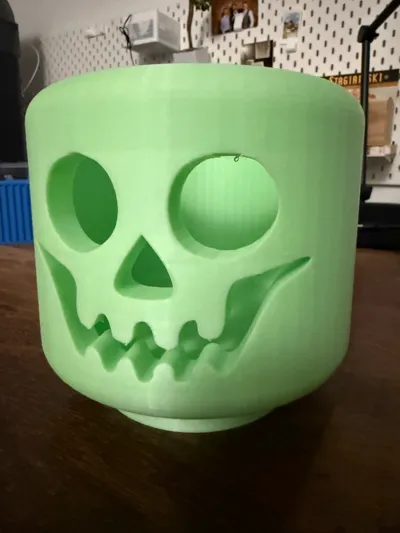
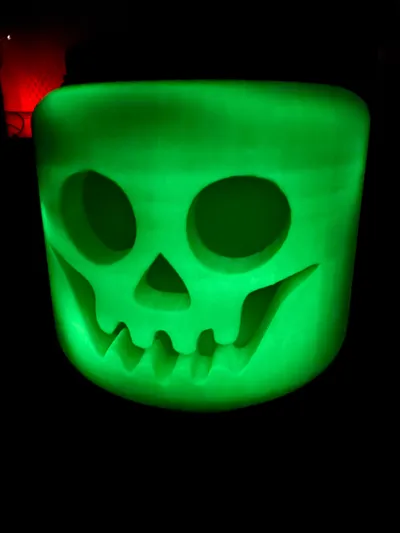
I’m thrilled! Scaled the design to 180% and printed in Bambu PLA glow with manual tree supports. Supports were easy to remove in a few minutes and the result is amazing!
Share
0
0
0
Here's a video of how to personalize the customizable pen I designed - hope you enjoy printing this #parametric model
Share
2
13
0
Oh no! One of our trucks broke down – time to call in the heavy wrecker! This snap-on upgrade transforms your 3D-printed truck into a rescue vehicle. Just snap it into place, and your fleet gains a powerful tow unit ready for any roadside emergency. The articulated recovery arm swings into action—lifting up and lowering with a satisfying click-click-click that sounds like serious business
Heavy wrecker tow truck snap-on upgrade
535
1.2 k
Share
1
0
0