Home
All Models
MakerLab
Contests
Crowdfunding
Explore
Maker's Supply
CyberBrick
Community
Forum
Privacy
Terms
Guidelines
FAQ
Cookie Settings
Hot Searches
© 2026 MakerWorld
Search models, users, collections, and posts
Log In
3d_Print_King
@
Carter1019396
16
Followers
14
Following
5
160
339
61
Follow
Social Media Links
Home
Collections
3D Models
Laser & Cut Models
Crowdfunding (0)
Posts (26)
Recent Article
3D Blog: Avoiding Layer Lines!
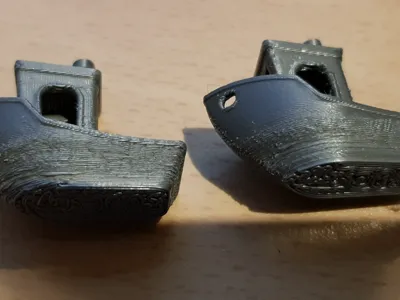
Hi, 3D Blog! I am so excited for this to be my first blog post! I am going to be talking today about how to get rid of layer lines! This is an issue that I have had for 5 YEARS now! I have found the fix and am so excited to share it with you!AboutThe issue with layer lines has been an issue for a while now. Here are some examples: These are really ugly and I am going to explain 1 setting that can fix all of it! Fix:Ok what you are going to want to do is open Bambu Studio or your preferred slicing software.Then go into Others, Fuzzy Skin, Contor.ConclusionThis fuzzy skin technique has solved all of my problems, but also made my prints show NO layer lines. Making it feel like the build plate. Here are some examples of what fuzzy skin looks like:I hope you enjoyed this blog post. As this is my first one make sure to follow me to see my daily blog! -3D_Print_King! :)
3D Blog!
Hi, Makerworld community! I am super excited to share with you the first EVER Makerworld Blog! I am going to post every day with printer tips, settings, new modules, and much more! I am going to start posting as of 9/13 so get ready! If you have ideas for a post feel free to reach out to me!Following:Make sure to SMASH the follow button so you don't miss a post!
Explore All Posts