Search models, users, collections, and posts

Print Profile(2)

All
X1
P1P
H2S
H2C
P1S
X1 Carbon
H2D
X1E
A1 mini
A1
P2S
H2D Pro
X2D
A2L

0.2mm layer, 5 walls, 50% infill
Designer
10.5 h
4 plates
4.5(11)

Combined plates .2mm layer, 5 walls, 50% gyroid infill
35.5 h
6 plates

Open in Bambu Studio
Boost
452
1422
28
31
599
196
Released 

Description

ReadyMag by Qwerm


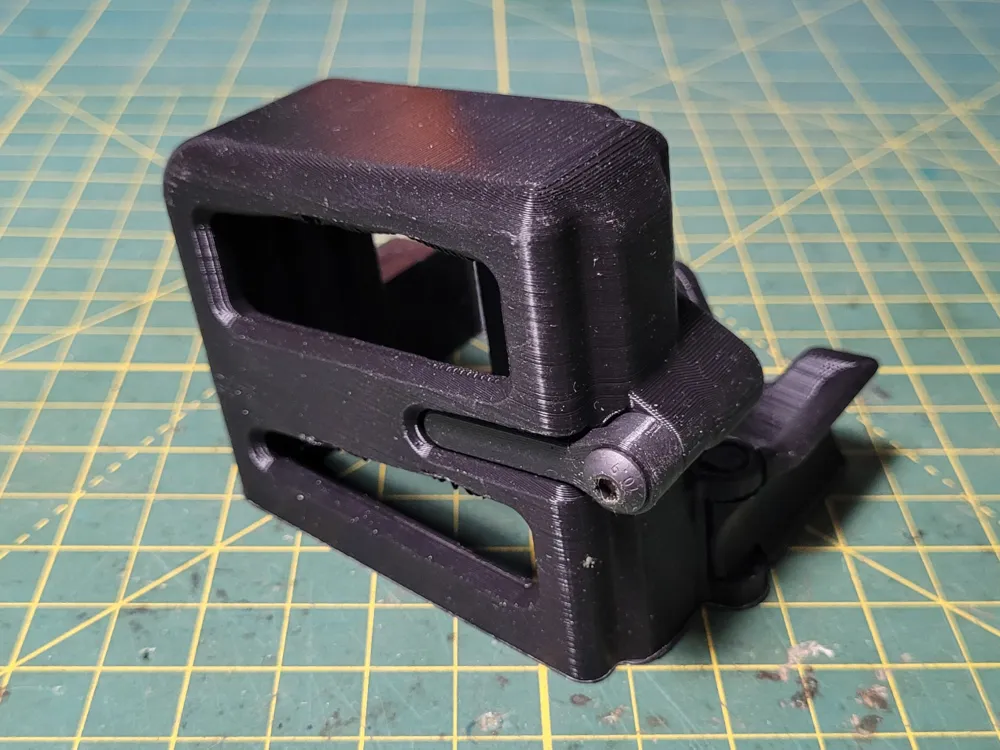
A device based on the Redi-Mag that allows you to carry a spare magazine on your AR15. The magazine release is actuated by your standard magazine release button. Included is a solid version and a skeletonized version. The solid version is able to be printed without supports and the skeletonized version may be able to be printed without supports if you have your material and printer very dialed in, but I suggest adding at least two supports along the bridged areas or making a test print, printing only the overhanged section before trying to print the entire thing. The model features a print in place hinge that might vary in tolerance depending on your printers setup.


Orientation: Print main model standing up and the mag catch on it's flat face.


Settings Used:
Material: PLA+
Extruder Temp: 210c
Bed Temp: 60c
Layer Height: 0.20mm
Wall Line Count: 5
Infill Percentage: 50-100%
Support: No*
Fuzzy Skin: Disabled


Hardware Needed:
1x M5 12mm Socket Head Bolt
1x M5 35-40mm Button Head Bolt.
2x M5 Nuts
1x AR15 Magazine Release Spring (Or Similar)


Instructions:
Assemble the magazine catch by using the M5 35-40mm button head screw and one M5 nut.
Attach the magazine catch to the device like you would on an AR15, but using a M5 nut in place of a magazine release button.
Open up the hinge and slide it though the trigger guard, closing it with the M5 12mm bolt and nut.
You may have to modify the magazine catch bolt's length depending on your rifle's magazine catch by either grinding off, or adding epoxy to, the tip of the bolt.


Thanks:
Jstark / DetDisp for the AR15 CAD file, It would have been very difficult to make this without it.


This work is licensed under CC BY-NC-SA 4.0. To view a copy of this license, visit
http://creativecommons.org/licenses/by-nc-sa/4.0


Thank you for checking out my model. And thank you to everyone who likes and boosts my models, it helps me out a lot more than you may think!

Boost Me (for free)


Documentation (1)

Other Files (1)
README_10a59e78-e4cc-4165-89ca-4a04e331561d.txt

Comment & Rating (28)

(0/1000)

no mag release button. please tell me hi to locate file
The designer has replied
0
Reply
For the mag catch you use "ReadyMag-MagCatch.stl" and use a bolt and spring.
0
Reply
Replying to @QwermMakes :
you should make a preofile that prints both parts at once for ease! You can do print by object to print one at a tinme but should all be on same plate!
0
Reply
Print Profile
0.2mm layer, 5 walls, 50% infill
printed great. a little rough on the under side where no supports were but it should work
0
Reply
do you know if this will work with airsoft M4/AR15 mags?
The designer has replied
0
Reply
I would think so, but I can't say for sure. I would suggest using BambuStudio and cut the model into a cross section so you can just print a small slice of it and test fit it.
0
Reply
Replying to @QwermMakes :
okay I will probably do that, Thanks
0
Reply
hey man found an answer?
0
Reply
where you can put spring? i wont relase my magazines :D
The designer has replied
0
Reply
I'm away from my computer for a few days, but hopefully this sketch gives you an idea. Blue: Bolt Purple: Nut Red: Spring
0
Reply
Replying to @QwermMakes :
in this pic your 2 m5 nuts would be used on the spring? the purple is the M5 nuts correct.
0
Reply
Replying to @user_698418661 :
Purple are the nuts. Only one but should be against the spring. You should be able to slide the spring into the hole on the side facing the rifle, followed by the second nut. Then you can thread in the part your holding in your picture from the opposite side.
0
Reply
I wonder if it works for other m4 models
Show original
0
Reply
Boosted
hinge wouldn’t function properly even with reccomended settings. refuses to open. printed it with 2 different filaments (petg and then pla) both times it snapped at the hinge while trying to open
0
Reply
does not fit my gun sadly
0
Reply
mine came out great! fits good but didn’t print the mag release button? also looks different from the picture? do you have a file for the mag release button?
0
Reply
Print Profile
0.2mm layer, 5 walls, 50% infill
having difficulty getting set to magwell. might be an error from my side.
0
Reply
Boosted
Print Profile
0.2mm layer, 5 walls, 50% infill
nice print
0
Reply

License

This user content is licensed under a
Creative Commons Attribution-Noncommercial-Share Alike

Related Models

There are no related models yet
