
Search models, users, collections, and posts

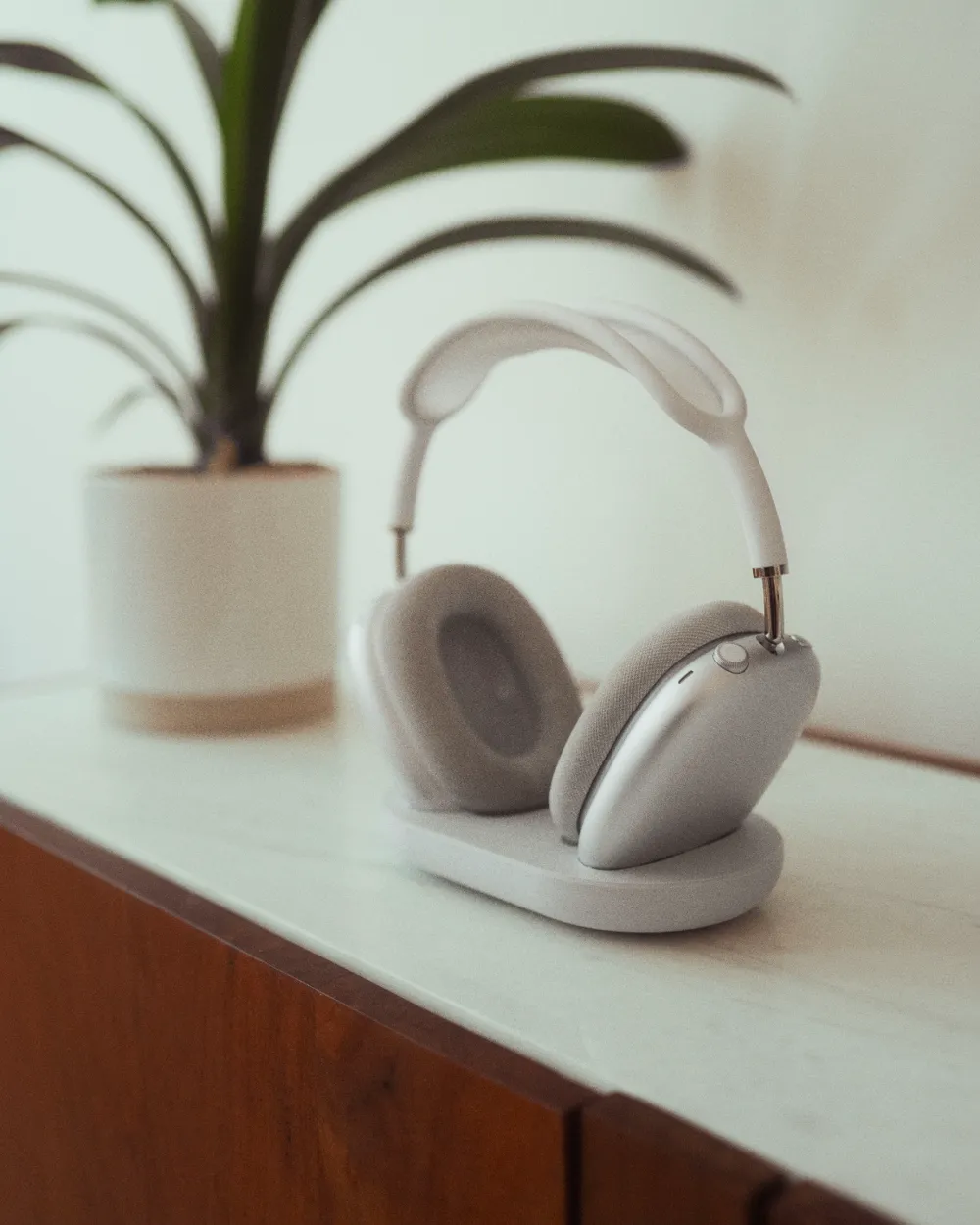
Slim AirPods Max Stand with Sleep Mode V1

IP Report

Print Profile(2)

All
A1 mini
P1S
P1P
X1
X1 Carbon
X1E
A1
H2D
H2D Pro
H2S
P2S
H2C
X2D
A2L

0.2mm layer, 2 walls, 10% infill
Designer
2.1 h
1 plate
4.8(18)

For 10x2 magnets
For 10x2 magnets
2.2 h
1 plate
4.0(1)

Open in Bambu Studio
Boost
227
593
37
31
653
314
Released 

Bill of Materials

Bambu Filaments
Select all
Light Gray (10104) / Refill / 1kg
List other parts
  • Magnets8x3mm x 4: N52-Strong
  • AntiSlipPads x 4: 8x4mm

Description

Version 2 with improvements is out: Link

Elevate your AirPods Max with this sleek and minimalistic stand, designed to perfectly complement Apple’s iconic design. At just 20mm in height, 160mm in length, and 100mm in depth, this slim stand blends seamlessly into any setup. Four integrated 8x3mm N52 magnets ensure your AirPods Max enter sleep mode when placed on the stand, preserving battery life effortlessly. Optional anti-slip pads can be added to the base for extra stability.


Please note that the areas where the ear cushions rest on the stand may not print as cleanly as the rest of the model. Users are encouraged to remix or suggest improvements to enhance this part of the design.


It is crucial to use strong magnets (such as N52) to ensure the sleep mode activates properly. Weaker magnets may fail to trigger this feature.
I used these magnets: Link
 

Boost Me (for free)

If you like my models I would be happy about a Boost from you :)


A future version with charging capabilities is in development, though this iteration prioritizes its ultra-slim profile for minimalism enthusiasts.

Comment & Rating (37)

(0/1000)

It looks good—I would have preferred a slightly tighter fit for the AirPods Max, but this is fine as it is. In addition to the magnets, I added metal balls to the gaps in the infill, making the holder heavier and more stable on the table. Thank you for the model
The designer has replied
Show original
0
Reply
Thank you! I had to make the fit more flexible to accommodate headphones of varying size adjustments
Show original
0
Reply
Replying to @schoenholz :
... I hadn't even changed the size setting: True, that makes a difference. I considered covering the surface with velvet (flakes or something - but haven't found any yet…)
Show original
0
Reply
Replying to @w_ing :
Good idea. Please send me a picture if you tried it out :)
(Edited)
0
Reply
Boosted
Print Profile
0.2mm layer, 2 walls, 10% infill
A truly lovely and simple model. Unfortunately, the areas requiring supports don't look very appealing; sandpaper will help here. I highly recommend it
The profile uploader has replied
Show original
0
Reply
Thank you! Yes, the interior surfaces aren't ideal. If I manage to improve them, I will let you know. I'm working on something!
Show original
0
Reply
Print Profile
0.2mm layer, 2 walls, 10% infill
Super Model! It looks simply superb in metallic blue!
The profile uploader has replied
Show original
0
Reply
It looks fantastic! I'm thrilled you like it
(Edited)
Show original
1
Reply
Print Profile
0.2mm layer, 2 walls, 10% infill
Full work sleep mode done , i love you
0
Reply
8mmx2mm N35 magnets work well. Supertack plate did a great job along with ironing for smoothing the surfaces. Bambu matte PLA in ivory white looks very nice!
0
Reply
hi I am new to 3D printing I have a question. Do you have to pause the print to put the magnets in and then continue
The designer has replied
designer
1
Reply
I haven't printed it but looking the slicer, there's a pause already programed for you to insert the magnets.
designer
1
Reply
hi! Thanks for your comment. When you print through BambuStudio there should be an pause automatically. Here are instructions for placing the magnets: 1. Check Pauses: Ensure pauses are set in your BambuStudio project. If missing, pause the print on the layer that first covers the magnet hole (not the last open layer). 2. Insert Magnets: Use strong magnets. Polarity is not important for this project. During the pause, firmly press 8mm x 3mm magnets into the slots. I made the holes very tight so the magnets aren't loose. You will need a bit power to press them into theholes. 3. Secure Magnets: Use glue or adhesive strips for added stability. 4. Make sure that the magnets or glue dont peak out of the hole. the next layer already closes the holes. 5. Resume Print: Continue printing. Pauses are shown on the right side after you sliced the plate in BambuStudio:
(Edited)
3
Reply
Replying to @schoenholz :
Perfect thank you for getting back to me I will buy the magnets and print this. Much appreciated for your work and your response
0
Reply
Boosted
printed perfectly and looks really nice!
designer
1
Reply
OK
0
Reply
Print Profile
0.2mm layer, 2 walls, 10% infill
nice fit great
0
Reply
Print Profile
0.2mm layer, 2 walls, 10% infill
perfect print
0
Reply

License

This user content is licensed under a Standard Digital File License.

You shall not share, sub-license, sell, rent, host, transfer, or distribute in any way the digital or 3D printed versions of this object, nor any other derivative work of this object in its digital or physical format (including - but not limited to - remixes of this object, and hosting on other digital platforms). The objects may not be used without permission in any way whatsoever in which you charge money, or collect fees.

Remixes (1)
(Created before license restrict)

