
QIDI Q1 Pro BS-03 HEPA/Carbon Filter Setup

Print Profile(0)
Description
🚀 QIDI Q1 Pro BS-03 HEPA/Carbon Filter Upgrade – DIY Cleaner Air Mod! 🚀
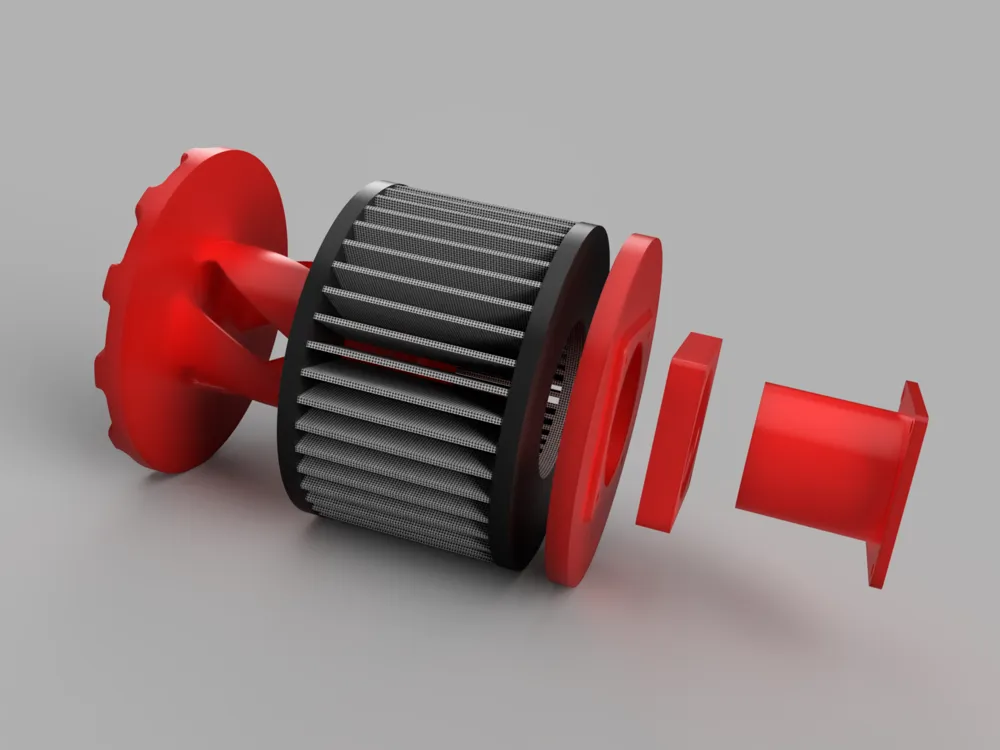
*filter is for rendering purposes only. Not included in files *
Transform your QIDI Q1 Pro into a clean-air powerhouse with this BS-03 HEPA/Carbon Filter Mod, designed to efficiently filter harmful particles and eliminate odors from your 3D printing workspace. Whether you opt for a heatset or plastic-thread version, this mod ensures an airtight fit and easy installation.
📦 Bill of Materials (BOM)
3D Printed Parts:
- Panel Flange (46mm)
- Filter Lid
- Case Duct (46mm)
- Filter Base (Heatset or Plastic Thread Version)
Hardware:
- Stock 60x15 Fan: 4x M3x25mm screws
Upgraded 60x20 Fan: 4x M3x35mm screws
Affiliate Link: https://amzn.to/4gOXVSs
- Flange-to-Housing Assembly: 4x M3 screws
- Optional Heatset Inserts: 4x M3x4x5mm inserts (for Heatset Version)
- Tube of PTFE Grease (often already included in printer toolkits for bearings)
Filter:
- Filter Details:
- Product: BS-03 Filter
- Dimensions: 5.2"L x 3.6"W x 5.2"Th
- MERV Rating: 13
- Compatible Devices: PARTU BS-03 Air Purifier, Slevoo BS-03 HEPA Air Purifiers
- Affiliate Link: https://amzn.to/3P8k56b
⚙️ How to Assemble the BS-03 Filter Upgrade
Step 1: Print the Required Parts
- Download and print the Panel Flange, Filter Lid, Case Duct, and your preferred version of the Filter Base:
- Heatset Version: Designed for M3 heatset inserts.
- Plastic Thread Version: Allows direct threading into the plastic.
- Heatset Version: Designed for M3 heatset inserts.
Step 2: Access the Fan Inside the Enclosure
- Open the QIDI Q1 Pro’s print enclosure to access the fan area.
- Unscrew the 4 factory screws holding the stock fan in place.
Step 3: Insert the Case Duct
- Inside the enclosure, slide the Case Duct between the fan and the enclosure wall.
- Ensure the duct aligns properly with the fan opening for an airtight seal.
- Reattach the fan using the appropriate screws:
- Stock screws (M3x25mm) for the standard fan.
- Longer screws (M3x35mm) for upgraded fans.
- Stock screws (M3x25mm) for the standard fan.
Step 4: Install the Rear Panel Flange
- Remove the printer’s rear panel completely to prepare for flange installation.
- Attach the Panel Flange to the rear panel by securing it to the Filter Base.
- For the Heatset Version, install M3x4x5mm heatsets into the designated holes before attaching screws.
- For the Plastic Thread Version, create threads directly in the plastic and secure the flange with screws.
- For the Heatset Version, install M3x4x5mm heatsets into the designated holes before attaching screws.
Step 5: Reinstall the Rear Panel
- Carefully align the Rear Flange with the duct inside the enclosure.
- Reinstall the rear panel, ensuring all components fit snugly.
- Tighten all screws for a secure assembly.
Step 6: Install the BS-03 Filter
- Attach the BS-03 HEPA/Carbon Filter to the Filter Lid Assembly.
- Apply a small amount of PTFE grease to the lid threads to ensure smooth threading.
- Thread the lid securely into the Filter Base.
Step 7: Enjoy Cleaner Air!
Power on your QIDI Q1 Pro and experience a cleaner, healthier workspace with effective filtration of particles and odors.
🌟 Why Upgrade to the BS-03 HEPA/Carbon Filter?
- Clean and Fresh Air: Captures fine particles and odors, ensuring a safer printing environment.
- Customizable Setup: Choose between a heatset or plastic-thread version for the filter base.
- Precision Fit: Seamlessly integrates with the QIDI Q1 Pro for easy assembly.
- DIY Convenience: Straightforward installation process suitable for all skill levels.
- Cost-Effective: Uses affordable BS-03 filters and standard hardware.
🎨 Print Your Way to Cleaner Air Today – Download the Files and Upgrade Your Setup! 🌬️
Transform your QIDI Q1 Pro into a high-performance air-filtration system with this simple yet powerful mod. Cleaner air and healthier prints are just a few steps away.
3D printing settings
.2mm layer height 100% infill
Recommended: ABS (PETG may work mileage varies)
License



Comment & Rating (6)