
Infinite Train Starter Set


Print Profile(9)


Description
🚂
The problem with toy trains is that they are never long enough!
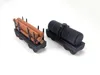
This 3d model introduces a system of standardized articulated link and connection for different type of cars.
You can print as many cars as you want and extend your train as far as your filament supply allows.
Prints as separate parts that assemble so they can be colored and keep filament waste to near-zero.
The InfiniTrain links will print-in-place without support. Slide the tab into the cars of your choice to create a flexible connection.
If you are a Maker, I posted the flexible link here under CC license. Please feel free to use it in any of your projects: https://makerworld.com/en/models/796179
I recommend using PLA Basic or other non-effect filament for the links. Matte and silk filaments are not strong enough for structural prints.
The passenger car is approximately 11cm long. The locomotive 8cm long.
The basic set printed from the first plate is approximately 36cm long in total.
Plates are provided to print a locomotive, a coal car, a passenger cars, a caboose and the links required to connect them, and window inserts.
Please remember to rate your prints!
Profile ratings are not only important for other users but also serve as valuable feedback for designers!
Click here to see my other models
Boost Me (for free)
If you like this model, please boost! It's free to you, but it's a meaningful way to support me and my designs.
General 3d Printing Tips
- Make sure your printing plate is clean! Oils from your skin can cause adhesion issues for your prints. Regularly wash your print plate with a detergent like Dawn, and avoid touching the surface when removing prints from the bed.
- If it's an option on your printer, always level the bed before each print. If you have to perform this manually, do so after every few prints. It takes a bit of time and patience, but it's a fair trade for reliable results.
- Ensure bed and nozzle temperatures are within the expected range for the material you're printing. Temperatures that are too high or too low can negatively affect the print, causing warping, malformed layers, or adhesion issues.
- Reduce your printing speed. Slower speeds are especially important for overhangs, as they give the material more time to cool as it's deposited.
Membership
Click here to obtain a commercial license to sell physical prints of my 3D models.
License

You shall not share, sub-license, sell, rent, host, transfer, or distribute in any way the digital or 3D printed versions of this object, nor any other derivative work of this object in its digital or physical format (including - but not limited to - remixes of this object, and hosting on other digital platforms). The objects may not be used without permission in any way whatsoever in which you charge money, or collect fees.


Comment & Rating (34)