


Print Profile(10)


Bill of Materials


- DoubleSidedTape_Thin_Tesa_Universal x 1: needed to stick the MagSafes
- pieces of felt x 1: optional
Description
Quiet, Convertible, Universal, Customizable, Piggy Bank, A1-Compatible: Standby Mode Dock for all iPhone variants, with optional docks for Apple Watch and AirPods.
Boost Me (for free)
With Boosts you support me to buy more filament and invest time for tests and new designs.
You can also support my work with little donation via paypal, Thank You:



Story:
After remixing beautiful iPhone Standby Mode Dock (designed with OVERWERK) from genius Scott Yu-Jan:
- Dock for iPhone15 & 15Pro + Apple Watch options: https://makerworld.com/en/models/624637#profileId-549242
- Dock for iPhone15 Pro Max incl. case + Apple Watch: https://makerworld.com/en/models/622846#profileId-547018
- iPhone 15 Pro Max Dock incl. case max.: 168x83,3mm: https://makerworld.com/en/models/619565#profileId-543522
I decided to create this complete new design with following features:
Features:
- Modular/Convertible: It can be converted quickly and easily in various versions without having to print the whole thing again.
- with Apple Watch Dock or Cover L
- with AirPods/AirPodsPro Dock or Cover R
- with Backcover or Drawer
- with ready-made Frame Adapters for iPhones with or without Case
- with Replaceable Ejectors with “Eject” Symbol, with custom text or plain
- Universal: It can be used for all Magsafe compatible iPhones including (almost all standard) Cases
- Simply select one of the ready-to-print Frame-Adapters from Print Profiles (MAX/PLUS Frame_Adapters and STD Frame_Adapters) suitable for your iPhone (with or without Case)
- for unusual iPhone case sizes, You can modify the provided STEP-Files: “STD_Modifiable_Adapter.stp” and/or “MAX_Modifiable_Adapter.stp” according to your wishes.
- You need to just print another Frame-Adapter to make it quickly compatible for iPhone in other sizes.
- Customizable:
- You can choose your favourite color and texture for each individual Part.
- on the Ejector you can place your custom text, print it with “Eject”-Symbol or plain.
- my personal tip: Print Frame-Adapter on Textured Plate, it looks realy nice. You can also try other third party build Plates with Holo-Effects.
- You can also experiment with Fuzzy-Skin on few Parts. I have not testet this on this model yet.
- New Ejector design:
- which is very quiet compared to other models.
- integrated oldschool “Eject”-Symbol can be used for multicolor Prints.
- The upper area can also be used for custom text or other symbols.
- All Parts easy replaceable:
- no screws or glue necessary
- Double sided tape is needed (small stripes) to fix the Frame-Adapter to the Base and also to fix the Magsafes to the Base.
- Apple Watch Charger Dock is designed as press-fit. To remove the Apple Watch, you can push from backside-hole with maximal 7mm diameter rod/screwdriver or something else.
- 2 small shafts/Rods on the ejector can be rejected also with a small screwdriver, you have to remove the Frame-Adapter first.
- One more thing!!!: EASTER EGG
- Under the ejector, there is a hidden slot in the Base, where money can be thrown in - Hidden Piggy Bank :)
- The middle Back-Cover or Drawer can be pulled out to get your collected Money without destroying the dock.
- You can use this area also to store other parts like AirPods replaceable ear tips or something else.
Print Profiles:
- MAX/PLUS iPhone-Dock and MAX/PLUS Frame_Adapters(V1 to V4) for MAX and PLUS iPhone versions
- MAX/PLUS iPhone-Dock and MAX/PLUS Frame_Adapters(V4A) for iPhone Air (2025)
- STD iPhone Dock and STD Frame-Adapters(V5 to V8) for Standard iPhone sizes
- STD iPhone Dock and STD Frame-Adapters(V9) for iPhone Minis
You can simply print only the parts you need. You do not have to print all parts. If you dont need Apple Watch and/or AirPods docks, you can print only simple side covers.
Frame Adapters
From the Frame-Adapter Print-Profiles MAX/PLUS Frame_Adapters(V1 to V4) and STD Frame-Adapters(V5 to V9) you can choose one suitable for your iPhone/Case. Allocation including dimensions you can find in Table below:
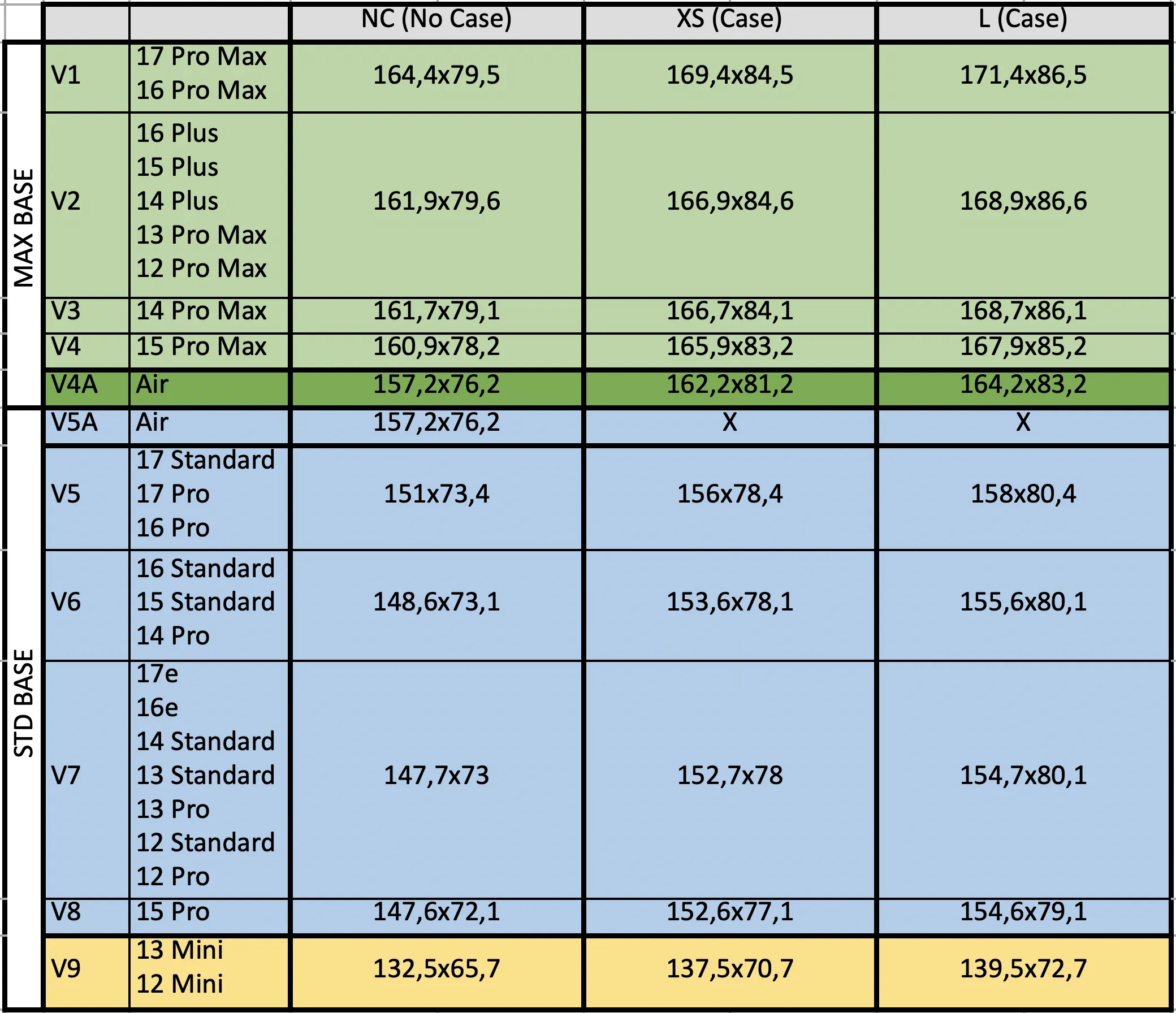
Additional Raw Model Files (OPTIONAL):
If the listed Frame Adapters in Table above are not suitable for your iPhone/Case, you can use optionaly one of modifiable STEP-files which you can find under Raw Model Files. You can adjust the inner cave of the Adapter with CAD-Software to match your Phone/Case size.
- STD_Modifiable_Adapter.stp: compatible with MAX/PLUS IPhone-DOCK
- MAX_Modifiable_Adapter.stp: compatible with STD iPhone Dock
If you dont have any experience with CAD-Software and you can not modify Step files, let me know which dimensions you want and for which case. After Boosting me I can provide a customized version especially for you :).
Assembly Process:
Most components are simply plugged into each other.
Apple Watch charger have to be pressed into the recess.
The Magsafe are fixed in place with thin double-sided adhesive tape, some of them don't need tape and can be also only pressed in.
The Transparent MagSafe which I used is this one (JSAUX 15W Mag-Safe): https://amzn.to/4gBnK8W (affiliate Link)
Recess in Modell for Magsafe is 56,2mm diameter.
(21.04.2026 Update: added new PrintProfile “Bodies_for_59mm_MagSafe_2026_04” which includes Base Bodies and suitable Small-Covers for MAX and STD Variants to fit newer bigger MagSafes up to 58.7mm.)
Frame adapters should be fixed to the housing with thin strips of double-sided adhesive tape, as shown in pictures below.


All cables can be routed inside the housing in the recesses provided in the direction of the rear cover hole.
The Ejector must be assembled with two shafts, after that you can install the Frame Adapter, which prevents that the shafts falling out :).
please make sure that the holes of the Base-Model are free from Support remains. You can use for example small Drill bit or pin to remove and push these out.
Optional:
You can fix all cables together with a Tape or something else, so that only one cable comes out of the housing.
At the bottom I glued small pieces of felt so that it is more quiet on the table and does not rattle.
Assembly/Disassembly Video:
Have Fun and enjoy.
Please contact me if any issue.
please provide Pictures of your makes ;)
30.11.2024 Update: uploaded new Ejectors with different Logos and Christmas-things ;)

https://makerworld.com/en/models/834862#profileId-779887
07.12.2024 Update: Print Profile for optional horizontal and 45 degrees covers for Watch added: Horizontal and 45 Degrees Watch Covers Optional
Thanks for picture @oksamot

14.01.2025 Update: Added Adapter Frames V9NC, V9XS and V9L for iPhone Minis to Printprofile STD Frame-Adapters.
02.02.2025 Update: Base-Models (MAX and also STD) updated to make it symmetric. There are now on both sides suitable cutouts for AppleWatch- and AirPods-wires.
You can now mirror existing left and right covers (AirPods/Watch) to asselbe it on the other side of the dock.
To Mirror the Model, open the Print-Profile (3mf-file) in Bambu-Studio, click on the model which you want to mirror, right click on the model and then click on mirror in Y-Axis.

Also added additional AirPods-Docks for bigger/wider AirPod cases (29mm width and for SpigenLock).
01.04.2025 Update: added Frame for iPhone XR without Case under Raw-STL files: iPhoneXR_VXNC_1519x772_Adapter
11.09.2025 Update: added Frames for aaaaaaaalllll neeeeeew iPhone 17, iPhone 17 Pro, iPhone 17 Pro Max and for iPhone Air, with- and without cases. See V1, V4A and V5 in the Frame-Adapters-Table. Happy Printing :)
28.09.2025 Update: added Adapter Frame under Raw-Model Files for iPhone SE 3. Generation without case. VX_SE3_NC_1394x688_Adapter. Its compatible with STD-Variant Base models.
04.12.2025 Update: added Adapter Frame for iPhone Air for STD-Base under STD-Adapter-Frames Print Profile V5A.
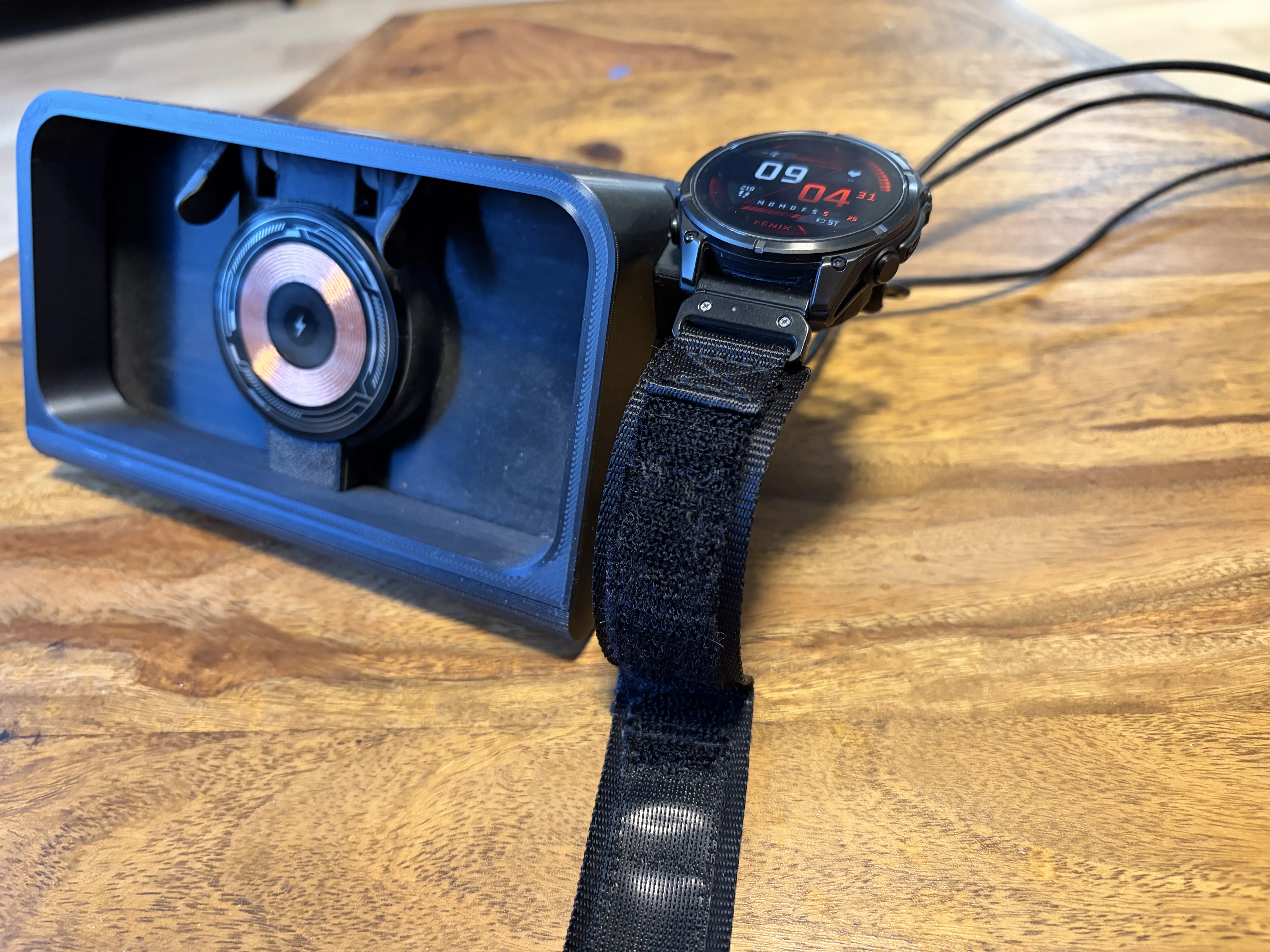
25.01.2026 Update: new Garmin Fenix Epix Watch Adapters uploaded as separate Model: https://makerworld.com/de/models/2297841-piggibank-garmin-fenix-epix-watch-adapter#profileId-2507683
02.03.2026 Update: Adapter Frame Table updated with iPhone 17e.
21.04.2026 Update: added new PrintProfile “Bodies_for_59mm_MagSafe_2026_04” which includes Base Bodies and suitable Small-Covers for MAX and STD Variants to fit newer bigger MagSafes up to 58.7mm.
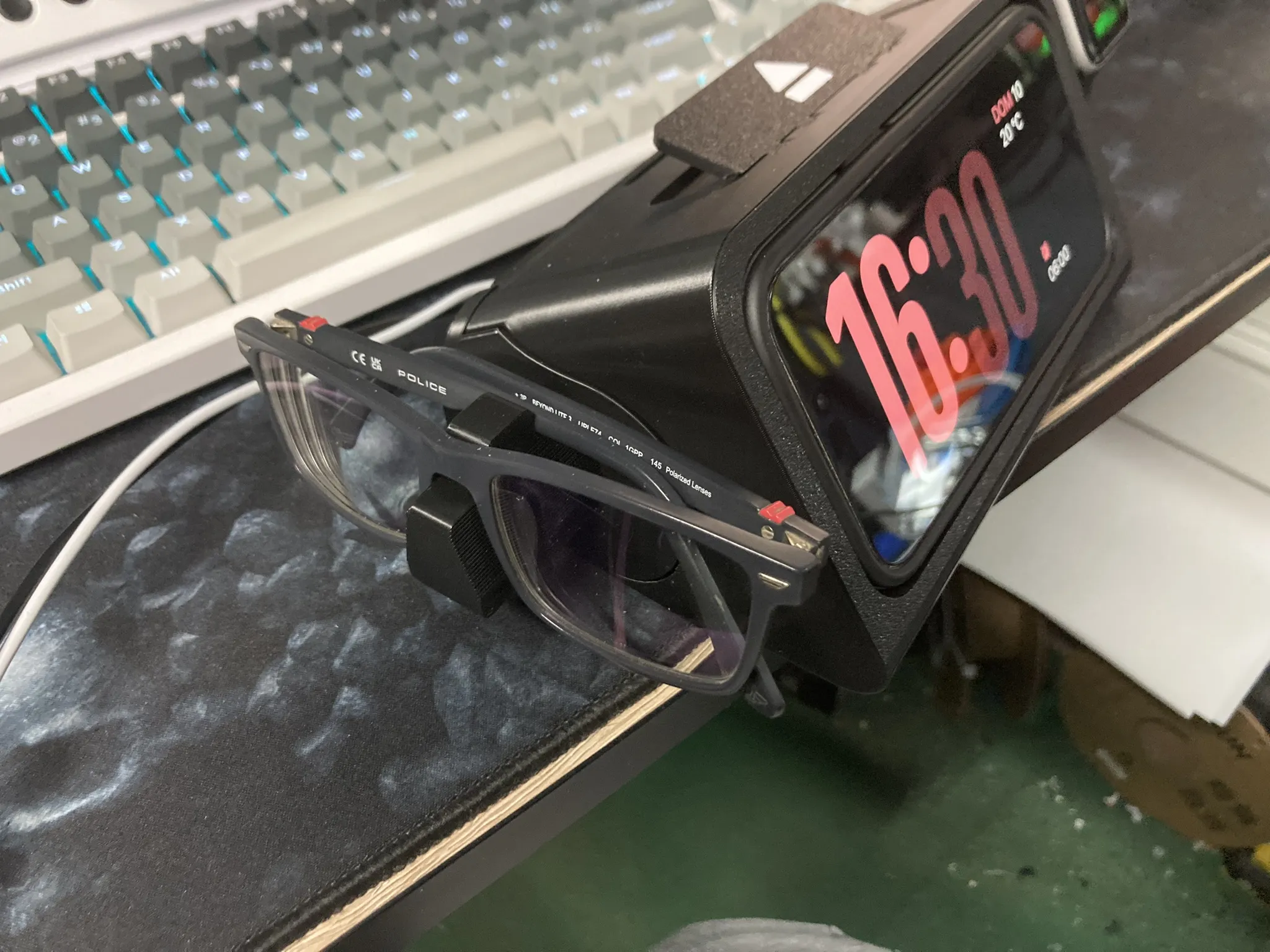
21.05.2026 Update: I've seen that some people have designed their own adapters, like holders for glasses, and it's really cool. To make it easier for people, I've uploaded raw-models of the covers and drawers in STEP format. Thanks to @Slipknik for designing the glasses mount adapters.
License

You shall not share, sub-license, sell, rent, host, transfer, or distribute in any way the digital or 3D printed versions of this object, nor any other derivative work of this object in its digital or physical format (including - but not limited to - remixes of this object, and hosting on other digital platforms). The objects may not be used without permission in any way whatsoever in which you charge money, or collect fees.


Comment & Rating (1166)