Search models, users, collections, and posts

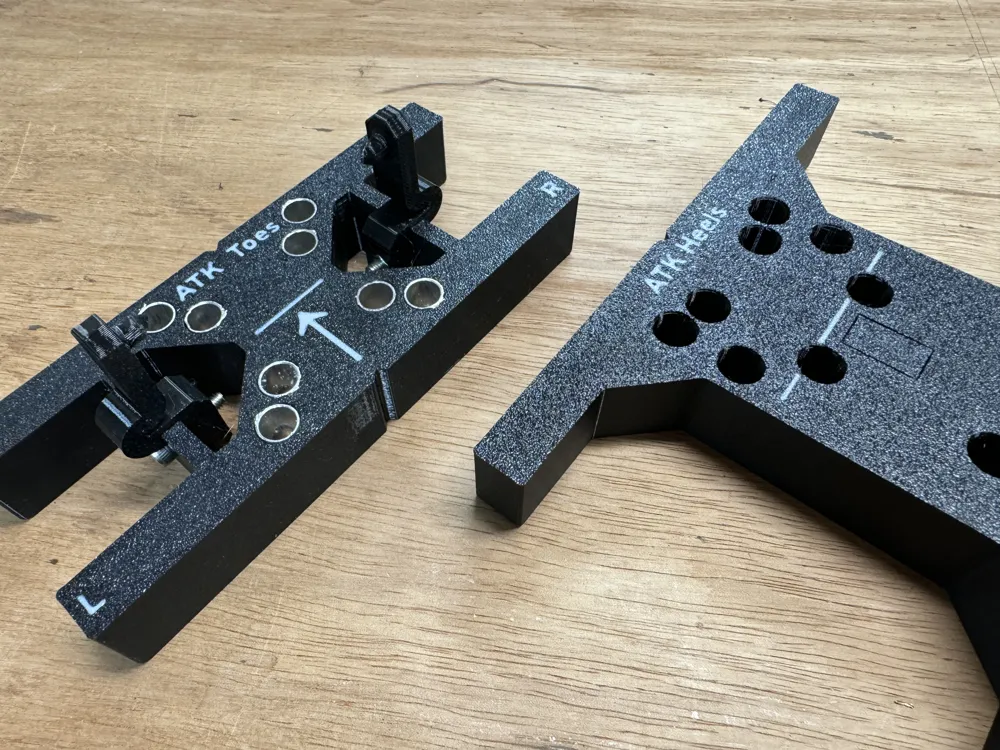
Ski Drill Jig Templates (Flush Text)
Print Profile(4)

All
X1 Carbon
A1
H2S
X1E
H2D
H2C
X1
P2S
P1P
H2D Pro
P1S
X2D
A2L

8.3mm holes for direct drilling (no inserts)
Designer
142 h
33 plates
5.0(8)

9.0mm holes for brass inserts
Designer
145.7 h
34 plates
5.0(2)

9.2mm holes for aluminum inserts
Designer
161.7 h
34 plates
5.0(3)

Demo and Frame spacers
Designer
9.1 h
8 plates
5.0(1)

Open in Bambu Studio
Boost
79
166
97
44
266
142
Released 

Description

These are templates for my ski drill jig (found here). 

Note that the customize button doesn't work for this one as its not built to be used with OpenScad's customizer. I may fix that in the future, but for now you need to use the files I've provided.


12/31/25

  • updated print profiles with
    • updated ski trab template
    • updated 22D template
  • removed all individual files, see my model listing on printables for those. For this one just use a print profile. 


2/27/25

  • Updated ATK toe to include forward holes for the HY binding
  • Updated ATK heel to include an additional hole (used only for demo templates, HY holes were already present)
  • Added Dynafit Ridge & Seven Summits+ templates
  • Updated Shift templates with very slight dimensional changes
  • Updated template library (there are some other new templates in there, telemark and demo primarily I think). 


9/24/24: 

  •  updated template geometry so that toe and heel stops slide into place for easier storage. 
  • Added the stops and toe springs to this file. 
  • Consolidated some templates (PLUM toes and Heels, kingpin and alpinist toe).

Overview

I don't have every single file uploaded here, just the print profiles.

If the file you are looking for isn't in a print profile, There might be more templates here. Most templates are in the print profiles, though there is a plate limit within a single file so some obscur bindings or less common tele bindings didn't make the cut. 


I use 9.2mm for all the templates I make, but I try to keep the 9.0mm and 8.3mm up to date as well. There might be some differences between the profiles however


This version has flush text labels and is set up for a printer with multiple heads or a filament changing system for best results.

For single color printing you have a couple options:

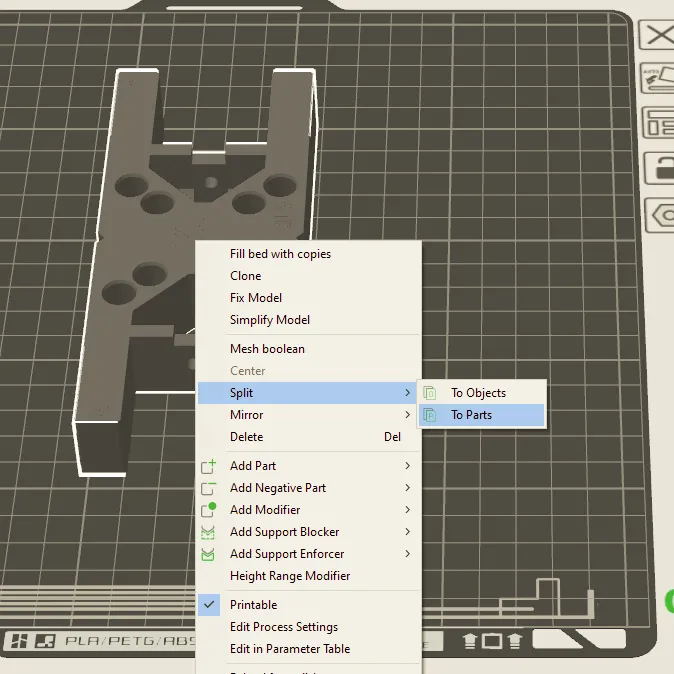
  • split the template into parts (see below in the coloring section) and then:
    • Delete out all of the label components, leaving voids
    • Select all label components and scale in Z, so they extend beyond the upper surface 
  • alternatively see version 1 of my template library. (note however that I no longer update that version.


Notes:

Sometimes different brands calls the same binding by a different name and some patterns are shared by multiple bindings; If you can't find what you are looking for it might be under a different name.


Most of the data is from paper templates. Where there are variations between templates I have chosen what I think to be the correct one.


The small notch in the hole is for Z-seam clearance. This is important to get a smooth cylindrical surface for drill guidance or for bushing fit. Make sure and set Z-seam position to be at the sharpest corner. 


Binding hole patterns and drill size combinations are endless. I am happy to make new templates or share my OpenSCAD template library - send me a message and I am happy to help. 


For best results print these text down on the build plate, No supports needed.  


Hole sizing and Inserts

Use the 8.25mm holes if you intend to use WITHOUT brass inserts - If you are able to print you own parts, this is the simplest method and will fit a standard 8mm ski drill bit.


If you are able to easily print you own templates you probably don't need to use a drill sleeve, but it makes for a nicer product with increased durability, so feel free to if you want

If you want to use WITH drill sleeves, you will want to print the template parts that have a good snug fit to the tube being used. You will have to test the hole size and you'll want to print whichever size fits best on your as-printed parts. Different filament materials, mfg, color, etc all affect shrinkage a little bit and thus hole size. There is a test part for dialing in hole size.


Brass drill sleeves

These (K&S 8134) 11/32" x 0.014" wall brass tubes are perfect fit for a standard 8mm. Cut to ~¾" length. You can also get in longer packs if you plan to make more than a couple templates (or use the aluminum tubes).


For the brass inserts, use the profile and templates labeled "9.0" (9mm) and depending on the fit, you may have to use hole size compensation (in the slicer) to fine tune the size a bit. There is a hole size fit test block to help calibrate if you need to figure out how much to shrink or enlarge holes. 


Aluminum drill sleeves

These (K&S 3908) 9mm OD x 0.45mm wall aluminum tubes will also fit 8mm stepped ski bit and will increase durability of templates. Cut to ~¾" length.


For the aluminum inserts, use the profile and templates labeled "9.2" (9.2mm) and depending on the fit, you may have to use hole size compensation (in the slicer) to fine tune the size a bit. There is a hole size fit test block to help calibrate if you need to figure out how much to shrink or enlarge holes. 


Note: You can always fine tune hole size with ”XY hole/contour compensation” within the slicer for tighter or looser fit on inserts


Coloring parts

Use my print profile for ready to print parts, but 9.0mm diameter (for brass inserts) only as that's the ones I use. If you want a different hole size, you will have to color the models yourself. 


The Easiest way to color this version is to import the file into your slice and split into parts. Then you can change the color of the main body and all the text pieces to whatever you wish. This should work for anything based on Prusa Slicer (prusa/bambu/orca) other slicers might work slightly different.


Making a new template (or modifying an existing one)

I have an OpenScad template library, however I no longer have that publicly posted for several reasons. 
 

If you wish to make a new template or generate existing templates with different hole sizes, send me a message and I am happy to share it with you and/or help you out with whatever you need. 


Comment & Rating (97)

(0/1000)

Hi MottN, thank you so much for your awesome project. I was wondering if you could clarify the difference between the Tyrolia and the Tyrolia Demo? For reference I’m trying to mount the Tyrolia power rail to my ski and I’m not certain which one of these I should get :) Thanks!
The designer has replied
1
Reply
if you have the power rail, you should measure the hole spacing and compare. It wouldn’t be the normal tyrolia template, and it might or might not be the same as the demo pattern either. I don’t know what the pattern for the power rail is, it’s sounds like a demo binding but could be different.
0
Reply
Replying to @MottN. :
Hi MottN, thank you for your quick reply! From https://github.com/tomahawkins/binding-templates/blob/48ec303c5173e811ee7613bdff9c4e92e05e4186/BindingTemplates.hs#L299C1-L300C1 it looks like for the powerrail bindings, the screws are spaced 30mm apart, and it forms a rectangle of 100x200 (unless I'm much mistaken). I'm not quite a cad guru but I'd be happy to help if you could point me to the right direction :) Again appreciate your awesome project!
0
Reply
Replying to @twwt :
Thanks. I will make a template for that and add it in the next week or so. The patter is 100x30.
0
Reply
Boosted
Hi MottN. This is an excellente project an I have already printed the jig. With the templates I would need to modify the template using OpenSCAD since I am using 10mm sleeves (the only ones I could find with an inner diameter that fits the drill bit. Anyway. When I preview the modified settings everything look OK. But when the model gets generated it looses the text and there is nothing to be split in Bambu Studio with the exported stl file. Any suggestions on this issue? Thank you very much.
The designer has replied
2
Reply
@mio_no There is a setting called lazy union that needs to be checked for this version to work I believe. Preferences ->Features ->Enable lazy unions (or something like that). That is what tells it to keep separate bodies instead of grouping everything into one when it exports. I will add that to the description. Hopefully that solves your issue! Let me know if you continue to have issues.
0
Reply
Replying to @MottN. :
@mio_no I forgot to mention, if its not listed in the settings within OpenScad, you might need to get a newer build from the development snapshots...just get the latest nightly build.
0
Reply
Boosted
Replying to @MottN. :
@MottN Gettig the development nightly build and enabling the "lazy unions" option did the trick - Thank you very much!
0
Reply
Thanks so much. These templates are one of the main reasons I bought my P1S. Change for a nickle?
The designer has replied
0
Reply
Awesome, Welcome to the hobby :)
0
Reply
Replying to @MottN. :
where is the hole size tuning part?
1
Reply
Replying to @user_1364731925 :
if you download the cad files (instead of the button to open 3mf) its in a folder called test parts. It's only important if you are using metal inserts...and if you can print your own templates you don't really need to use inserts.
1
Reply
Boosted
This is a great system - love the effort and good mechanical design. Tolerances were tight (for me) to make the 2020 rail fit into the bracket and needed to resort to engineering tool #1 (hammer) and a block of wood to seat them.
The designer has replied
0
Reply
Glad you like it! Tolerances are on the tight side, yes....snug-fit to tap-in depending on printer tolerances, shrinkage, etc.
0
Reply
Hello Thank you very much as well I am currently assembling the template However I have a Fritsch Xenic The heel mechanism is the same as the Viptec but the front is smaller Could you add another template for that Regards Jan
The designer has replied
Show original
0
Reply
Hello, I am happy to make a template for the Xenic, But I don't think I ever got measurements for the toe piece. I can use the pattern from here (if you can confirm it is correct) https://www.wildsnow.com/backcountry-ski-pdfs/xenic-template-1-2019.pdf, but I also need to know where the pin line is relative to the mounting holes.
1
Reply
Replying to @MottN. :
Hello, I also only have this paper template. The pins are definitely centered. My measurements show a 32mm hole spacing, and the pins are at 16mm
Show original
0
Reply
Replying to @Alpenperle :
The rear ones are the lower ones on the PDF and then the middle ones of the remaining three holes Distance 60mm The Viptec template should fit there though I have already printed it out and it looks good
Show original
0
Reply
Print Profile
8.3mm holes for direct drilling (no inserts)
Looks awesome, fit perfectly the associated ski binding jig. What a work! Thanks a million for that!!
0
Reply
Hello MottN, Thank you for taking the time to provide so many different drilling templates online. I need to mount a Fritschi Xenic 10, but unfortunately I couldn't find a template. I am a complete beginner with OpenSCAD :( Could you help me with this? Best regards Matthias
The designer has replied
Show original
0
Reply
Hello. I am happy to help, however I have not seen a template for the Xenic. I see this one, but it does not have the pin line or boot heel line marked which is needed for me to make a template: https://www.wildsnow.com/backcountry-ski-pdfs/xenic-template-1-2019.pdf If you have a physical binding, perhaps you could take measurements, and I can make the template?
0
Reply
Replying to @MottN. :
Thank you for your help. i'm gonna measure it in the upcoming days. can you just tell me what exact distance i have to measure for the heel line?
0
Reply
Replying to @user_3556937583 :
*i meant boot line
0
Reply
Boosted
It's a great tool, and the centering alone is worth it. I often use the Dynafit Beast 16 and 14, so could someone make a template for it?
The designer has replied
0
Reply
If you find a paper template I can go off of, I'm happy to model the template. If you have the bindings you can trace the holes and measure the heel and pin lines also.
1
Reply
Boosted
Replying to @MottN. :
Is this data okay? Thank you!
0
Reply
Replying to @railedge :
Yes that works. I didn't realize there was a Knut Pohl template for those. I have added to my printables file: https://www.printables.com/model/847664-ski-drill-jig-templates-version-2-flush-text Should be files for the Beast 16 toe, and the Beast 14 & 16 heel. (beast 14 toe is the radical 2.0/rotation) I will possibly update the makerworld one too at some point, but for now I only have the 36-plate print profiles and not the individual files, so it takes more time to update the profiles
1
Reply
hello, the work is truly incredible. thank you very much for what you have done! I ask for your forgiveness, but could you make a video of how you use them? I don't visualize how to combine the pieces, especially the central mounting one. thank you very much again!
The designer has replied
Show original
0
Reply
The center part you line up with the mount point on the ski. Then sight along the lines to line the boot center mark up with that. Then based on the boot, position the front and back templates. Here is a video from an early version of the jig: https://imgur.com/9oj33tR
1
Reply
Replying to @MottN. :
Thank you so much for replying, I really appreciate it. I've now seen the video, and I've seen the guides and the central tool you created… could you send me the link? Thanks again!
0
Reply
Replying to @user_2781345758 :
Yes, This model page has all of the templates. The jig itself is here: https://makerworld.com/en/models/442550-3d-ski-binding-jig#profileId-348495
0
Reply
Excellent work on this project. I do have a question on the Kingpin heel, I am not sure if I am missing something or if the template is. Seems to be missing the 5th hole in the center for the switch? (116.5 mm from the closest rear hole). Thanks.
The designer has replied
0
Reply
Yeah I think I thought the template would be too big if I included that. I figured it was a pretty easy to mark and hand-drill that one.
0
Reply
Replying to @MottN. :
No problem, I was not sure if this was known or not. I am done marking by hand :) I modified the template and it is big but not too big. My only concern is I may have to go through a little trial and error to dial it in with SCAD. Thanks again.
0
Reply
