Search models, users, collections, and posts

Dorm Room Decor | Street Sign | Birthday | Gift

Remixed by
IP Report

Print Profile(1)

All
X1 Carbon
P1S
P1P
X1
X1E
A1
H2D
H2D Pro
H2S
P2S
H2C
X2D
A2L

0.2mm layer, 3 walls, 8% infill
Designer
4.2 h
2 plates
4.9(41)

Open in Bambu Studio
Boost
719
1965
76
27
1.8 k
554
Released 

Description

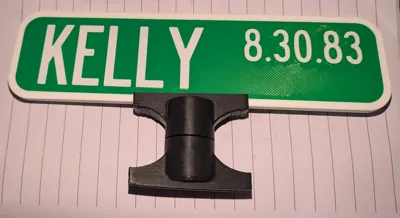
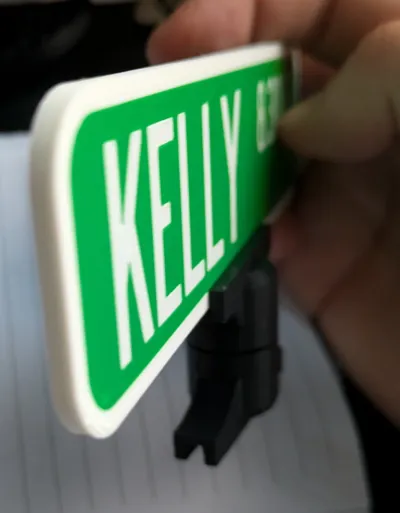
Using https://makerworld.com/en/models/451789#profileId-358898 stands, I remixed the sign names to be flat, as well as front and back so that no matter what angle you view the signs they will be readable.


Follow original makers instructions for adjustments and renaming! The possibilities are endless for fun names, keep sakes and more!


All sizes fit in original makers stand/slots

Comment & Rating (76)

(0/1000)

Print Profile
0.2mm layer, 3 walls, 8% infill
Great print for a friend to enjoy
The profile uploader has replied
profile
9
Reply
Looks great!
0
Reply
what is that name✌️😭
0
Reply
Print Profile
0.2mm layer, 3 walls, 8% infill
Great learning experience on how to edit text.
The profile uploader has replied
profile
1
Reply
great work!
0
Reply
Print Profile
0.2mm layer, 3 walls, 8% infill
great print. perfect gift to others. love how easy it was to edit the names.
profile
1
Reply
Boosted
hey there sorry to bug you could you give me advice on how to edit this, l am a true newbie
0
Reply
Print Profile
0.2mm layer, 3 walls, 8% infill
Love how this turned out!
0
Reply
Boosted
Great file...I customized it and it turned out great!
0
Reply
Print Profile
0.2mm layer, 3 walls, 8% infill
very cute sign! thanks a bunch!
0
Reply
Hi im definitely not having any luck adding my own words. I can create the words with the text tool but the prototype words are still there
The designer has replied
1
Reply
The original maker https://makerworld.com/en/models/451789#profileId-358898 has a small step by step process to update the text, if you want more detail, I have a post that goes into more detail on how to edit existing text. https://makerworld.com/en/models/901209#profileId-860248 Please let me know if you have any questions
0
Reply
Boosted
having same issue
0
Reply
you have to click on the text shape in the left side for that sign to add text and not have the old text appear
0
Reply
how do you customize the name on it
1
Reply
In order to customize this, you have to download and open it in the Bambu Studio on desktop. Under "Objects" you can right click the various text elements and select "Edit Text." From there, you can change the text, font, size, etc. 👍🏻
0
Reply
Replying to @GUARD1AN0YL :
how big is this sign? in inches?
0
Reply
Replying to @user_143107216 :
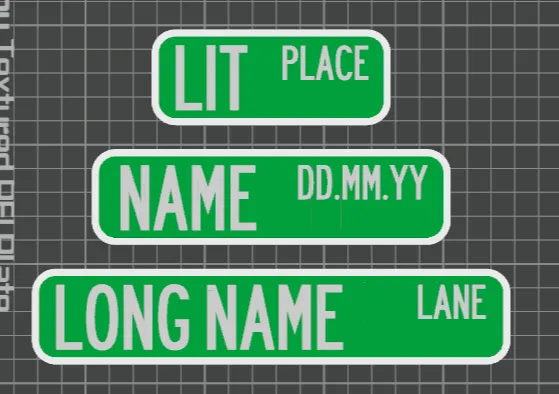
The file has three different size options: 7.64in (194mm), 5.91in (150mm), 3.94in (100mm). However, you can always scale these in the studio to make them whatever size you'd like as well. 👍🏻
(Edited)
0
Reply
what filament and color green did you use for the print
The designer has replied
0
Reply
To be completely honest I cannot remember off the top of my head. I've had two greens that were very similar the past couple years. I either used the Hatchbox Green found here https://amzn.to/40PvcYl or I used the roll of Bambu Green I got with my printer. They are both really similar, the Hatchbox green I think is just a little bit overall than the Bambu if memory serves
0
Reply
Replying to @bombsurace :
thanks! it seems like alot are using the bambu green. i just realized i had a roll come with my printer that i forgot all about. i was having a hard time finding the correct color green
0
Reply
Replying to @print3dReality2 :
Yea I prefer Sunlu and Hatchbox when they have deals and the price. Sunlu has some great greens as well. The Bambu green is certainly good, but if I can save 4-10 bucks per spool with sunlu I tend to lean that way. Glad you have a roll of it from before! Win win!
0
Reply
is it possible to do this with one color
The designer has replied
0
Reply
I don't understand the question. If you printed it with one color it would just be, one color and a rectangle with no writing on it. Which obviously you could do it, but defeats the purpose of the print? Either delete the text features or just turn everything into one color in your objects menu and that would do the trick
0
Reply
Replying to @bombsurace :
yes that’s basically what I’m asking, would it ruin it or not.
0
Reply
Replying to @user_3410677640 :
Not sure what you mean by ruin it. It will literally just be one solid color and no writing or anything. It would just be a blank slate. You can preview it and see for yourself in your profile viewr
0
Reply