


Print Profile(1)

Description
Overview:
A Bitcoin price ticker that runs on an ESP32-C3 microcontroller connected to a 2.9" monochrome e-ink display. The device connects to WiFi and periodically retrieves data from CoinDesk. The current Bitcoin price in USD and a 30-day history chart are rendered on the display. You can specify the refresh rate and color scheme (standard or inverted).

The device is powered by a 5V power supply through a USB-C connector.
The device has a width of 105mm, a depth of 60mm, and a height of 68mm.
There are two options for the case smooth one (Inky_Monitor_Body.stl) and one with embossed bitcoin logo (Inky_Monitor_Body_Bitcoin.stl).

Bill of Material:
- XIAO ESP32-C3 Module
- WeAct 2.9'' E-Ink Black-White Display
- 4x 2.6x10mm Screw (Set of Screws)
- 3x 2.6x6mm Screw (Set of Screws)
- 2x 7-Pin 90° Header i.e. Reverse bending pin header (optional)
Case:
It is recommended to print the case in the following orientation, with support and a brim (back).

Assembly Instruction:
- Clean the printed parts.
- Insert the display into the body and secure it using Crossbar1 and a 6mm screw.
- Solder 90-degree headers to the XIAO-ESP32-C3 development board. This step is optional, you can also solder the wires directly to the board.
- Connect the display to the ESP32-C3 board according to following wiring diagram.
- Connect the WiFi antenna.
- Place the ESP32-C3 board into the body and secure it using Crossbar2 and two 6mm screws.
- Arrange the wires and antenna, close the box, and secure the bottom part with four 10mm screws.

Programming:
Option 1 - Build from source code with hard coded settings:
- Download the source code or clone it from GitHub (main branche)
- Install Arduino IDE
- Open the project in Arduino IDE
- Install esp32 by Espressif Systems in Boards Manager
- Install NTPClient by Fabrice Weinber in Library Manager
- Install ArduinoJson by Benoit Blanchon in Library Manager
- Install GxEPD2 Library by Jean-Marc Zingg (with dependencies Adafruit BusIO Library, Adafruit GFX Library) in Library Manager
- Select XIAO_ESP32-C3 board
- Update WiFi credentials (ssid, password), refresh rate, inverted mode in inky-monitor-config.h file
- Click on Verify button
- Connect the ESP32-C3 over the USB cable to the PC
- Click on Upload button
- Wait until all data are written
- Device should be now properly configured and display actual data
Option 2 - Prebuild binary with configuration portal:
- Download compiled firmware from GitHub
- Open ESP Tool - a serial flasher utility
- Connect the ESP32C3 over the USB cable to the PC
- Click on Connect button

- Change Flash Address to 0x0
- Select the binary file (inky-monitor.ino.merged.bin)
- Click on Program button

- Wait until all data are written

- Disconnect and connect the ESP32-C3 again
- WiFi configuration portal is now active. Connect to Inky Monitor WiFi network from your mobile or PC.
- Configure your WiFi connection and settings parameters
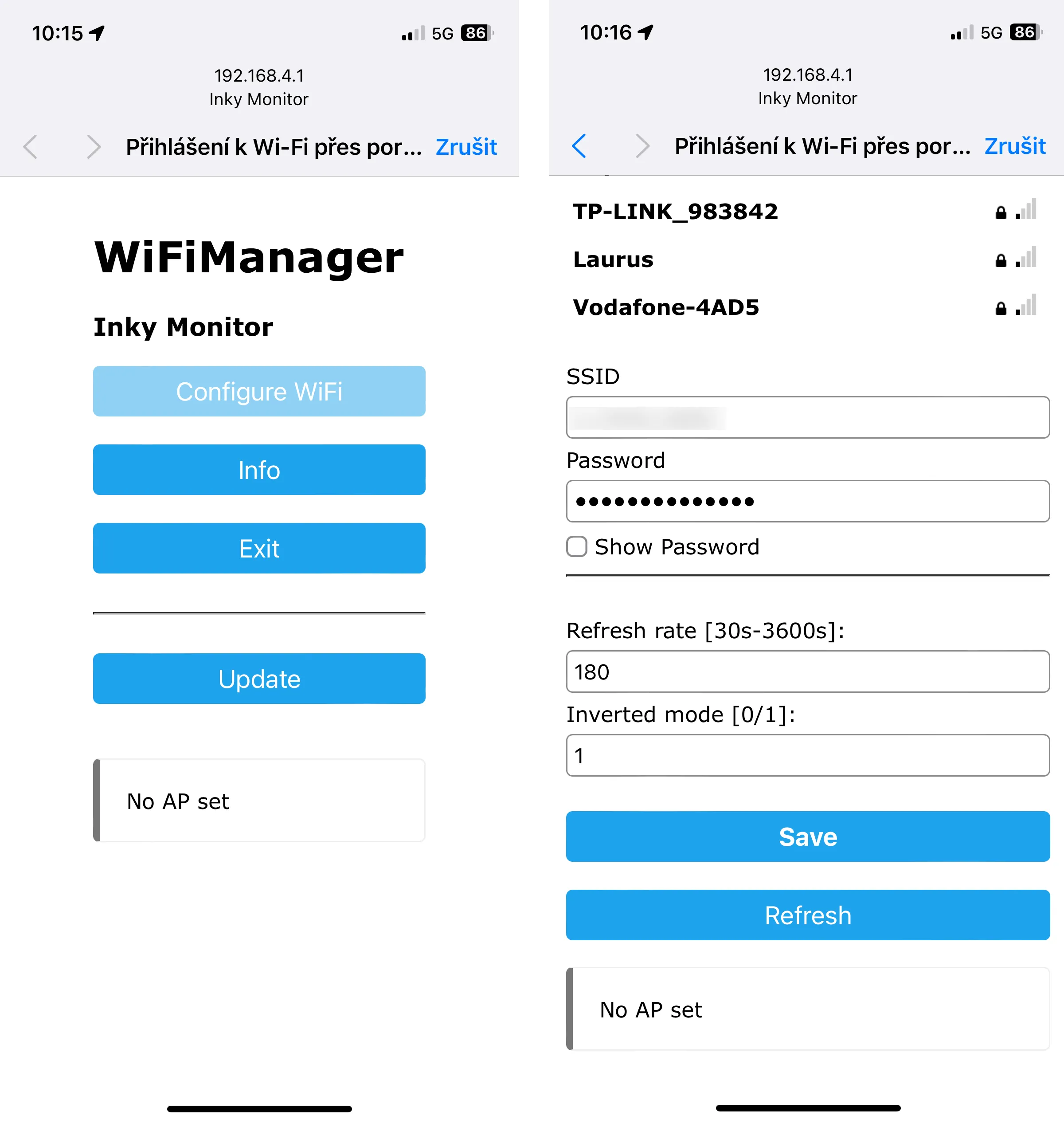
- Device should be now properly configured and display actual data
- If connection to WiFi is not successful the WiFi configuration portal is automaticaly activated
- Configuration erase can be forced by pressing and holding the BOOT button for 5 seconds. Use the pin to press the button. From the front view, the BOOT button is on the left side.
Debugging:
If something is not working as expected you can see some details what is going on in the device by connecting to serial port using a serial terminal. The baud rate is 115200.

Updates:
24.2.2025 - Firmware v1.2.0 and v1.2.0-3C
- Change API for bitcoin price history from Coindesk to Coinbase.
- Add option for candle chart.
- Increse size of the chart.

19.1.2025 - Firmware v1.1.0 and v1.1.0-3C
- Changed API for current bitcoin price and time from Coindesk to Coinbase to have more precise price.
- Posibility to set local time zone offset.
29.12.2024 - Firmware v1.0.0-3C
- Created new firmware version for three colour display
License



Comment & Rating (44)