
Make your own mulitcolor filament


Print Profile(3)



Description
This spiral prints about 7 meters of a filament in two colors of your choice.
Make sure to use glue stick or hair spay for this print, as it doesn't have a lot of contact area on the printbed.
It's a lot of fun to experiment with different colors and/or materials, so this model lets your create your own little patch of special filament.
Don't resize the spiral, as the diameter won't fit then anymore.
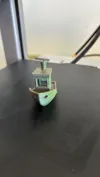
If you make sure the filament stays in the same direction, you'll get a “one side with color A, other side with color B” print, while random rotation gives something like the benchy in the example. In order to get chaotic colors, remove the spiral while it's still warm and straighten it out. To get perfect order, let it cool down on the printbed.
Have fun!
PS: any fun experiments are more then appreciated!
License



Comment & Rating (195)