Search models, users, collections, and posts

"Galactic Wonders" - Bookmarks set

IP Report

Print Profile(6)

All
P1S
P1P
X1
X1 Carbon
X1E
A1
A1 mini
H2D
H2D Pro
H2S
P2S
H2C
X2D
A2L

AMS, 0.08mm layer, 2 walls, 100% infill
Designer
2.6 h
1 plate
4.9(66)

A1MINI, AMS, 0.08mm layer, 2 walls, 100% infill
Designer
2.8 h
1 plate
4.9(14)

NO AMS, A1MINI, 0.08mm layer, 2 walls, 100% infill
Designer
2.6 h
1 plate
5.0(4)

NO AMS, 0.08mm layer, 2 walls, 100% infill
Designer
2.5 h
1 plate
4.8(4)
Click to see more

Open in Bambu Studio
Boost
2060
5278
111
92
1.8 k
664
Released 

Description

If you want to sell prints of this model, as well as all of my models - future and past
Subscribe to My Patreon:

Or Subscribe for a commercial License Directly in Maker World:
 

Membership

C3D Commercial Membership - Authorized Merchant

Join


A beautiful set of bookmars with a different pictures in a galactic theme.

The full set is to be printer together. It's designed in such a way which makes this possible with color changes at layers.

Filaments Used: PLA EryOne Galaxy Black Transmission Distance: 0.1

PLA Jayo Meta Gray Transmission Distance: 3.5

PLA+ Jayo Silk Bronze Transmission Distance: 1.1

PLA+ Jayo Silk Gold Transmission Distance: 2

PLA KINGROON WHITE Transmission Distance: 6.9
 

Swap Instructions:
Start with Galaxy Black / Black
At layer #7 (0.64mm) swap to Dark Gray
At layer #9 (0.8mm) swap to Bronze
At layer #12 (1.04mm) swap to Gold
At layer #13 (1.12mm) swap to WHITE for the rest.

If you like my work, drop me a follow!🤜🤛

How to do more than 4 colors on a single AMS?


To use more than 4 colors with a single AMS is pretty simple when it comes to HueForges.

Always start the print from either Bambu Studio or Bambu Handy App - This will allow you to map the rolls of filaments to a certain slot in the AMS:
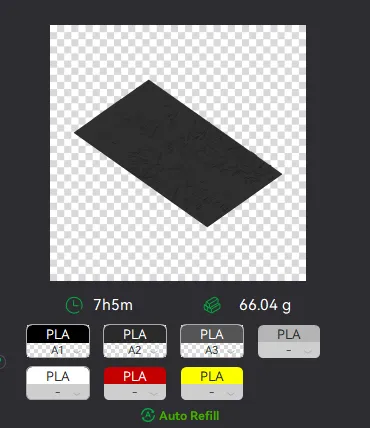
Now map the first 4 colors (which should already be inserted in the AMS to Slots 1 - 2 - 3 - 4
Once thats done move to maping colors 5 - 6 - 7 - 8 to respectively AMS Slots 1 - 2 - 3 - 4 again!
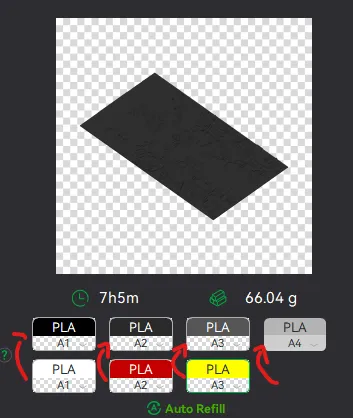
This will allow you to Change the rolls of filament once the printer is done with that color.
For example, in the picture above once we are done with the Black color (Which is usually first) we are going to remove the black roll (you can do that while printing) with White, then once Charcoal Black is done we are going to change that to Red, Dark Gray to Yellow and we are done. ~ You can do that with as many colors as you need!

If you like my work, drop me a follow!🤜🤛

Comment & Rating (111)

(0/1000)

Print Profile
A1MINI, AMS, 0.08mm layer, 2 walls, 100% infill
The profile uploader has replied
profile
4
Reply
Cool idea to make them glowing! P.S I think you should dry your glow in the dark PLA, seems like it has issues due to humidity. Glow filaments soak a lot of humidity.
(Edited)
3
Reply
Replying to @zhakryuu :
Yeah, it’s two year old filament that’s been sitting on the shelf in the humid South.
0
Reply
Boosted
Print Profile
AMS 0.2m, split models, 2 sets arranged for X1/P1 series
Gorgeous. I used Overture black, Overture white, Overture silk copper, and Jayo silk gold.
profile
3
Reply
Boosted
Print Profile
AMS, 0.08mm layer, 2 walls, 100% infill
came out really great
1
Reply
Boosted
0.25 Revo nozzle on P1S.
The designer has replied
0
Reply
Nice! Looks super clean! Thanks for the boosts Kaji, glad you like my bookmarks!
1
Reply
Print Profile
AMS, 0.08mm layer, 2 walls, 100% infill
0
Reply
Was this just black, white, gold, and Grey?
0
Reply
Replying to @UniqueXclusives :
hey there this was so long and I can't really remember what color I used besides black and white. I think it was yellow pla from eryone and a light brown from bambu, probably one of their mattes
0
Reply
Replying to @quantax :
thanks!
0
Reply
Print Profile
AMS, 0.08mm layer, 2 walls, 100% infill
Really Nice and Easy to print. Thank You!
profile
1
Reply
Print Profile
AMS, 0.08mm layer, 2 walls, 100% infill
love it!
0
Reply
Print Profile
AMS, 0.08mm layer, 2 walls, 100% infill
Love these, simple but attractive.
0
Reply
Print Profile
AMS, 0.08mm layer, 2 walls, 100% infill
P1S 0,4mm nozzle
0
Reply
they look amazing! I used red, yellow, white and black for mine.
0
Reply

License

If you want to use this model commercially, please join my membership.
Join Now
This user content is licensed under a Standard Digital File License.

You shall not share, sub-license, sell, rent, host, transfer, or distribute in any way the digital or 3D printed versions of this object, nor any other derivative work of this object in its digital or physical format (including - but not limited to - remixes of this object, and hosting on other digital platforms). The objects may not be used without permission in any way whatsoever in which you charge money, or collect fees.

