
QR Code Stand Generator (Custom Wifi/URL/Phone)


Print Profile(1)

Description
Boost Me (for free)
3D modeling is fun, but it takes time! ⏳ If you enjoyed this design, a boost 🚀 would mean a lot and help me create even more. 🙈
🎁🎉 Thank you very much for your boosts, folks! I really appreciate it 🙈
Create your own QR code stands with this customizable generator. You can generate stands for Wi-Fi credentials, URLs, vCards, or phone numbers. Add your own text and customize the dimensions to your liking.
This generator allows you to print the QR code on the first layer, ensuring the layer lines merge seamlessly for a clean and clear QR code. Use engineering plate for the smooth result.
How It Works
- Customize Your Stand
- Click the "Customize" button.
- Design your stand with your desired specifications.
- Download Your Stand
- In the "Generated" section, select "Stand" and click "Generate."
- Click "Download" and choose "Download STL."
- Repeat the process for “QR code + Text.”
- Prepare for Printing
- Select both generated files and drag them into Bambu Lab Studio.
- When prompted, select "YES" to load the files as a single object with multiple parts.
- In Bambu Lab Studio, go to the "Objects" section (top left UI), select the stand and QR code part, and assign them the desired color.
30 seconds guide on youtube:
TIPS
- Use attached 3MF profile to get better results
- Optimize Dimensions: For a 0.4mm nozzle, use dimensions like 100x80mm. You can use smaller dimensions with a 0.2mm nozzle.
- Calibrate Filament Flow: Proper calibration is essential for a clean first layer and a high-quality QR code.
- Remove Text: If you don't want text on the stand, simply erase it in the customization process.
- Circular QR Code: To generate a circular QR code instead of a boxed one, check the “Use circles” option.
Troubleshooting
- If the QR code is not visible and only the stand appears, ensure both STLs are imported.
Rename the models so that the stand is "1.stl" and the QR code is "2.stl" as Bambu Lab Studio prioritizes file names during slicing OR manually set the stand's STL to be first in the object list
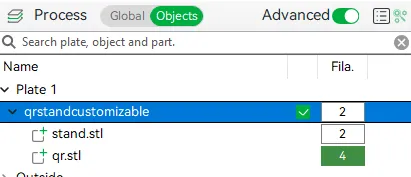
Stand.stl must be first.
The generator is using scadqr library by xypwn.
2024-06-04 - v2
- added support for fonts
License

You shall not share, sub-license, sell, rent, host, transfer, or distribute in any way the digital or 3D printed versions of this object, nor any other derivative work of this object in its digital or physical format (including - but not limited to - remixes of this object, and hosting on other digital platforms). The objects may not be used without permission in any way whatsoever in which you charge money, or collect fees.


Comment & Rating (79)