Search models, users, collections, and posts

Raspberry Pi 5 - M.2 HAT+ case

Print Profile(4)

All
A1
P1S
P1P
X1 Carbon
X1E
X1
H2D
H2D Pro
H2S
P2S
H2C
X2D
A2L
A1 mini

Rev.3 - 0.2mm layer, 2 walls, 15% infill
Designer
1.8 h
1 plate
4.9(49)

Rev.2 - 0.2mm layer, 2 walls, 15% infill
Designer
1.8 h
1 plate
4.8(31)

Case Accessories - Power Button
Designer
11 min
1 plate
4.7(6)

A1 mini - Rev.2 - 0.2mm layer, 2 walls, 15% infill
1.8 h
1 plate
5.0(4)

Open in Bambu Studio
Boost
189
549
138
65
1.5 k
921
Released 

Description

Raspberry Pi 5 case for m.2 Hat+

Secures in the case using m2.5 x 10mm screws on the bottom

Designed to provide room for the pcie ribbon cable.


*Rev.2 - increased the dimensions to allow more clearance and fitment of the m.2 thumb screw.

**Updated the print profile and STL/STEP to include Rev.2 files.


*Rev.3 - Used integrated Bambu Studio mouse ears for corner bed adhesion. *I find it works really well to keep the edges from peeling/warping

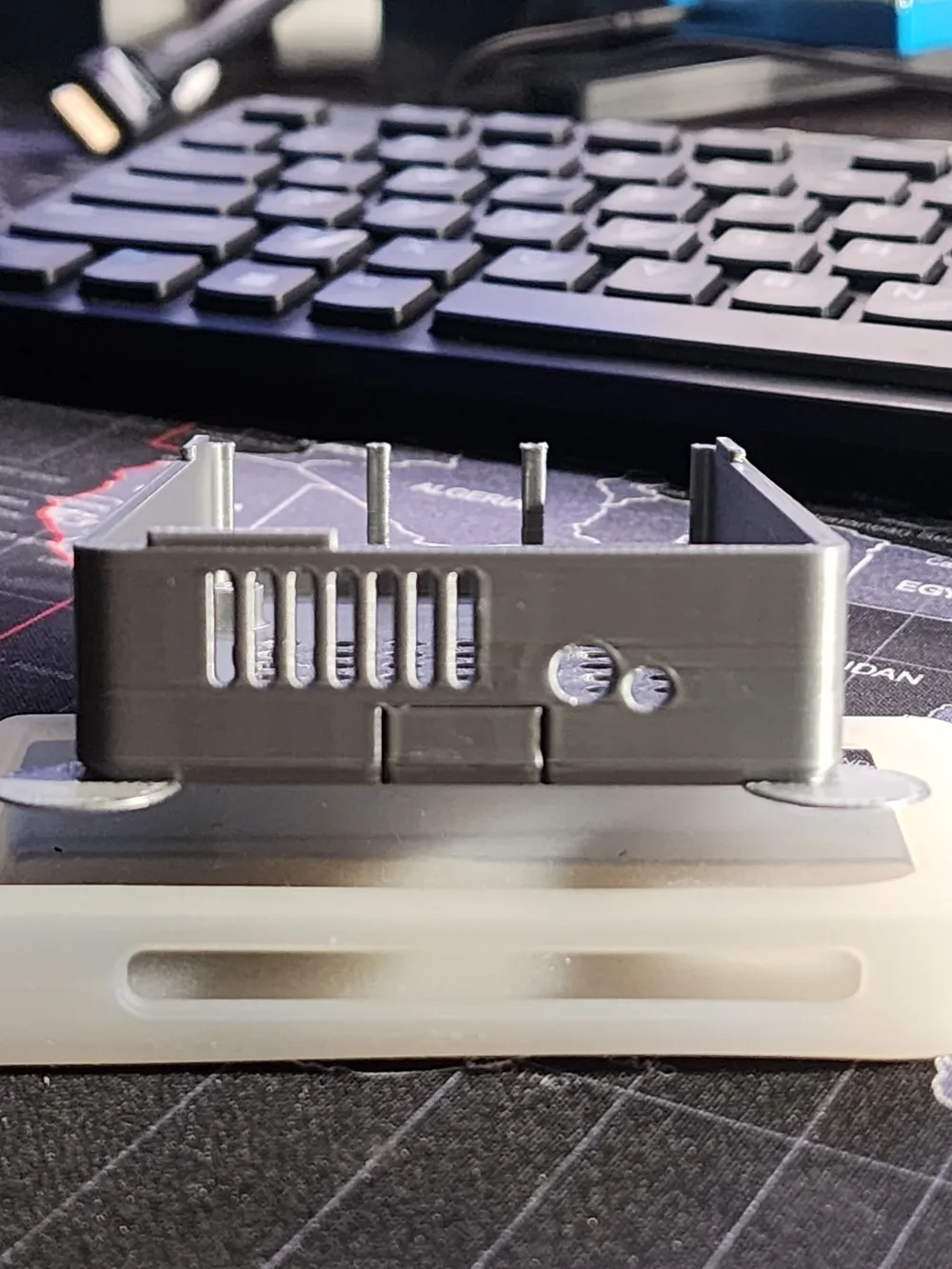
** added side air-flow vents

*** added removable SDCard slot - you can remove after printing or remove before printing and replace with supports.

**** fixed snap together joinery for better hold/fitment

Comment & Rating (138)

(0/1000)

Boosted
No access to the SD card slot once in the case, this means you have to do all the setup to boot from the nvme before putting in the case, and taking out again if you need to reload from the SD for any reason. I bought the Geekworm nmea top hat as it can be used with a 2280 nmea but unfortunately the lid will not fit with this ssd as to close the lid the mainboard need to move further towards the back which puts the usb-c and hdmi connections out of line.
(Edited)
The designer has replied
3
Reply
For clarification: This was designed around the Raspberry Pi M.2 Hat+ as per the title and description. It was also designed around booting from an m.2 nvme drive, not the sdcard. I'm happy to modify the model for your Hat, if I can find a compatible model to build around.
0
Reply
Boosted
Replying to @routedVector :
The Geekworm top hat is M.2 Supports 2230/2242/2260/2280 NVME M2 ssd. I have fitted the 2280 and the case does not fit properly. In order to boot from the nvme you need to install a booting system on the SD and boot from the SD in order to get to manager app and edit the config.txt as you probably know, there are also other ways to do it but ALL need access to the SD card. I posted a link but it does not work. if you google the Geekworm x1001 M.2 nvme hat and look where the SSD fits, its almost to the same level as the front of the usb sockets so the lid does not fit, even without the SD card slot it is no use for the 2280 M.2 nvme SSD drive
(Edited)
1
Reply
Boosted
Replying to @routedVector :
This stops the case from closing, the bars that go down between the usb sockets is right in the midle of the end, hope you can see it in my poor attempt ad drawing.
0
Reply
Cheers to the creator. Works with AI Hat+. I found the top holes to be a little too large, but liked the form factor, so added so spacers to cross them out. Love the LED holes, screw holes in the right place, flush finish with USB hubs, and micro-hdmi ports. Printed the SD card access bottom, and the access to the SD card is excellent. I would love some hexagonal airflow holes on the side, as currently the sides don't have any airflow, though the fan is located between the main board and hat and may add them later. The additional clearance for the rainbow cable for the HAT, means that it is impossible to physically press the power button on the SD card side of the board. I would love an indent that allows it to be press, and I may add a 3D printed pushpin, that is inserted before the board goes into the case allowing this. The case also stays together well when stationary, and slightly snaps together, but I would still not be entirely confident picking it up from the top half of the case. I might make the clearances a little tighter so it snaps together more solidly. If you are going to use this with the AI Hat, you will need additional screws, as the screws that come with it will not go through the the case, the mainboard and into the extenders. Printed in Black PETG for higher thermal performance, at 247C, with 15% cubic infill on A1 mini.
(Edited)
The designer has replied
2
Reply
Thank you for the feedback and the boost. I've been working on adding a lot of those features. Although it takes time, I find myself stuck trying to figure out the best way to do certain things. Power button, airflow and other items are on the list. Airflow through the back is done, but not posted. Happy to post it without the other features though, if you'd like. Edit - Posted Rev.3 if you want to check it out
(Edited)
1
Reply
Replying to @routedVector :
Hell yeah, you're truly doing great work. Looks absolutely great. LOVE the side vents, and the increased snap fitment. I'd love some side vents on the side opposite the USB-C and micro-hdmi, and may add them. Also right now the Ethernet and USB hub isn't exactly flush (although this does function as air vents!) Keep up the great work, we're all cheering you on, best RPi5 + Case on here, more than happy to boost again.
1
Reply
Boosted
Print Profile
Rev.3 - 0.2mm layer, 2 walls, 15% infill
Thanks for this model! I printed in PETG so I don't have to worry about heat, and in a single color since this is going in my homelab rack so who cares :) I found that, at least with PETG, the breakaway lines on the vertical section of the SD punchout were not big enough, and cracked my first print trying to remove it. Only then did I notice that it was a separate part I could delete in the model, so thanks for including it as such. 500 Character limit? Replies with more info incoming.
profile
1
Reply
Boosted
As I was saying: I modified the separate power button profile; by slicing the main stem and reducing it to about 80%, I found it was the perfect size to use with an M3*8 motherboard washer, making the button pesudo-captive. I then used some natural (uncolored) PLA filament cuts as makeshift optical cables, along with some hot glue to extend the visibility of the LEDs. As the pictures show, I had more success making a nice rounded glue blob with the Pi's power LED than the hat's. I'm still waiting on an SSD to arrive, so there's no activity on the other hat light.
(Edited)
1
Reply
Replying to @Aximilli :
This is a cool idea, thanks
0
Reply
It's really good I like it! I would only improve 2 things the top part could have a little more space for the hat, my PoE hat give access to the GPIO pins and it make it impossible to close it, adding 5mm or so to the top would allow closing it properly. Also having access to the SD card without unscrewing the board would be nice. Otherwise, it's really great and solid.
The designer has replied
2
Reply
I can modify the model and post it for you if you'd like. This one is specifically for the "M.2 Hat+", which is also why I didn't build in any SD Card access. In my case I'm booting from the nvme drive, so I didn't require the SD card. I wasn't sure how to modify this to give access the SD card cause of the extra space I gave it for the pcie cable at the back. If you have an ideas, I'm open to suggestions!
0
Reply
Hello, I downloaded the case and modified it a bit. However, the Raspberry Pi 5 with my NVMe SSD doesn't quite fit. Perhaps the case needs some adjustments. The mounting points, or rather the Raspberry Pi itself, could be moved slightly closer to the button holes. There's plenty of clearance. The cover on the HAT side could perhaps be raised a little to accommodate other SSDs. Regards
The designer has replied
0
Reply
Thanks for the feedback. Although, this makes sense in your case since you're not using the Raspberry Pi M.2 HAT+. This was specifically designed for the Rpi Foundations M.2 HAT+. The space allocated at the back is for the fragile PCIe cable.
0
Reply
Replying to @routedVector :
I think 3.5mm to the button wall is not a problem for the cabel ;-) Thanks for the feedback.
0
Reply
Thank you for the design
The designer has replied
Show original
1
Reply
Youre welcome! Looks great!
0
Reply
Print Profile
Rev.3 - 0.2mm layer, 2 walls, 15% infill
Awesome, everything fit for the ports perfectly on the bottom part of the case, just wished it would have more headway for the HAT board on the top part.
profile
2
Reply
Printed in 2 versions adding my own color - prints great - but - can you post pics on how you mounted the screws on the bottom with spacers provided with the M2 hat? I added the provided screws to the bottom of my pi 5 so I cannot make this sit on the case the alignment for the holes is off by few millimeters. Did you remove the screws for the spacers from the bottom? Did you add a different type of screw which can reach all the way from the bottom of the case to the spacer through the pi?
The designer has replied
0
Reply
I used different screws for the bottom. They pass through the bottom into the spacers. I kept the screws that came with the hat to secure the hat to the spacer. Does that help?
0
Reply
Boosted
Print Profile
Rev.2 - 0.2mm layer, 2 walls, 15% infill
Good box for my raspberry.
profile
1
Reply
Print Profile
Rev.3 - 0.2mm layer, 2 walls, 15% infill
Precise and perfect
Show original
profile
1
Reply