Search models, users, collections, and posts

Stencils from SVG

Print Profile(1)

All
P1S
H2D Pro
X1 Carbon
X1
A1 mini
P1P
H2S
H2D
X1E
A1
P2S
H2C
X2D
A2L

"panda" 0.2mm layer, 2 walls, 15% infill
Designer
36 min
1 plate
5.0(2)

Open in Bambu Studio
Boost
142
331
9
12
259
106
Released 

Description

Take an SVG and create an optimized stencil for both spraying or pencils! Creation is fully automated.

Customize

To get a stencil from an SVG, use the makerworld customizer with the green button above, or install OpenSCAD and on your own computer and follow these in depth instructions.
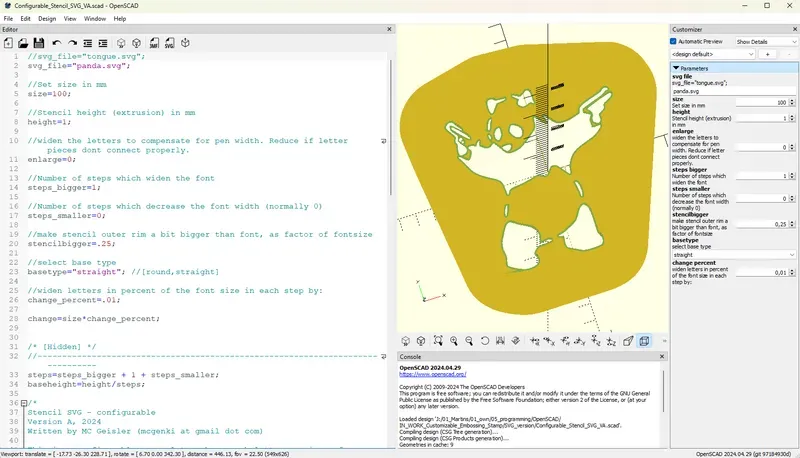
Put the SVG in the same folder, activate the customizer and type in the SVG name. 
You could also just change svg_file="panda.svg"; to your file name.

If you want to have the two example SVG, please go to printables and download them there.

Included stencils

  • Banksy panda
  • Tounge smiley

Download them on Printables as Makerworld does not allow SVG files yet.


The stencil prints quite fast, so i use them as a give-away.

Have fun!

Comment & Rating (9)

(0/1000)

Boosted
I was finally able to make a stencil of a particular font I've been needing. Thank you for putting this out!
The designer has replied
0
Reply
Cool :)
0
Reply
Floated around for ages trying to do this on my own. Low and behold you have built one for us. Great, easy to use. Would love to see there be a "link" option where floating regions can be linked together. Double boost for you
The designer has replied
0
Reply
Wow thanks a lot! the link option is a cool idea! Normally you do it by applying several stencils after each other (black - white - black spray) but i could do a "3d bridge" for floating htings. Problem is that i cant really identify floating regions in openSCAD :( I could however search for layers called "base" and "bridge" and act accordingly. You would have to provide a respective SVG to use it then. What do you think? Can you send an example with a "floating area" you have to play around with? (DM me)
0
Reply
Amazing work!
The designer has replied
0
Reply
Thank you! Also thanks for the boost :) - what did you print?
0
Reply
Just what I needed for my custom shoes!! Thanks
0
Reply
Print Profile
"panda" 0.2mm layer, 2 walls, 15% infill
0
Reply
Print Profile
"panda" 0.2mm layer, 2 walls, 15% infill
0
Reply
No more
