
"Hexaphane" Display System With Halloween Scenes


Print Profile(7)


Description
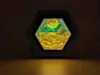
I love making lithophanes because they are colorful and easy to print. For best viewing, they need a brighter light than one tealight can provide. I designed a display system that can use up to 3 tealights or a USB light stick. The top of the display case lifts off easily to change out the hexaphane slides. The storage rack on the back of the case has room for six additional slides.
Update - I added a new top frame with no tealight holes to the “display case only” profile (also as stl in the download section). Use this top if not using tealights and only using the USB stick light.
Printing Instructions
A multi-material printing system is strongly suggested. There are 16 color changes for each slide. I have provided two .3MF files for Bambu Studio; one with the display case only and the other with all five lithophanes for easy printing on Bambu Labs printers. For other slicers, there are several steps required to generate the hex shape. Each lithophane was created at Lithophanemaker.com using these settings:
Lithophane Resolution: 0.2
Colored Resolution: 0.8
Layer Height: 0.1
Width: 115
Maximum Thickness: 2.5
Minimum Thickness: 0.8
Height: 115.00
First Layer Height: 0.2
Filaments for Color Palette: Printed Solid CMYK
This generates a 115mm square lithophane. You can generate your own 115m square lithophane using these settings and create the hex shape using the procedure below. Use the “Hex Mask” stl to create a negative volume object on top of the lithophane.
- Slicer set for .1mm layer height. .2mm on first layer. 100% infill
- Load the 5 .stls for one of the lithophanes as a single object with multiple parts.

- Assign the colors to each part of the assembly

- Drag the “hex mask” stl onto the plate and center it over the lithophane

- Select all the objects and assemble the mask to the lithophane

- Convert the hex mask object to a negative part

- When sliced, it will create a hexagonal lithophane with a .6mm border to slide into the display case and rack

I used the following IIIDMax PLA+ colors, but you can use similar colors from any manufacturer.
| IIIDMax Colors | RGB | Hex |
|---|---|---|
| White | 231,231,224 | #e7e7e0 |
| Yellow | 246,196,45 | #f6c42d |
| Light Blue | 34,155,213 | #229bd5 |
| Fuchsia | 162,70,141 | #a2468d |
License



Comment & Rating (115)