Search models, users, collections, and posts

Bambu Lab X1/X1C Fan Shroud (stock, aftermarket nozzle or with LED)

Print Profile(5)

All
X1 Carbon
P1S
P1P
X1
X1E
A1
A1 mini
H2D
H2D Pro
H2S
P2S
H2C
X2D
A2L

stock configuration, 0.2mm layer, 2 walls, 15% infill
Designer
38 min
1 plate
5.0(3)

aftermarket hotend (2mm lower), 0.2mm layer, 2 walls, 15% infill
Designer
39 min
1 plate
5.0(1)

stock configuration with LED, 0.2mm layer, 2 walls, 15% infill
Designer
54 min
2 plates

aftermarket hotend (2mm lower, with LED), 0.2mm layer, 2 walls, 15% infill
Designer
54 min
2 plates
Click to see more

Open in Bambu Studio
Boost
79
157
17
13
226
91
Released 

Description

IMPORTANT NOTE ON COMMERCIAL USE OF MY MODELS

Please note that I am sharing my designs for everyone to enjoy but for personal use only. You may share physical copies for FREE but not the digital copy nor sell as I have NOT provided any commercial license to any one to sell either digital or physical copies of my designs. I will not hesitate to report to Etsy's and other online sites' admin if I find them being sold there for profit.

__________________________
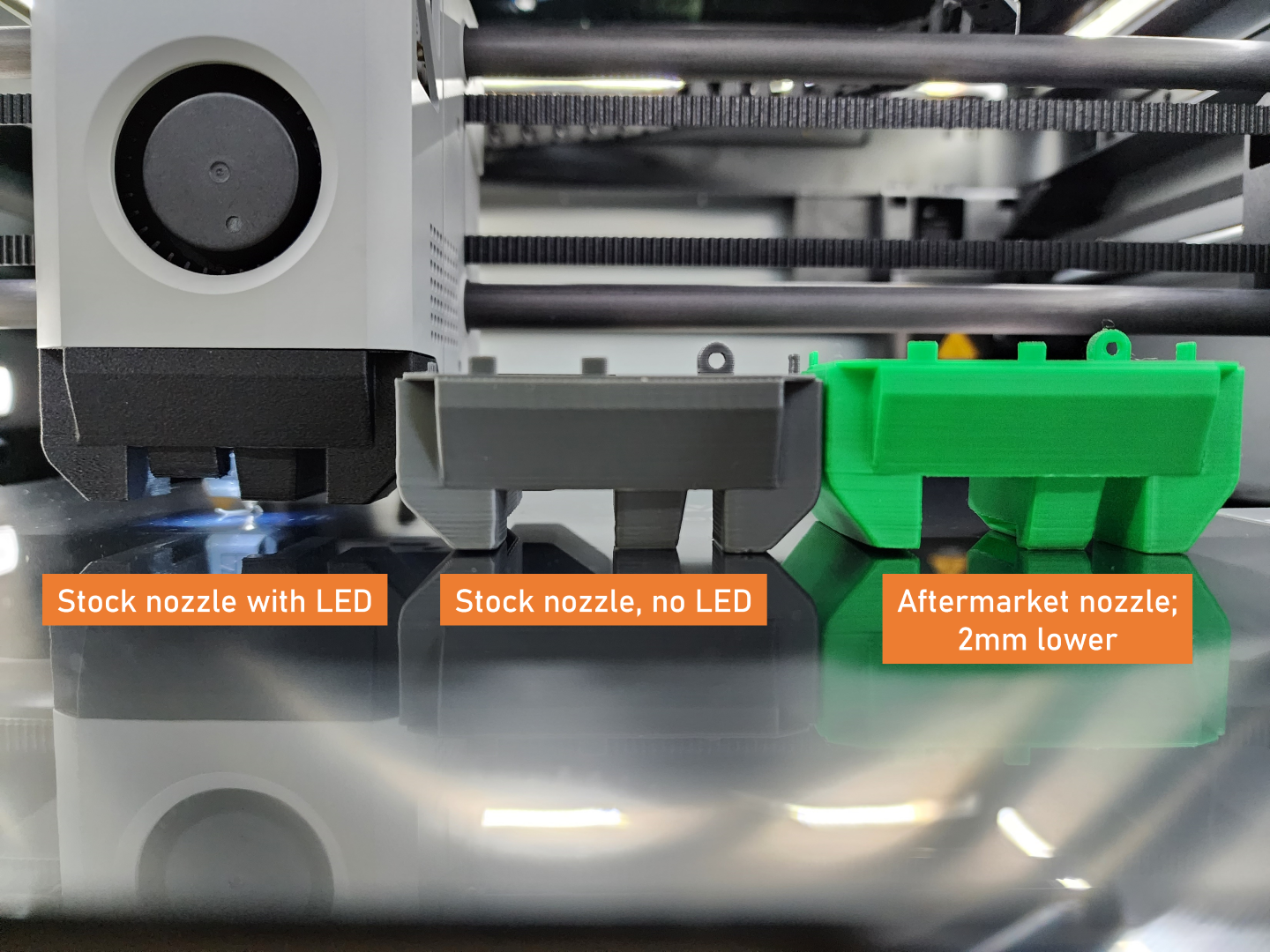


This is fan shroud modeled according to the stock shroud on the X1/X1C.

You have the following options on which shroud to print:

A. Stock Configuration

This is the version you need to download if you're replacing a broken stock fan shroud, you're not using aftermarket nozzles or simply would like to mod the shroud using the base configuration.

Additional hardware needed:

  1. one (1) 4x2mm magnet
  2. one (1) 2x2mm magnet

B. For aftermarket nozzles (2mm lower)

If you're using CHT aftermarket nozzles, the stock fan shroud will be 2mm shorter so a version that's lower by 2mm is also provided for download.

C. With nozzle LED

If you're like me who prefers to examine the print layer by layer as it's printed, this is the version you would want to download. If you're also planning to install a nozzle camera probe that needs additional lighting, then this is the version that's best for your use case.

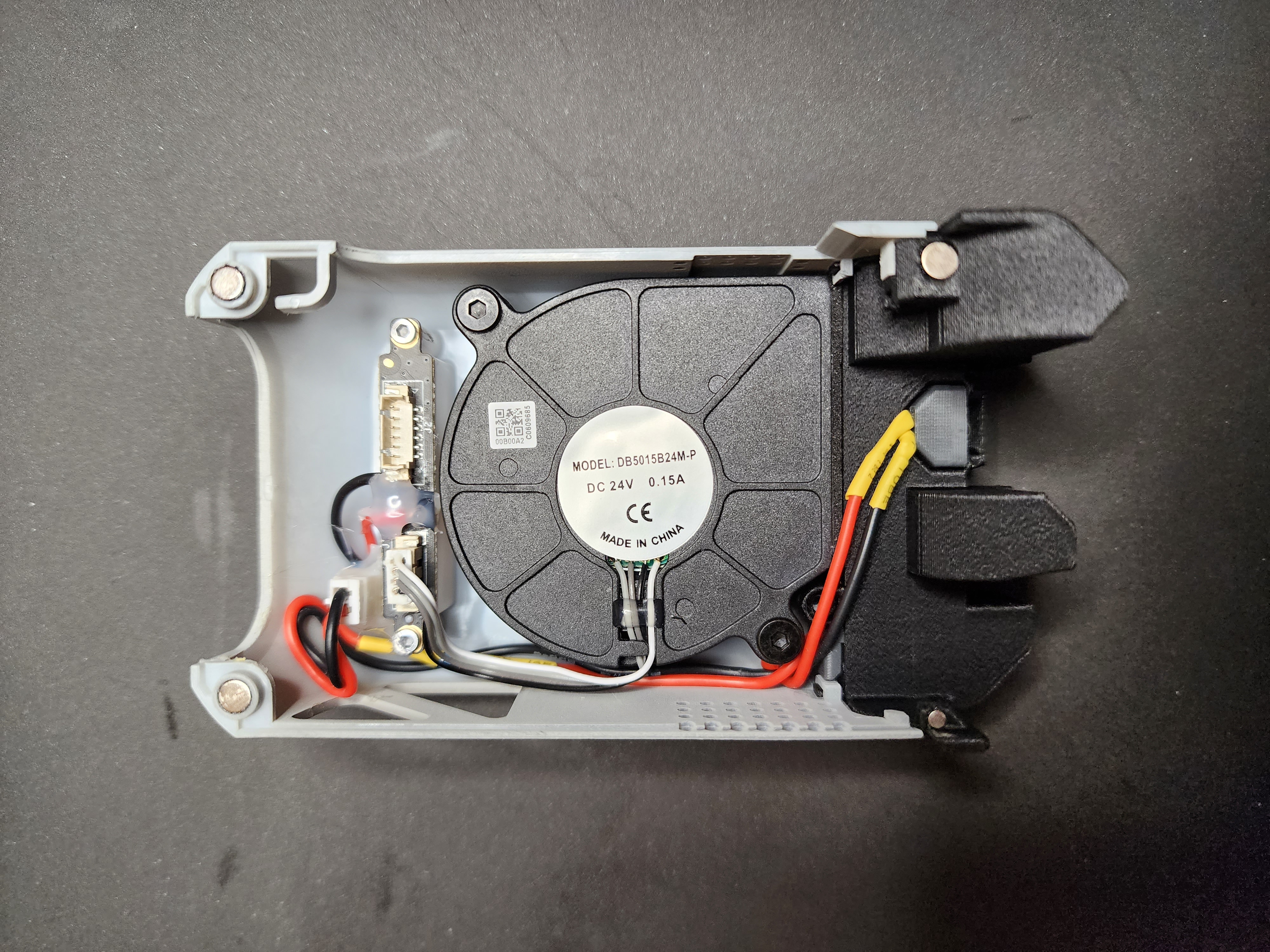
IMPORTANT: Installing the fan shroud with LED requires some soldering to the toolhead logo LED board. DO AT YOUR OWN RISK!

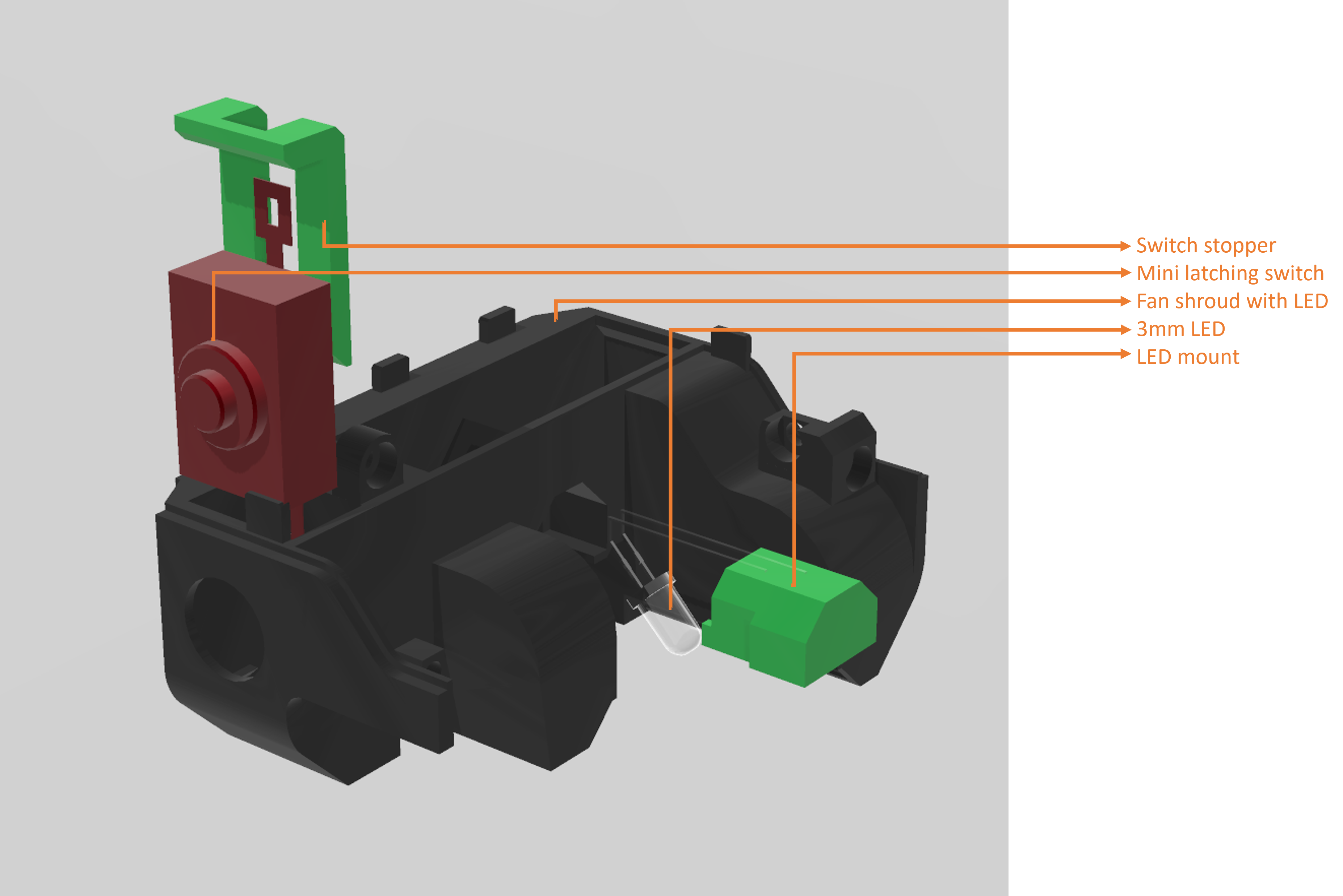
Additional hardware needed aside from the magnets:

  1. 3mm white LED (2.7V, 30mA)
  2. 120 ohm resistor
  3. mini latching switch
  4. jumper wires

My implementation involves tapping on TP5 and J2 ground. This will power the LED as soon as the printer is told to print something. A 120 ohm resistor is solder in between the power source and the LED to prevent burnout. I added a manual switch override in case I need to use the LiDAR which is like 1% of the time.

Hopefully someone smarter than me can figure out which connection/signal line we can tap on to, to have the LED turn on/off simultaneously with the toolhead logo LED.
 

Boost Me (for free)

If you find this creation useful or just to show appreciation for the effort in making this model, please hit the BOOST button!

Comment & Rating (17)

(0/1000)

Hi, Chiz can you please guide where can i find this front cover
The designer has replied
2
Reply
Sorry. I don't have that one in the versions I created.
0
Reply
Replying to @chiz_m :
i did it
designer
3
Reply
Print Profile
stock configuration, 0.2mm layer, 2 walls, 15% infill
Actually saved me! very surprised Bambu doesn't sell just the duct!
The profile uploader has replied
profile
1
Reply
Glad to be of help! :)
0
Reply
Why not just turn on the calibration unit LED light (the one just right of the nozzle)? Just put this in the "Before Layer Change G-code" section: {if layer_num > 1} M960 S4 P1 ; Turn on nozzle LED. {endif}
1
Reply
Print Profile
stock configuration, 0.2mm layer, 2 walls, 15% infill
I also blobbed my fan shroud. this print seems to be a perfect recreation of the destroyed part. for those of you who are wondering you can print this in PLA without a fan shroud. I then used the PLA shroud to print a PETEG shroud.
0
Reply
Print Profile
aftermarket hotend (2mm lower), 0.2mm layer, 2 walls, 15% infill
need to mount it still
0
Reply
You might have already done this to turn off the logo light at the end of your print, but if not add this to the end gcode. M960 S5 P0 ; turn off logo lamp
The designer has replied
2
Reply
I've always wanted to tap on to that logo circuit so that the LED turns off and on as the logo light turns on/off but I've not have any luck so I just have the LED toggled with a hard switch. Perhaps you can figure it out and share your findings?
0
Reply
Replying to @chiz_m :
Why don't you just use the power source of the logo LED? I personally don't mind the logo LED not working.
1
Reply
hi, can this be printed with a 0.6mm nozzle?
The designer has replied
0
Reply
Either you leave the 0.6mm nozzle on and set it as 0.4mm in the slicer and print. Or you can set it as 0.6mm and it should still fit.
0
Reply
Thank you i just had to fix my printer because of a blob formed and it cracked the faceplate and fan shroud. face plate was glues but shroud needed replaced.
The designer has replied
0
Reply
Glad to be of help! :)
0
Reply
Saved Me!
0
Reply
Is there any version which can support a nozzle camera? I'm very interested in this upgrade.
(Edited)
0
Reply
