
Grizzly BXA QCTP Lathe Back Splash Tool Holder


Print Profile(1)

Description

All Compatible Lightbox Frames & Mounts Available Here!
🛠️ Recommended Gear
Check out my Amazon Storefront by clicking here!
Bed Adhesion (Fix First Layer Issues) Magnets (for optional mounts)
Recommended LED Light Strips Battery Powered LED Light Strips Double Sided Tape for Lens: Optional
Custom One-Off Designs Available - CLICK HERE
Printing tips are located at the bottom of this listing
___________________________________________________________________________
This is a remix of a great idea from The_Architect_23 (Printables), I have the larger Grizzly lathe and my backsplash had a thicker top. I resized the original holder to fit over the backsplash as well as extended it a little. Resizing also made a nice fit with my BXA holders and allows them to slip on and off easily. Then I added a threaded hole on the back to accept an m10 x 1.5 x 50mm bolt. I have included a knob for the bolt as well. This new feature allows you to just clamp it enough to keep it from moving when lifting off the tool holder. ***Note, I did not use pins as originally called for in The_Architect_23's thing.
I suggest printing on a narrow end and putting 3 supports with z-gap under the dovetail. This orientation will give you the best strength. No other support is needed. Adding a brim is up to you. I did not need it but every printer is different.
_________________________________________________________________________________________________
Thanks for downloading from Chopper Originals.
If this print earned a spot on your printer and you’re out of Boosts, consider buying me a coffee ☕ to help support future designs and releases.

___________________________________________________________________________________
Affiliate Disclosure
Some links in this listing are affiliate links. As an Amazon Associate, I earn from qualifying purchases at no extra cost to you.
____________________________________________________________________________________
Having issues getting that first layer to flow and stick good? Follow these steps, it helps! ***If using an enclosed printer, be sure to remove the lid and leave door open to avoid heat creep***
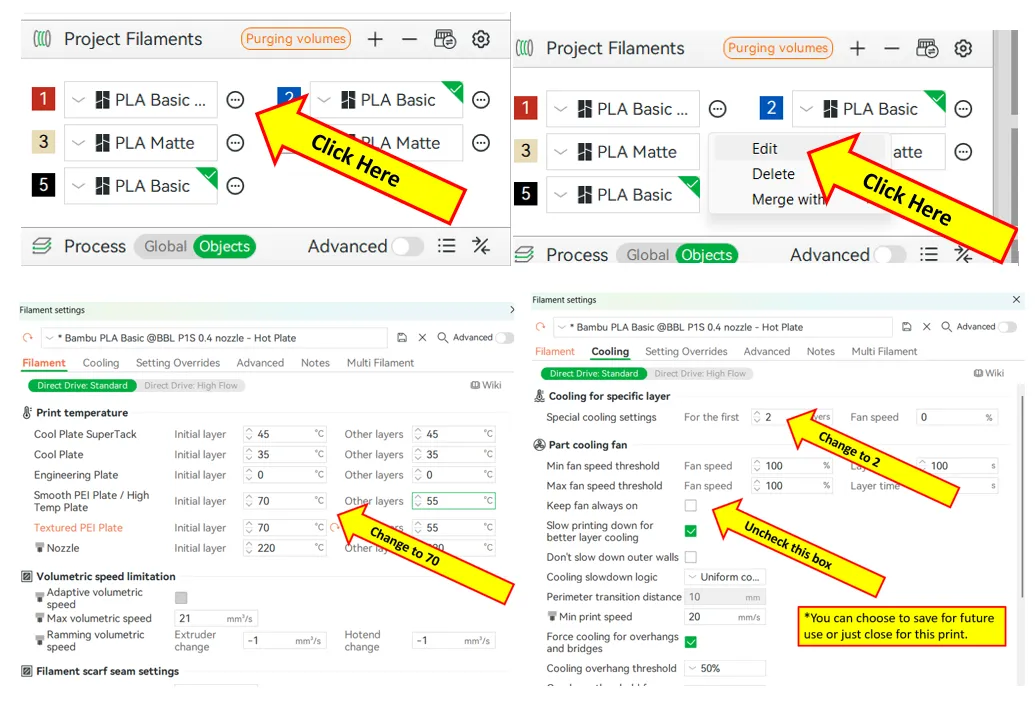
If using multiple brands/types of filament, you will need to save each as a Custom Filament setting. Otherwise the settings will change when your colors switch.
License



Comment & Rating (1)