
Actually Parametric Gridfinity – Base Grid + Bins


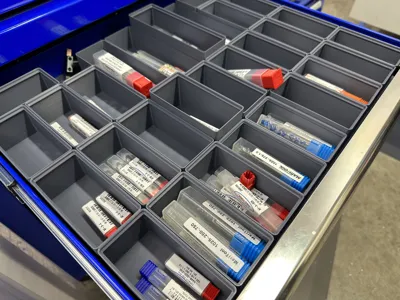


Print Profile(22)


Description
Here is a very parametric and ✨ Configured✨ Gridfinity Base Grid and Bin from Fusion 360 file with 3MF's. I'll keep adding and updating as we develop new items.
14 Oct 2023
- All F3D and 3MF files are now to Gridfinity spec.
- Reduced Grid Base Material needs – Shorter Z height, smaller magnet areas
- Included options for Bins
- Mag = Magnets - much faster and less material use to print without magnet holes.
- BF = Bin Fillet - easier to get your
- SOLID = Solid Bin so you can modify to your liking
This is an actually parametric Grid and Bin model generator

Parametric Fusion 360
- Upload and open F3D file in Fusion 360 (free) and then open parameters.
- Modify > Change Parameters.
- Edit any field and watch it update.
- Sometimes things will break, so scale back your change and see if it works that way.

Key Parameter Fields:
- GridX: Number of Cells in X (Base Grid)
- GridY: Number of Cells in Y (Base Grid)
- GridXY: Grid Internal Cell Size in MM. 42mm is standard. affects Grid Bases and Bin sizing.
- BinTall: Height in MM
- BinWide: Unit of GridXY (cell size)
- BinDeep: Unit of GridXY (cell size)
Bins 1x1 will cause a warning but shouldn't affect the model.

Parameters in Fusion 360 (red lines are key parameters to change for customizations.
Grids Types
NESTABLE GRID BASES - Simply mirror in slicer to get the other sides.
Change the [Side]GridOffset to 0mm for nestable sides on the Grid Bases. Pre-made 3MF are named as such:
- -0S – Nestable Grid
- -2S – Has two adjacent thickened outer walls and two nestable (mirror one way to get other side)
- -4S – All four outer walls are "outside walls"
Configured options in Fusion 360
The CONFIGURED-V10.f3z file now has configured options to make it easier to change common features that are tricky otherwise.
See our video on the new Configurations feature.

Print Settings
- PLA - 8-10% infill, Support Cubic.
- No support or Brim is Needed.
- 0.2mm Layer Height
Our Favorite Things for 3D Printing
Includes Affiliate Links
- Nano Adhesive - Stop using glue sticks - this is 1000% better 😉
- 6mm Magnets - fits magnet holes in
- Plastic Debur Knife - clean up plastic edges (brims)
- Assembly Glue
Known Problems
- The pattern feature will throw an error if the Bin is not more than 1x1. It shouldn't affect anything, however.
- See notes in parameters for known limits
This remix is based on

License



Comment & Rating (75)