
DeeJ Volume Mixer


Print Profile(2)


Description
Boost Me (for free)
Hi fellow 3D printing enthusiast,
If you find this model easy to print, fun, useful, please consider Boost it.
Thank you for your support.
Introducing a sleek and functional 3D printable case designed specifically for deej, an open-source volume mixer compatible with both Windows and Linux systems. This compact case accommodates five EC11 rotary encoders with push buttons, providing precise control over audio settings. Seamlessly integrating with an Arduino Pro Micro ATmega32U4, this case offers simplicity and efficiency in assembly, ensuring hassle-free setup. Elevate your audio experience with this customizable solution, perfect for enthusiasts seeking seamless control over their audio environment.
Printing Instructions:
*** Make sure to auto orient the files to print without supports***
- Layer Height: 0.2 mm
- Supports: No
- Brim: No
- Raft: No
- Material: PLA (or any)
Hardware Required: Aliexpress links are not affiliated. Its just what I used to buy myself.
- EC11 Rotary encoders with push button x 5 - Aliexpress
- Arduino Pro Micro (AtMega32U4) x 1 - Aliexpress
- Tiny screws x 4 (whatever tiny screws you have lying around)
Connection Schematic:
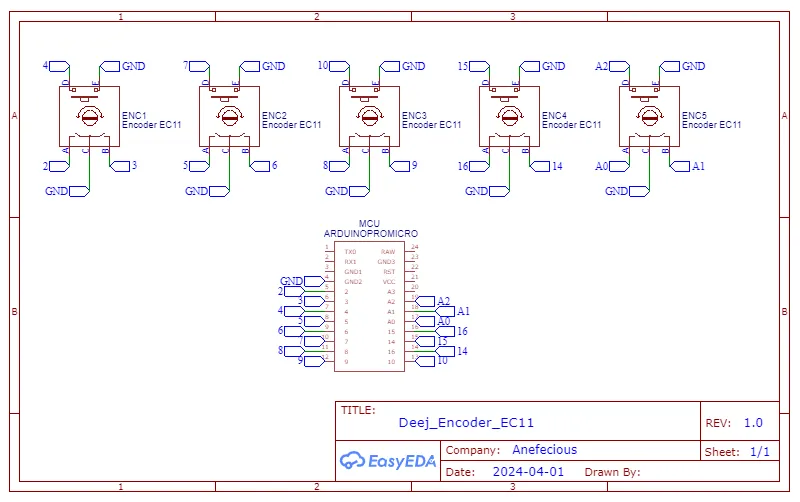
Additional Notes and Coding:
- Connect the wires as shown in the schematic
- Connect the Pro Micro to the computer
- Remove .txt from the Deej_Encoder_code.ino.txt file in Documentation.
- Open Deej_Encoder_code.ino code file provided in the resources with Arduino IDE
- Ensure the Arduino Micro board is selected in the Boards section with COM PORT listed there. Make note of this COM port
- In the IDE, under library manager, search for “Encoder” and install “Encoder by Paul Stoffregen”
- Verify the code
- Upload the code
Testing:
- Download deej.exe application and config.yaml from Deej Github
- Update config.yaml with the COM port saved above and also update the encoder functionality to your liking
- Test
- Grofit
References:
Please Like and Comment. Thank you!
Documentation (2)
License



Comment & Rating (2)