
Filament Dry Box Hinged Label


Print Profile(26)


Bill of Materials



Description
I wanted to store my filaments in individual containers where I could see them outside of the box/bag. But I would keep the box around because it had all the information, I may need to select the right filament for the print or to reorder the same exact color filament.
Some information I wanted to keep included filament type, brand, color, SKU, HEX colors, print temperatures, print profiles, etc.
I designed an all-in-one solution to beautifully display my filament, including the filament information, attached to a dry box, and easily removable to stay with the filament.
You can choose to use a blank tab to display the color or any of the included filament types pre-filled. I also provided an example of a fully completed tab label. You will need to download into Bambu Studio to add text (layers) objects to your model customized with your content.
I've created a couple of Print Profiles specific to certain brands and filament types. Please follow to stay updated on new brands and filament types.
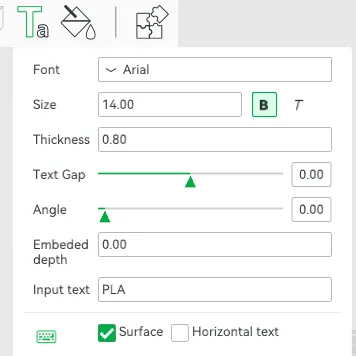
You can use Bambu Studio to add text right onto the model. I've designed the whole tab, double hinge, and label portion to be the same height. So that any text added to the top with no embedded depth, would only change filament once to the text color (filament) of your choice. Font: Arial, Size: 14, Bold, Thickness: 0.80, Embedded depth: 0.00
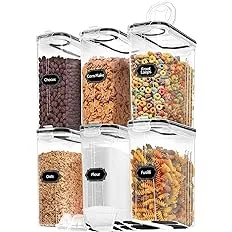
I buy these 4L / 135.2 oz airtight food storage containers at about $4 to $5 a unit to store my filament in my humid climate, and they fit perfectly: https://amzn.to/4aG7K35 (6 pack). Sometimes there are coupons or offers for buying multiple, but when shopping around, make sure they're the 4L / 135.2 oz containers.
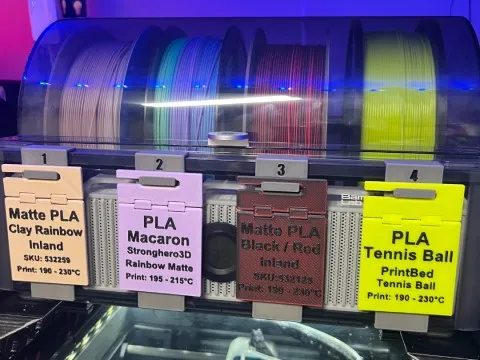
I also created tab holder that clips-on to the AMS numbered 1-4 that allows you to hang the label tab onto the AMS slot location. The tab is inserted firmly into the rear of the AMS clip, which is then attached and positioned in front of the spool slot on the AMS unit. You can find that model here: https://makerworld.com/en/models/401216
If you wanted to use the surface facing the print bed, feel free! There's plenty of tutorials on how to do that in Bambu Studio. Just be mindful that you're now introducing a bunch of filament changes.
Let me know if you'd like me to create additional tabbed labels for different filament types, or brands, or design clips for other places to attach them to.
Boost Me (for free)
If you found this helpful in organizing your filaments, please consider boosting.
Documentation (1)
License

You shall not share, sub-license, sell, rent, host, transfer, or distribute in any way the digital or 3D printed versions of this object, nor any other derivative work of this object in its digital or physical format (including - but not limited to - remixes of this object, and hosting on other digital platforms). The objects may not be used without permission in any way whatsoever in which you charge money, or collect fees.


Comment & Rating (2036)