Search models, users, collections, and posts

Easy & Quick Retraction Test / 快速回缩测试

Print Profile(2)

All
P1S
P1P
X1
X1 Carbon
X1E
A1
A1 mini
H2D
H2D Pro
H2S
P2S
H2C
X2D
A2L

PLA - 0.2mm layer, 4 walls, 100% infill
Designer
16 min
1 plate
4.9(426)

Std. settings, 0.2mm layer, 2 walls, 2% infill
16 min
1 plate
4.9(26)

Open in Bambu Studio
Boost
1129
4004
606
75
12.5 k
9 k
Released 

Description

Content has been automatically translated.
Show original

Boost Me (for free)

Boost our project and help the 3D printing community grow! 🚀


✨ Don't forget to like and follow for more great designs!
 

  • Product Overview: Test your printer's retraction settings with this quick and efficient print! This design helps you identify and fine-tune optimal retraction settings for cleaner prints and reduced stringing.
  • Features and Benefits:
    • Quick Print: Minimal material and time required for testing.
    • Universal Compatibility: Works with both direct drive and Bowden-style printers.
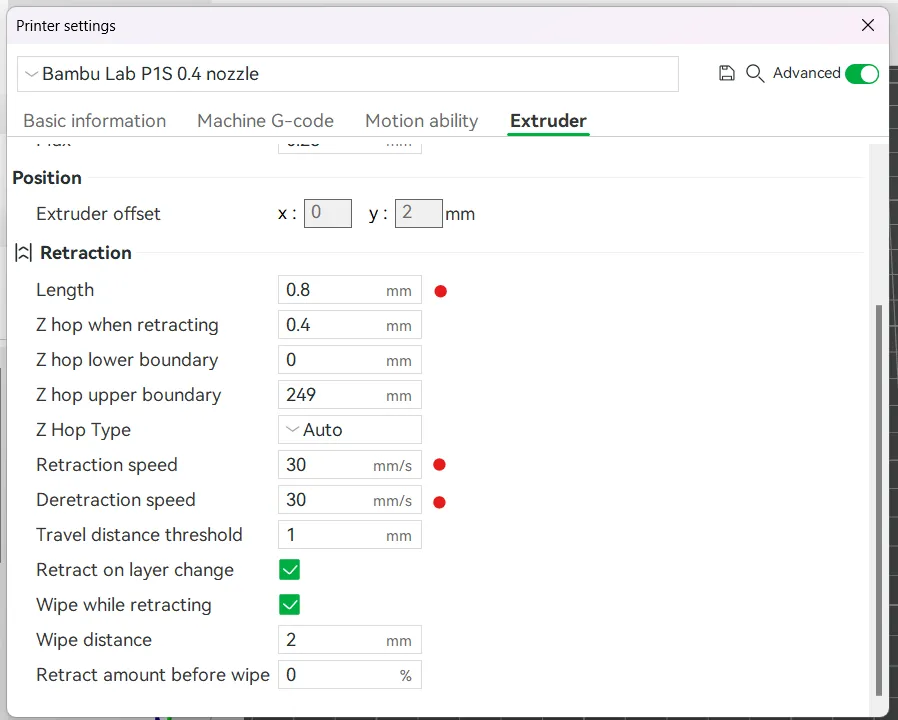
    • Customizable Settings: Tailored for experimenting with retraction length and speed.
  • Project Details:
    • Material Compatibility: PLA, PETG, Silk Filament, and more.
    • Print Settings:
      • Rafts: No
      • Supports: No
      • Resolution: 0.2 mm
      • Infill: Any (user preference)
  • Post-Printing Instructions:
    • Observe stringing between parts to evaluate your settings.
    • Adjust retraction length (0.5–1.5 mm/s) and speed (20–30 mm/s for direct drive systems) as needed to refine your prints.



Description (Chinese):

  • 推广信息: 推动我们的项目,助力3D打印社区成长!🚀✨ 别忘了点赞并关注我们,获取更多精彩设计!
  • 产品概述: 通过此快速高效的测试模型,检查您的打印机回缩设置!该设计有助于优化回缩参数,减少拉丝并提升打印质量。
  • 特点与优点:
    • 快速打印: 测试所需时间和材料最小化。
    • 通用兼容性: 适用于直驱和Bowden类型的打印机。
    • 可调设置: 为测试回缩长度和速度而量身打造。
  • 项目详情:
    • 材料兼容性: PLA, PETG, 丝光线材等。
    • 打印设置:
      • 底板: 无需底板
      • 支撑: 无需支撑
      • 分辨率: 0.2 mm
      • 填充率: 任意(根据用户需求)
  • 后期处理说明:
    • 检查零件间是否有拉丝,以评估您的设置。
    • 根据需要调整回缩长度(0.5–1.5 mm/s)和速度(直驱系统建议20–30 mm/s),优化打印效果。


Comment & Rating (606)

(0/1000)

Boosted
Print Profile
PLA - 0.2mm layer, 4 walls, 100% infill
Note that slowing down the print tends to change the outcome, so do this test at the exact print speed and settings you plan on using for actual printing. I always printed these at full speed, but my actual prints are usually slowed down. Anyway, 10/10, great for checking just how stringy new filament really is.
35
Reply
Print Profile
PLA - 0.2mm layer, 4 walls, 100% infill
X1C Ludicrous mode
5
Reply
cap
(Edited)
1
Reply
big cap
(Edited)
0
Reply
There is no way
0
Reply
The print profile is no longer public
I might be on a spectrum. In the end, I settled on 2 mm 30 mm/s 200C for Sunl* PLA+ grey on A1, which appears to be the recommended starting point. For Anycubic PETG white, both 2mm and 3 mm at 30 mm/s and 240C were perfect. Even though the towers printed perfectly without stringing at all, actual projects still have some. Edit: The project's default settings give false negatives. The slicer is printing the wall loop, printing the infill, and moving to the other tower. This doesn't give time for the pressure to build up in the nozzle and the movement from the centre of the cone obscures stringing. I think changing the number of walls to 6 and painting the seam toward the middle would provide a more representative outcome.
(Edited)
6
Reply
Got only two strings at the very top of the towers, but i guess its normal for petg.
2
Reply
What retraction did you use
Show original
1
Reply
Replying to @3dselectinggggg :
this depends on the filament so you need to test multiple values
0
Reply
The print profile is no longer public
Really useful, and already making improvements after 2 prints :)
3
Reply
Print Profile
PLA - 0.2mm layer, 4 walls, 100% infill
0
Reply
PLEASEEEE GIVE ME YOUR SETTINGS!!! i tryed so many retraction and temperature settings on my pla and wa snot able to print the tower clean in the last 1/3…yours looking perfect
(Edited)
1
Reply
Replying to @NikiJackson :
I don’t use any special settings 😅. Just basic factory settings. 😎
0
Reply
with a1, p1s or x1? and what type of filament do you use?
0
Reply
Print Profile
PLA - 0.2mm layer, 4 walls, 100% infill
good file to check the status of your filament regarding humidity and for retractions I have been able to realize that my new filament is full of moisture
Show original
1
Reply
The print profile is no longer public
great way for me to test the best settings to reduce stringing
1
Reply
Worked pretty well, thanks for that Printed on an A1 Filament: Jayo PETG High Speed Matte Black Settings were pretty standard 235° 0.2mm (Filament calibrated)
Show original
0
Reply
retraction
Show original
0
Reply
Print Profile
PLA - 0.2mm layer, 4 walls, 100% infill
No adjustments needed, but good to know anyway! Tried some fuzzy skin settings.
1
Reply

License

This user content is licensed under a Standard Digital File License.

You shall not share, sub-license, sell, rent, host, transfer, or distribute in any way the digital or 3D printed versions of this object, nor any other derivative work of this object in its digital or physical format (including - but not limited to - remixes of this object, and hosting on other digital platforms). The objects may not be used without permission in any way whatsoever in which you charge money, or collect fees.
