

Print Profile(2)


Description
Update July 3, 2025: Added limited support for online customizer. (No text or picture on customizer version)
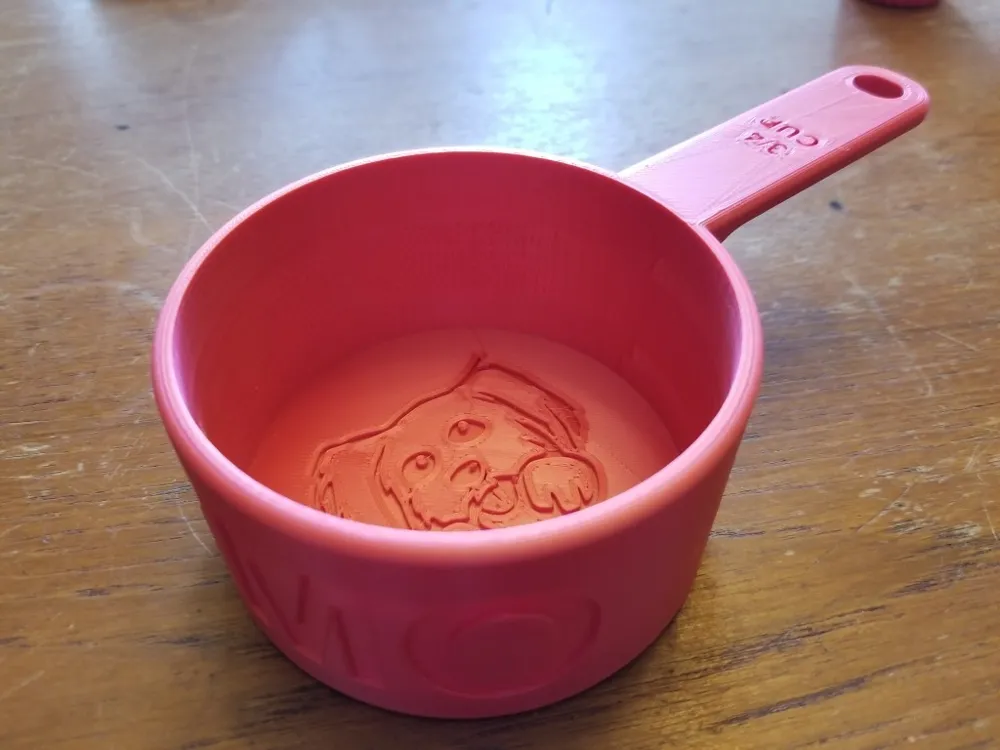
I originally made this for measuring out dog food, although I have included a blank version that could be used for other things. I am also including the Fusion 360 file so that it can be customized, including the ability to easily change the dimensions or capacity of the measuring cup.
I made this when switching dog food brands and finding that the recommended serving size for my dog was 3/4 cup, but I had no 3/4 cup measuring cup, and they are often not included with many less expensive measuring cup sets.
Useful things you can change in the fusion file are:
Parameters (Look in the bottom of the "Modify" menu):
volume_in_cups (The total capacity of the measuring cup. Change the "3 / 4" part of it to something else if you want a different measuring cup capacity. Note that the text on the handle will need to be changed separately to match)
volume (This is normally calculated using the volume_in_cups parameter, though if you plan to make a metric measuring cup, you should probably just change this to whatever volume you want. It does expect your volume in mm3 though)
diameter (Diameter of the cup. Height will also adjust automatically to make the volume correct)
handle_length (Handle length in mm)
handle_width (Handle width in mm)
NEW TEXT PARAMETERS AS OF OCT 2025:
PetName (The name to put on the side)
handle_text_number (For a ¾ cup for example this would be: 3/4)
handle_text_unit (This would usually be “CUP” or “mL” or something like that)
From Time Line:
Emboss1 (Supress this if you don't want your pet name on the side of the cup)
Extrude6 (Supress this if you don't want a picture of a dog at the bottom of the cup)
Please note that I did not create the drawing of the dog. I found it uncredited on a website offering free artwork for people to use as tattoos. I only converted it to a DXF and imported it in to Fusion 360. Based on the source, I believe I'm probably allowed to use it. If you are the owner of the artwork and this is not the case or you'd like credit for it, please send me a message.
Print Settings
Printer Brand:
Anycubic
Printer:
All-metal Mega
Rafts:
No
Supports:
Yes
Resolution:
0.2
Infill:
25% Gyroid
Filament: Stronghero3D PLA+ Red (looks pink)
Notes:
I printed it in the orientation shown in the STL. Supports will be needed under the handle. I only used 25% infill because I'm using it for dry dog food. If you intend to use it for anything liquid, you're probably better off using 100% infill. I printed at a 0.2 layer height, but I'm sure it would look fine at 0.3 if you want to save some time.
If this design was useful to you, please post a make!
If you found this model useful, please post a make or show your support with a boost!
Boost Me (for free)
License



Comment & Rating (63)