Search models, users, collections, and posts

Bambu X2D WipeLogic – Custom G-Code for Start/End
Print Profile(1)
All
X2D
H2D Pro
H2C
A1 mini
X1E
H2S
A1
H2D
X1 Carbon
P1S
X1
P2S
P1P
A2L

0.12mm layer, 2 walls, 15% infill
Designer
1.2 h
1 plate

Open in Bambu Studio
Boost
13
37
12
1
23
0
Released 

Description

Content has been automatically translated.
Show original

Designed with focus on fitment, print quality and everyday usability.

To download the printer presets, click on "Download STL/CAD file" in the download area
The ZIP file contains the ready-to-use WipeLogic profiles


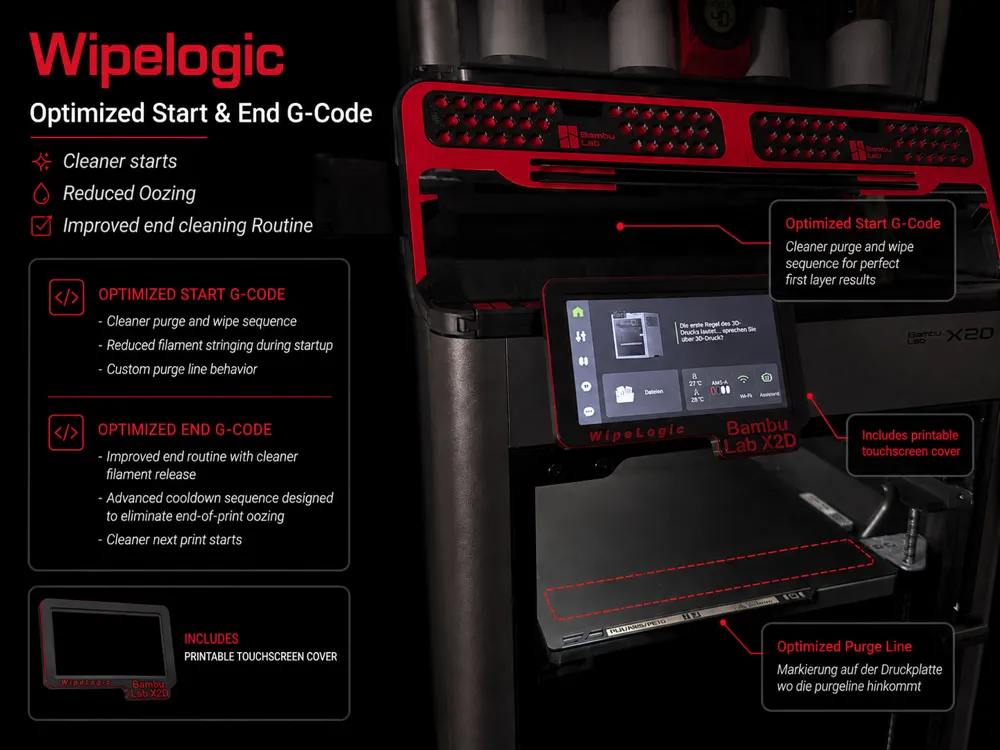
Optimized Start and End G-Code (less stringing / cleaner process)

I have slightly adjusted the standard G-code because a few things bothered me in everyday use, especially stringing at the start and a rather messy print finish

This is not a complete overhaul, but targeted changes in areas that truly make a difference

Start Code Changes

Heating in front instead of at the back
The nozzle reaches its final temperature only at the purge line instead of at the back in the park position/waste bin as is standard
This prevents anything from falling onto the print bed when moving to the purge line and significantly reduces filament strings in the printer
The result is a clean, controlled start

Optional functions via Notes
Easily control certain functions yourself via the printer notes without having to adjust the G-code itself

Revised cleaning process
The nozzle cleaning process has been slightly adjusted so that cooling and cleaning work together more effectively, and the nozzle starts printing cleaner

Revised Purge Line
The print setup has been slightly adjusted so that the nozzle is properly filled before printing begins
This is particularly noticeable with PETG and TPU

End Code Changes

Z-movement reduced
No more unnecessary movements at the end of the print, just as much clearance as necessary
The print bed only moves half as far down as before, saving time and preserving the Z-axis

Targeted cooling and clean finish
The hotend is specifically cooled down and the last bit of filament is cleanly removed, so the nozzle is clean for the next print and nothing sticks to it

AMS Unload optional
Unloading at the end is no longer fixed but only active when needed
Since I often only print and test with one material, constant unloading and loading with the Bambu Lab AMS is unnecessary and costs time and wear
Can be easily reactivated via the printer notes if required

Installation

Simply import the existing Start and End G-code into Bambu Studio

Illustrated instructions are included in the .Zip file

Notes

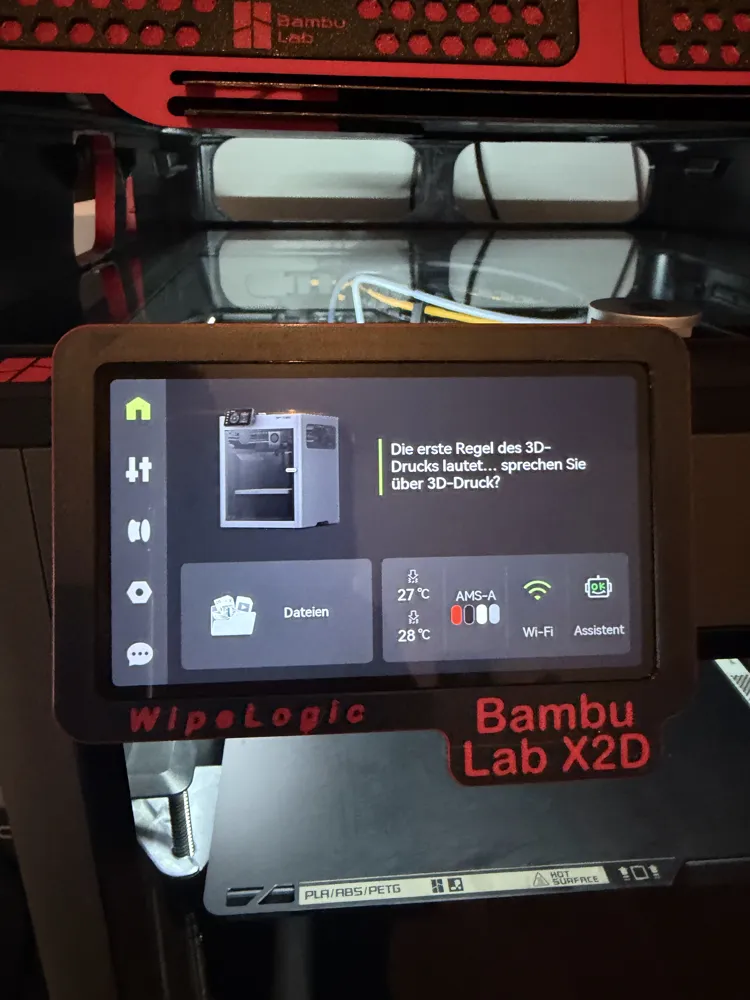
Tested on my setup (X2D), current test status includes several hours of print time and many different models. Various printing scenarios with diverse processes have been tested to ensure safety
Already successfully tested with various materials
It's more of a refinement than a complete overhaul, not necessarily making the process noticeably faster, but significantly more pleasant and less prone to errors

Included

ZIP file with WipeLogic profiles
Included presets for 0.2 / 0.4 / 0.6 / 0.8 mm nozzle sizes
Instructions for adding the presets in Bambu Studio

If anyone has useful additions, please let me know 👍


Boost Me (for free)

If you like my optimized start/end G-code and want to support my work, I would be very happy about a boost 🚀

Many hours of testing, adjustments, and various printing scenarios have gone into this project to achieve the cleanest and most reliable process possible.

Your support motivates me to further improve the G-code and develop more optimizations for the community.

Thank you very much for your support 🙂


Boost Me (for free)

If you like the model and it works well for you, I’d really appreciate a boost or a rating. Thanks for the support and happy printing.


Comment & Rating (12)

(0/1000)

Boosted
Top, tried it right away. You haven't included a pause for cleaning this time? And do you think it would be useful to include this G-code during layer changes? So that the PETG no longer sticks to the nozzle so much.
The designer has replied
Show original
designer
1
Reply
Boosted
:; layer num/total_layer_count: {layer_num+1}/[total_layer_count] ;######## ;### START: PETG NOZZLE WIPE SEQUENCE ### ; This logic handles nozzle cleaning at critical stages: Layer 2, every 10 layers, and the final layer. {if (filament_type[initial_no_support_extruder] == "PETG") && (layer_num > 0)} ; --- LOGIC ---
0
Reply
Boosted
; Check if current layer is: Layer 2 OR every 10th layer OR the very last layer {if (layer_num == 2) || (layer_num % 10 == 0) || (layer_num == (total_layer_count - 1))} M117 Nozzle Wipe Sequence (L:{layer_num}) M400  ; Finish all moves G91  ; Relative positioning G1 Z0.4 F1200  ; Z-Hop M83  ; Relative extrusion G1 E-2.0 F1800  ; Retract to prevent oozing G90  ; Absolute positioning      G150.3  ; Move to trash bin area G150.1 F8000  ; Wipe sequence 1 G150.1 F8000  ; Wipe sequence 2 G150.1 F8000  ; Wipe sequence 3 G1 E2.0 F1800  ; Prime nozzle G91  ; Relative positioning G1 Z-0.4 F1200  ; Return Z to original height G90  ; Absolute positioning         {endif} {endif} ;### END: PETG NOZZLE WIPE SEQUENCE ### ;#######
0
Reply
Glad you like it. I have omitted manual cleaning for now. With PLA, TPU, PETG, ABS, ASA, it cleans itself without problems, so I have forgone it as the cleaning performance is sufficient in my opinion and nothing sticks to the nozzle. I would have to look again about the additional wipes. With the X2D you have two nozzles, you have to be a bit careful with the logic behind it so that everything runs smoothly. The layer change code would have to be completely revised in general, as there is already a wiping sequence in it when printing with dual nozzles and a prime tower. Otherwise, it would overlap. Your G-code also has too many wiping operations and too much retraction built-in, which would not work well with all materials in the long run because it could lead to clogs in the extruder with some materials. I will take a look and, if necessary, build it in via the notes function to switch wiping on and off as needed
Show original
0
Reply
Great, X2D finally - Im using Your profile for P2S and its awesome, gonna add this one asap, just one suggestion - I would add PCTG also, as its even worse then PETG and requires wiping every few layers too. Thanks for sharing.
The designer has replied
0
Reply
I'm glad you like it. The wiping function is not limited to PETG, it works with all materials. The only limitation is that it only works when exclusively the main nozzle is in use. As soon as the auxiliary nozzle is involved in the print, it will no longer reliably insert the custom G-code and will not wipe. With the main nozzle alone, however, it's not a problem and works with all materials
Show original
1
Reply
Replying to @DG95 :
Good to know, I understood wrongly and haven't been using pctg on p2s, just started on x2d, great material just sticks badly to hotend. But then as to be clear, as I rushed and didn't read the notes, this profile doesn't add extra layer wiping for X2D, right ?
0
Reply
The wiping function is not automatic. It works exactly the same as in the WipeLogic version of the P2S. Slice the part and then insert the custom G-code template on the height slider on the right at your desired heights
Show original
0
Reply
cant find the guide in the zip after downloading and extracting only see the json configs and two png images showing how to complete that , imported the 3mf in the config profiles you provided , only ams unload at end is visible in notes section, is this the only thing i can switch on and off from notes ? couldnt find the g code i had to inject or a index of switches you can turn on and off , would love to check out your work but without seeing any type of switch or index info afraid im not willing to take the risk
The designer has replied
0
Reply
Thanks for the feedback. I understand the concern. There is no manual G-code injection required. The included .json already contains the complete printer profile setup with the custom Start/End G-code. The ZIP contains: - WipeLogic printer profiles - JSON config files - PNG setup images Import the included .json file like shown in the pictures, then select the WipeLogic printer profile, save it to your printer preset list and make sure the profile stays selected. At the moment AMS_UNLOAD_AT_END is the only optional user toggle exposed through the printer notes section. Example: ;AMS_UNLOAD_AT_END Remove ; to activate or deactivate the AMS unload feature. The optimizations are integrated into the Start/End sequences and work automatically. I agree the documentation needs to be clearer. I will improve this in the next update and add a proper overview inside the ZIP. Appreciate the honest feedback.
0
Reply
Boosted
Great job, check the comments, I added something there, maybe it's worth an update
Show original
0
Reply
No more

License

This user content is licensed under a Standard Digital File License.

You shall not share, sub-license, sell, rent, host, transfer, or distribute in any way the digital or 3D printed versions of this object, nor any other derivative work of this object in its digital or physical format (including - but not limited to - remixes of this object, and hosting on other digital platforms). The objects may not be used without permission in any way whatsoever in which you charge money, or collect fees.