
Ultimate Miniature/Figurine settings (0.4/0.2)
Print Profile(2)
Description
Hello everyone!
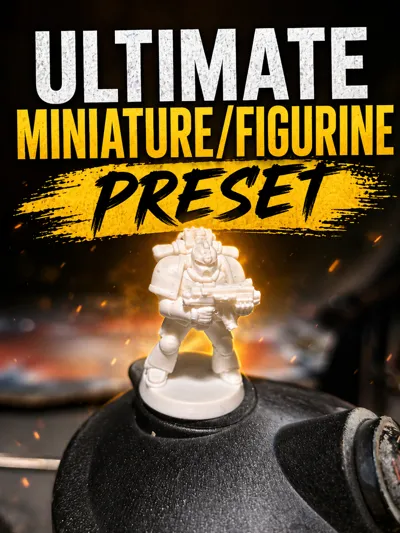
This is my Ultimate Preset for Miniatures and Figurines. The preset has been tested across all Bambu Lab machines (from A1 Mini to H2C) by me and some friends to ensure reliable results.
There are two profiles included:
- one for 0.4 mm nozzles
- one for 0.2 mm nozzles
The main differences between them are line width and layer height, optimized for each nozzle size.
Important – Required Preparation
These settings depend on proper setup. Without it, prints may fail.
Please make sure:
- You are using dry and calibrated filament (Pressure Advance, Flow Rate, Bridging, Overhangs)
→ Guide: https://github.com/OrcaSlicer/OrcaSlicer/wiki/calibration_guide - Your build plate is properly cleaned (dish soap + warm water)
→ Guide: https://youtu.be/8QIy3aUU8eo?si=mSR3x5sQ-kY2HJJN - You use a plate with good adhesion (personal recommendation: Juupine Geco Plate for PLA) or apply glue
Miniatures often have very small contact areas, so good adhesion is critical—this is why we avoid using a brim.
Settings You May Want to Adjust
(Some of these are even more important depending on model/filament)
Ironing
Ironing smooths top surfaces by re-passing the nozzle over printed layers.
Usually not necessary for miniatures, but can improve flat surfaces.
Must be calibrated per filament—there is no universal setting.
→ Guide: https://makerworld.com/de/models/2083080-advanced-top-surface-guide-understand-improve
Arachne Wall Generation (Important)
Arachne dynamically adjusts line width for better detail.
However, it can sometimes introduce artifacts or damage textures.
→Recommendation: Turn it off whenever possible.
It is enabled by default for compatibility but can be disabled easily.
(the low line wdith we set before will ensure will still get the most detail possible)
Seam (Semi-important)
Seam scarfing is enabled to improve surface quality by blending the seam into the model (similar to vase-mode behavior).
Works well with default settings, but I recommend testing it yourself.
→ Guide: https://www.youtube.com/watch?v=vl0FT339jfc
Wall Count (Semi-important)
Default is 2 walls.
You can increase this for stronger parts.
→Remember: Walls are stronger than infill.
Speed & Acceleration (Semi-important)
Balanced between quality and speed.
- For very small models you may reduce speed
- For larger figurines you may increase it
(we want to have out wall to be the slowest as its the one we will actually see)
Support (VERY IMPORTANT)
Supports will often decide whether your print succeeds or fails.
Most important setting:
- Top Z Distance
- More distance → easier removal, worse surface
- Less distance → harder removal, better surface
There are two types of supports:
- Supporting drooping filament
- Supporting areas you print on top of (most critical)
̶i̶’̶m̶̶ ̶̶c̶̶u̶̶r̶̶r̶̶e̶̶n̶̶t̶̶l̶̶y̶̶ ̶̶w̶̶o̶̶r̶̶k̶̶i̶̶n̶̶g̶̶ ̶̶o̶̶n̶̶ ̶̶a̶̶ ̶̶p̶̶r̶̶o̶̶p̶̶e̶̶r̶̶ ̶̶t̶̶e̶̶s̶̶t̶̶ ̶̶m̶̶o̶̶d̶̶e̶̶l̶̶ ̶̶f̶̶o̶̶r̶̶ ̶̶t̶̶h̶̶i̶̶s̶̶ ̶̶a̶̶n̶̶d̶̶ ̶̶w̶̶i̶̶l̶̶l̶̶ ̶̶u̶̶p̶̶l̶̶o̶̶a̶̶d̶̶ ̶̶i̶̶t̶̶ ̶̶i̶̶n̶̶ ̶̶t̶̶h̶̶e̶̶ ̶̶f̶̶u̶̶t̶̶u̶̶r̶̶e̶̶.̶
̶i̶̶n̶̶ ̶̶t̶̶h̶̶e̶̶ ̶̶m̶̶e̶̶a̶̶n̶̶t̶̶i̶̶m̶̶e̶̶,̶̶ ̶̶y̶̶o̶̶u̶̶ ̶̶c̶̶a̶̶n̶̶ ̶̶u̶̶s̶̶e̶̶ ̶̶e̶̶x̶̶i̶̶s̶̶t̶̶i̶̶n̶̶g̶̶ ̶̶t̶̶e̶̶s̶̶t̶̶ ̶̶m̶̶o̶̶d̶̶e̶̶l̶̶s̶̶ ̶̶o̶̶n̶̶ ̶̶m̶̶a̶̶k̶̶e̶̶r̶̶w̶̶o̶̶r̶̶l̶̶d̶̶.̶
Here is the test model: https://makerworld.com/de/models/2741934-ultimate-support-calibration-tool-top-bottom-z
Also make sure to calibrate your bridging settings to reduce the need for supports:
→ https://makerworld.com/de/models/1916063-unsupported-bridge-experiments
Skirts
I added 2 skirt layers:
- First layer primes the nozzle
- Second layer primes the nozzle after the first layer inspection
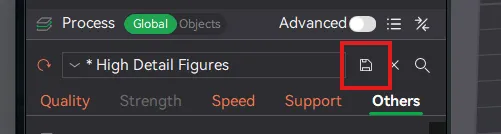
How to save the preset:
simply select the correct printer and click the Save icon
Final Note
Boost Me (for free)
If this preset helped you, I’d really appreciate a boost!
I’ll also be sharing painted miniatures made with this profile soon.
AI Disclaimer
AI was used for grammar and spelling corrections.
The thumbnail has been adjusted for better visibility results will stay the same)
This remix is based on

License



Comment & Rating (17)